


 EN
EN  ES
ES  DE
DE  PT
PT  IT
IT  JA
JA  ID
ID
Customize Every Pixel of Your WordPress Forms
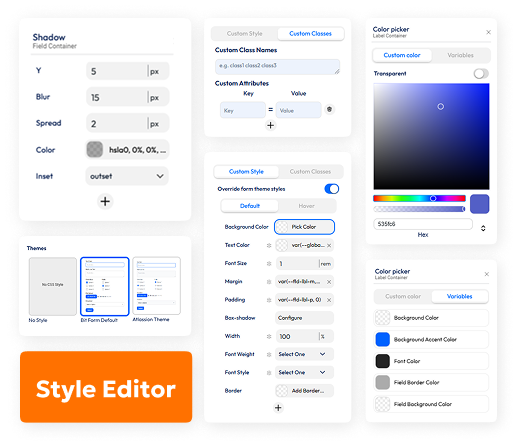
Fully Customize Your WordPress Forms
See changes live and make your forms look perfect on any device.
Pre-Built Themes
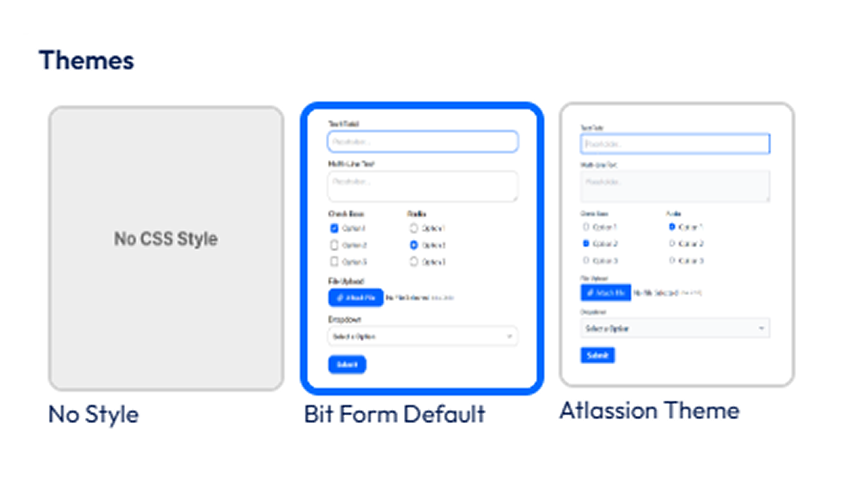
Global Styling Made Easy
Style Individual Elements
Add Custom Classes & Attributes
Live Preview & Mobile-Friendly
More Features to Build Smarter Forms


Annual or Lifetime Plan?
Exclusive Discount Deal
All Plans Include the Following Features
Get Your Lifetime Business Assets for Automation, Engagement, & Growth
Bit Apps Agency LifetimeDeal Bundle






Co-Founder, Bit Apps



Hello!!
How Can We Help You?
Frequently Ask Questions
Bit Form's Custom Style Editor is a no-code visual tool for styling WordPress forms. Customize colors, fonts, borders, and layouts instantly without writing CSS.
In the Style Editor, select the button element and tweak hover effects, gradients, sizes, and colors. Matches your brand easily.
Yes, enable RTL alignment for right-to-left languages. Ideal for multilingual WordPress sites.
Bit Form is compatible with almost all the WordPress page builders like- Elementor, Oxygen, Divi, Zion, Thrive, Themify & many more.
Box shadows, gradients, custom widths, margin, padding, border, and hover animations. No developer skills required for pro results.
Yes, you can bring in custom fonts for your Bit Form! Just upload the font files, and then use the style editor to apply your chosen font to the form elements.
Yes, you can enable Dark Mode in the builder settings to instantly switch and design forms for dark backgrounds.
Absolutely! You can easily add custom CSS to style your Bit Form. Remember to use the specific classes and IDs from Bit Form to target the elements effectively!
