


 EN
EN  ES
ES  DE
DE  PT
PT  IT
IT  JA
JA  ID
ID How to Create a Digital Consent Form With Signature in WordPress
Are you looking for a digital consent form with a signature option? Well, look no further; you’ll get that right here.
Paper consent forms are old school. If you can sell and buy things online, which was, back in time, an in-person thing, why can’t you sign agreements online?
I mean, just think about it: I agree that getting consent on paper sounds more usual and simple, but what if you’re overseas and you can’t meet? Obviously, you have to print the form, sign it, scan it, email it back, and then someone else has to store the document. So much hassle.
A digital consent form removes most of that back-and-forth. The person enters their information, reads the agreement/terms and conditions, signs directly on the form, and submits it. You get the response on your WordPress site instead of chasing a scanned document.
Isn’t it cool? However, most people think building an online consent form is tricky. Everything should be clear and professional. That’s why today we’ll make this process simpler; we’ll collect consent and a signature in the same WordPress form. Let’s build it from scratch.
TL;DR
- A digital consent form lets people read an agreement and provide their consent online without printing or scanning paperwork.
- In WordPress, the Bit Form WordPress form builder plugin lets you add a Signature Field directly to your form. Users can sign with a mouse, touchpad, or touchscreen. The signature is processed as an image and stored with the form data.
- You can also configure email notifications and generate PDF versions of submitted form data when you need a more convenient record of consent.
- A digital signature field does not automatically make every agreement legally binding. Legal requirements depend on the country, document, consent process, and how records are maintained.
Why Use a Digital Consent Form With a Signature?
Paper consent forms create unnecessary work when you need to collect, organize, and retrieve signed agreements. As I said before, there’s a lot of manual work to do: print it, sign it, scan or photograph it, send it back, and then the business has to store it somewhere.
A digital consent form simplifies and speeds up the process. Users can read the information, provide their consent, sign directly from their device, and submit everything through one form.
The signature also gives the submission more context than a simple checkbox. Instead of only recording that someone selected “I agree,” you can keep the signature together with the person’s submitted information and other consent details.
Here are some practical reasons to use one.
1. Reduce paperwork
Very important and impactful reason, though. You don’t need to print forms and wait for people to return signed copies, which also reduces use of paper. The entire submission can happen online.
This is especially useful when you collect consent from many people, such as event participants, clients, volunteers, students, or customers.
2. Make signing easier for users
People can complete the form from any device: a computer, tablet, or phone. That removes the extra steps involved in printing, scanning, and emailing a document.
3. Keep consent information together
A paper signature may end up stored separately from the person’s contact information or other responses.
With an online form, you can collect the person’s details, consent response, date, and signature through the same submission.
4. Make submissions easier to manage
Digital submissions are easier to search, review, and connect with other workflows than stacks of paper forms.
5. Give users a copy when needed
Some consent processes require the person to have a record of what they agreed to. So, when you generate a PDF from the submission, you can use it as a record of the completed form and send them as proof.
Common Uses for Digital Consent Forms
There are many everyday scenarios where this type of digital consent form with a signature field is required; some of the common use cases are:
- Client agreements
- Service agreements
- Event waivers
- Participation forms
- Photo and video releases
- Employee acknowledgements
- Volunteer agreements
- Parental permission forms
- Research consent
- Privacy and data consent
- Rental agreements
- Internal approval forms
How to Create a Digital Consent Form With Signature in WordPress
You can build the form with Bit Form’s drag-and-drop builder without writing a single line of code.
Step 01. Create a new form
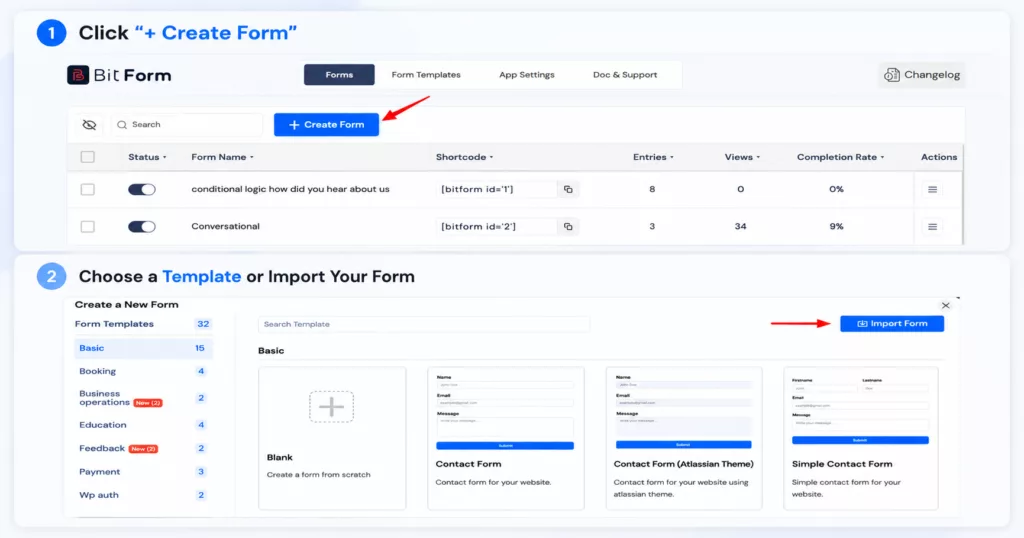
Install and activate Bit Form on your WordPress website, then open the Bit Form builder and create a new form. Start with a blank form if you want complete control over the structure.
You can also use a suitable existing form as a starting point and modify its fields for your consent process.
Before you start: This tutorial uses Bit Form Pro because the Signature Field and PDF generation features require Bit Form Pro. You can build the basic consent form with the free version, but you’ll need Pro for the complete signed-consent workflow shown here.
Step 02. Add necessary fields to your form
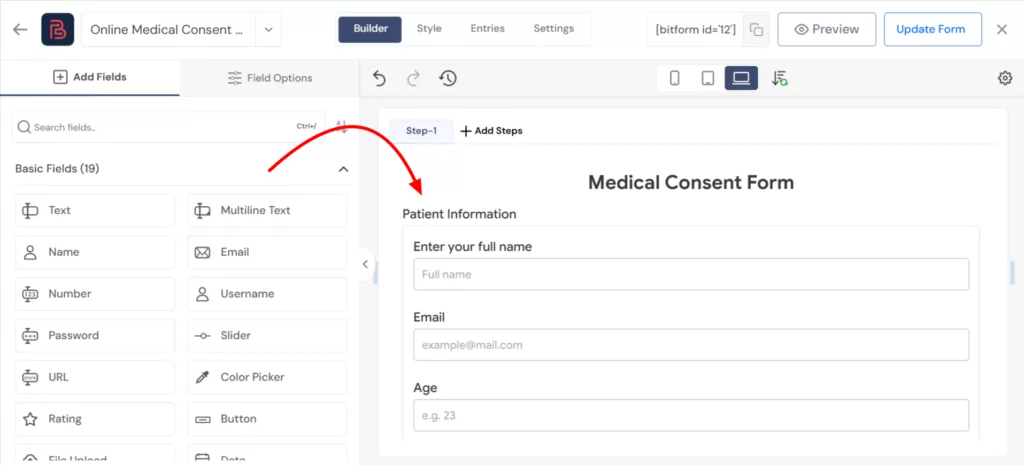
So today I’ll be creating a Medical Consent Form. For that, I’ll collect information of different types. Those are: Patient Info, Treatment info, Medical Info, terms and conditions, electronic signature, and date of signing.
For this form, I’ll be using some basic fields to give the form a structure. Such as name, email, phone number, multi-line text box, section to differentiate the information type, decision box, file upload field to get the patient’s medical history, HTML field to add agreement content, a signature field, and a date field.
You can simply drag-and-drop fields from the left side menu.
Step 03. Add the consent statement
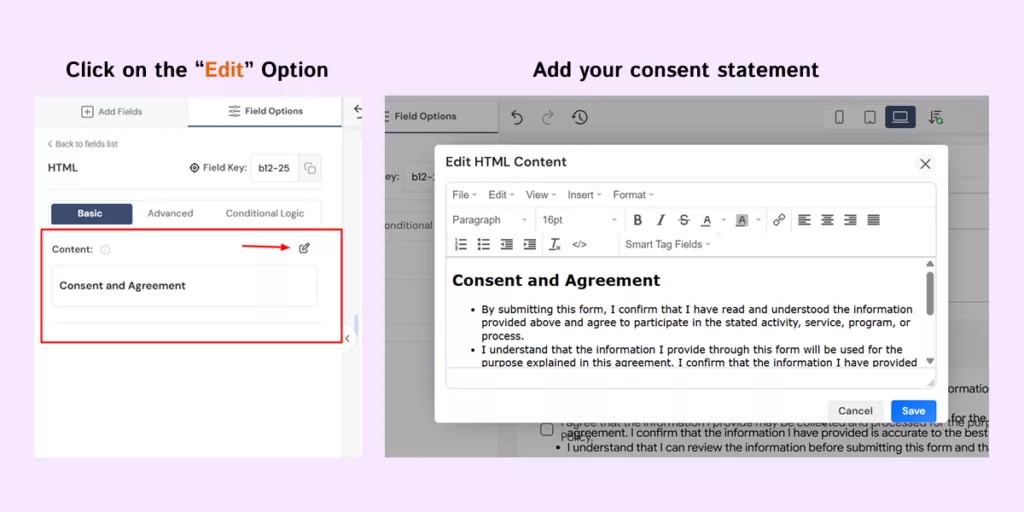
To add the consent statement, I’ve used the HTML field in Bit Form. With this powerful feature, you can present the statement just the way you want.
When you click the Edit option, you can view the Content block in the form settings. You can customize the content of the HTML field.
💡Tip: Make the wording easy to read. If the consent document is lengthy, consider linking to the full terms or presenting the information in a way that does not overwhelm the user.
Step 04. Add an agreement field
Add a Decision Box to collect user consent.
For example, your form could include:
- I have read and understood the information above and agree to the stated terms.
Make the field required since the authority needs their consent to proceed.
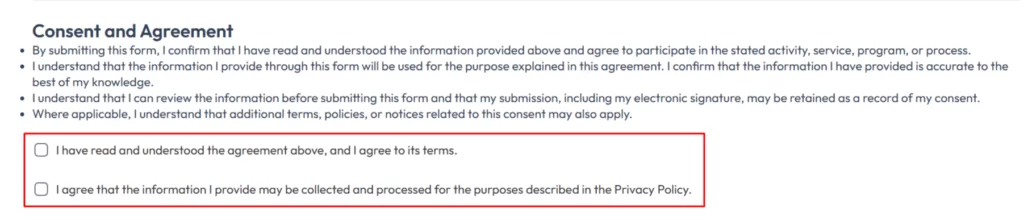
Important: If your form collects medical or other sensitive personal information, check the privacy, security, access-control, retention, and regulatory requirements that apply to your organization and location. Using a WordPress form or signature field alone does not establish regulatory compliance.
Step 05. Add the Signature Field and Date Field
Open the field list in Bit Form and search for Signature Field.
Drag it into the form where you want the user to sign. Give it a clear label such as: Signature
You can also add helper text to explain what users need to do.
For example: Sign below using your finger, stylus, touchpad, or mouse.
Next, configure the signature pad settings. You can adjust the pen, background, image type, button controls, alignment, and required status from the Signature Field settings.
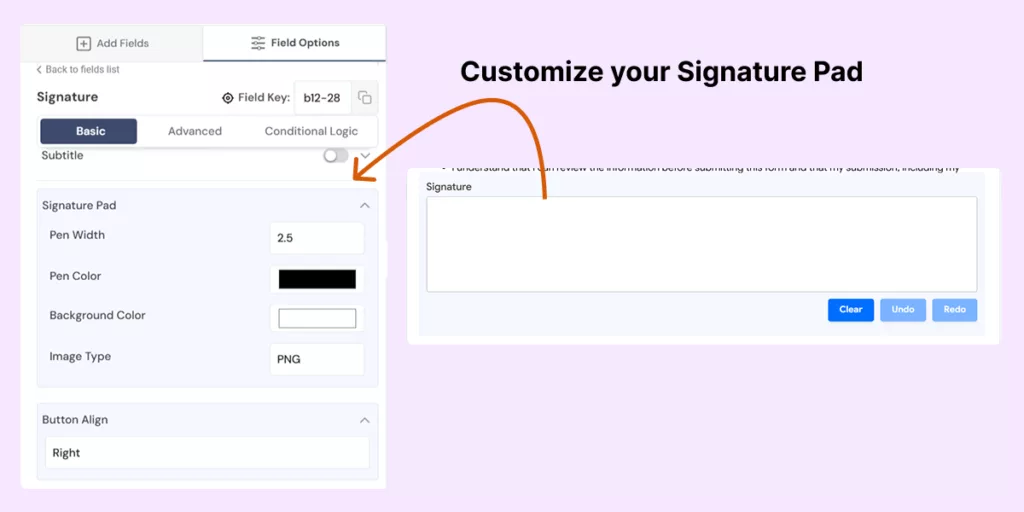
Since the signature is mandatory for the agreement, enable the Required option for the field. Bit Form also lets you define a custom error message for required fields.
Next, add a date field in the form to record the date of signing.
Step 06. Add a confirmation message
A user should know what happened after submitting the form. Bit Form supports success and error messages as well as redirecting users to another page after submission.
Choose whether to show a success message or redirect users to another page after submission. For this form, a simple confirmation such as “Your consent form has been submitted successfully” is enough.
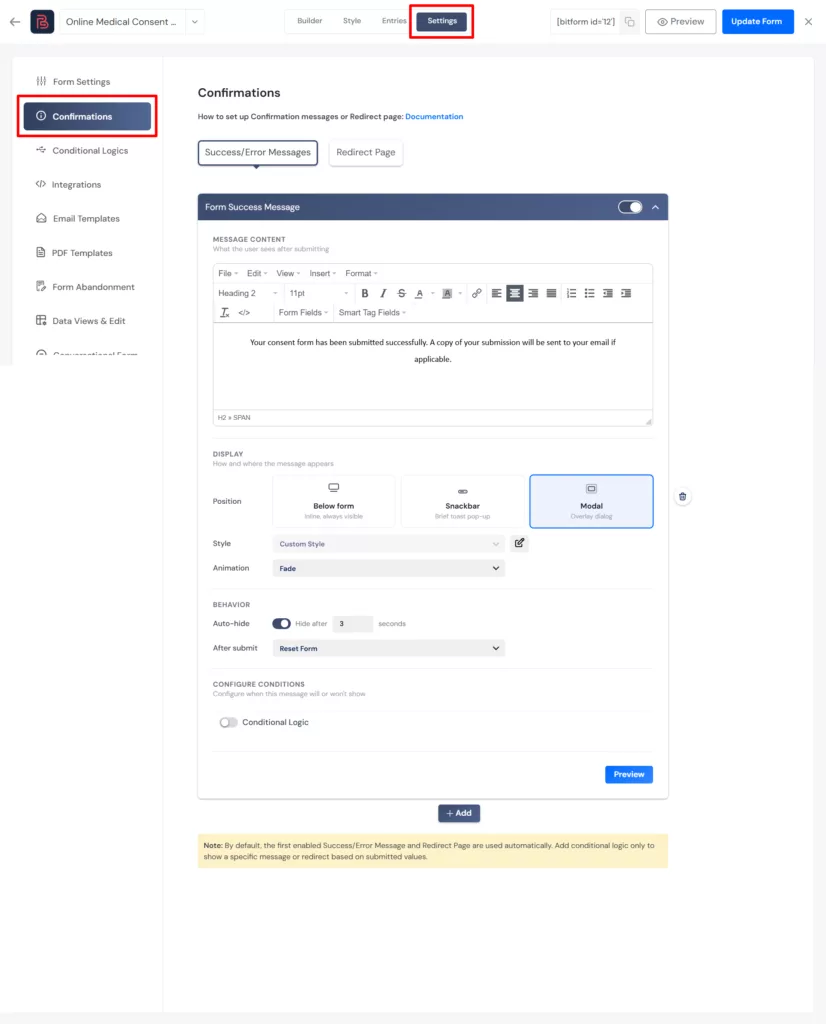
Step 07: Publish or Embed the form
Once the form is ready, embed it in a webpage or post using the shortcode block. And after publishing, the form will look something like this:
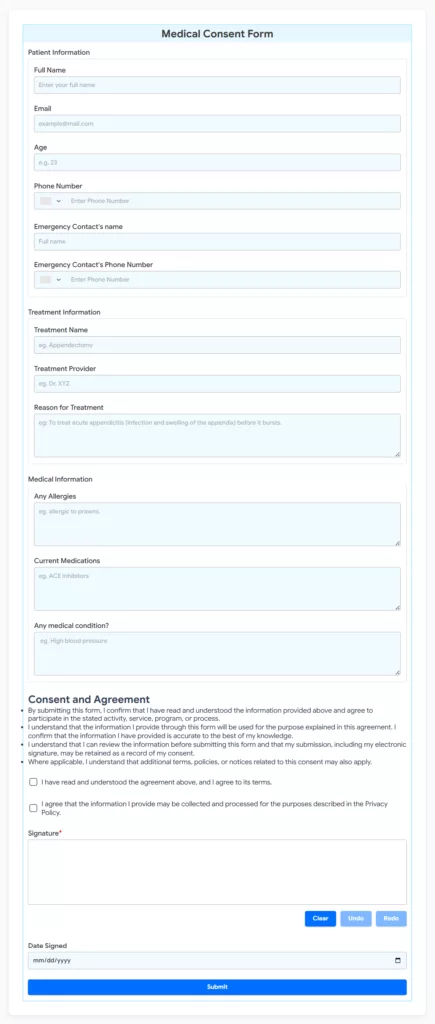
How to Keep a Record of Signed Consent
Normally, Bit Form stores submitted form data in Entries, and its Signature Field processes the signature as an image and stores it with the other form data. The signatures can be stored as PNG, JPG, or SVG and used in email or PDF templates.
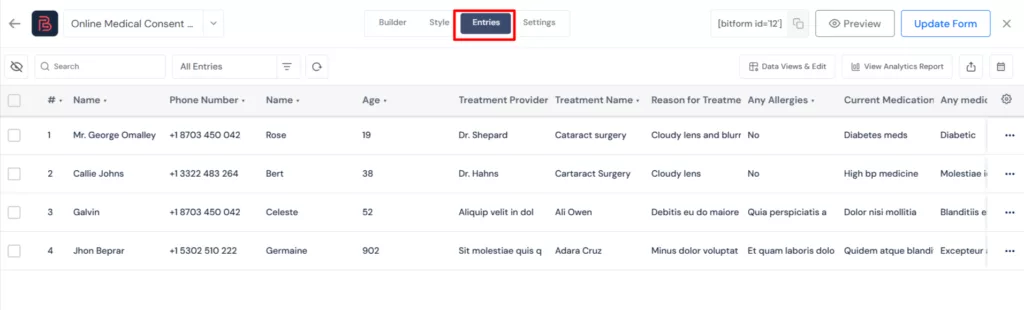
Use PDF records when you need a document copy
If you want a document version of each completed consent form, create a PDF template. Bit Form’s PDF Template feature allows you to generate a PDF on form submission. Add the relevant form fields and smart tags to the template, then configure the PDF settings you need.
For example, your PDF can contain:
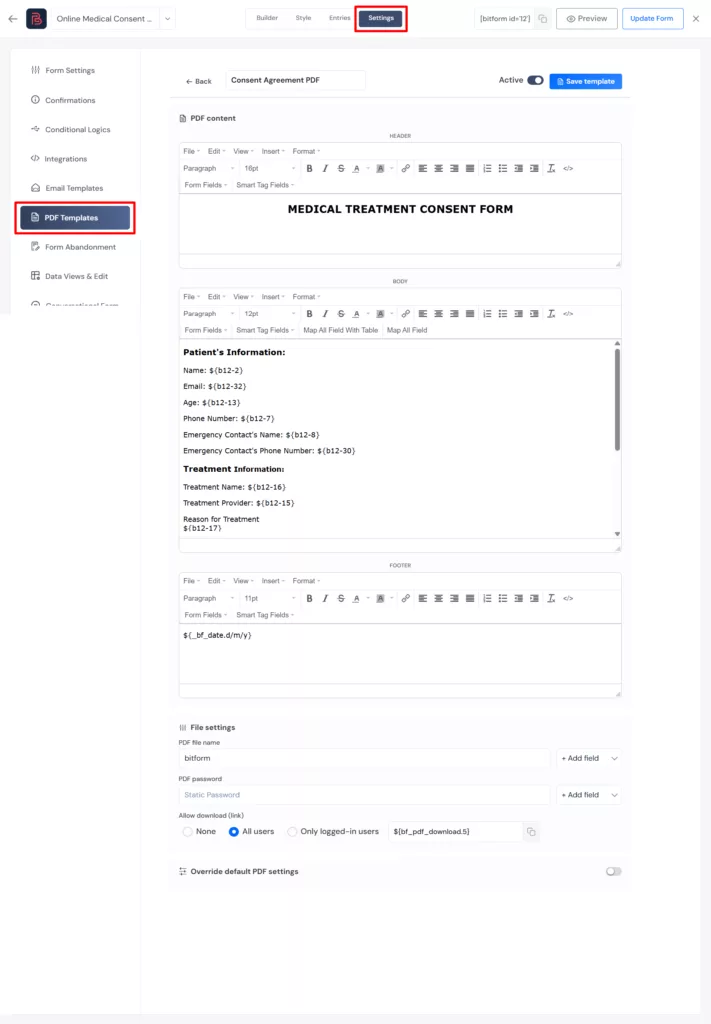
The exact smart tags and field keys should match the fields in your form.
Send the PDF of the Consent Form to the User
Once the consent form is submitted, you can send the person a confirmation email with a copy of their completed form. This gives them a record of the information they provided, the consent they gave, and their electronic signature.
Bit Form can also send email notifications to the admin. For this tutorial, however, we’ll focus on the user notification and show what the person receives after submitting the form.
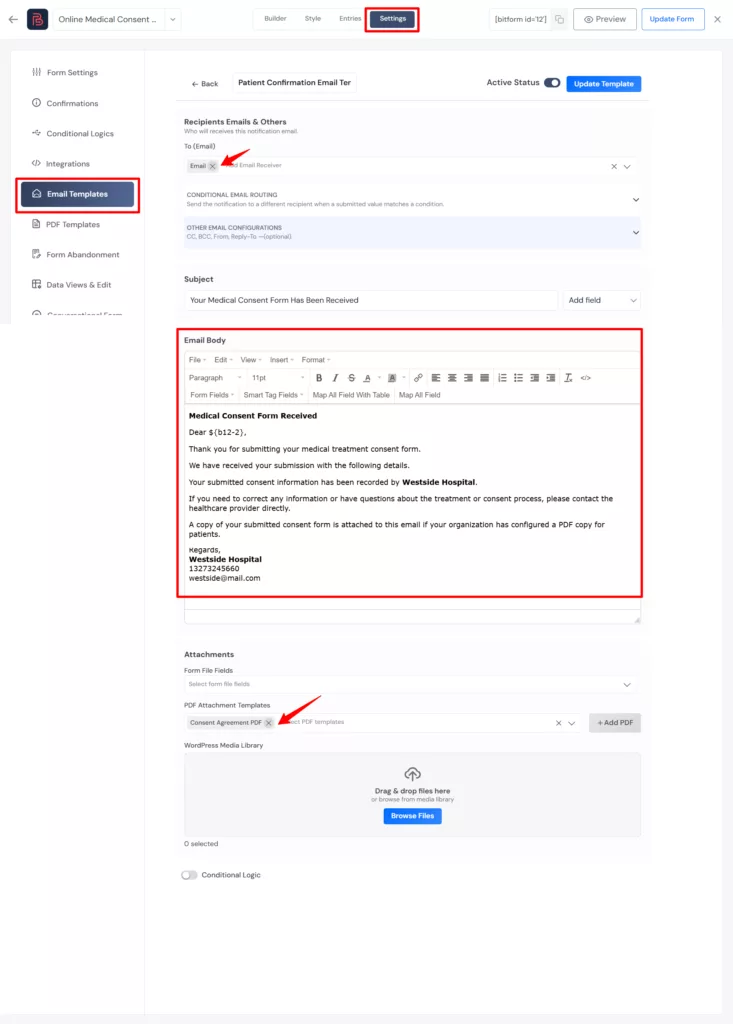
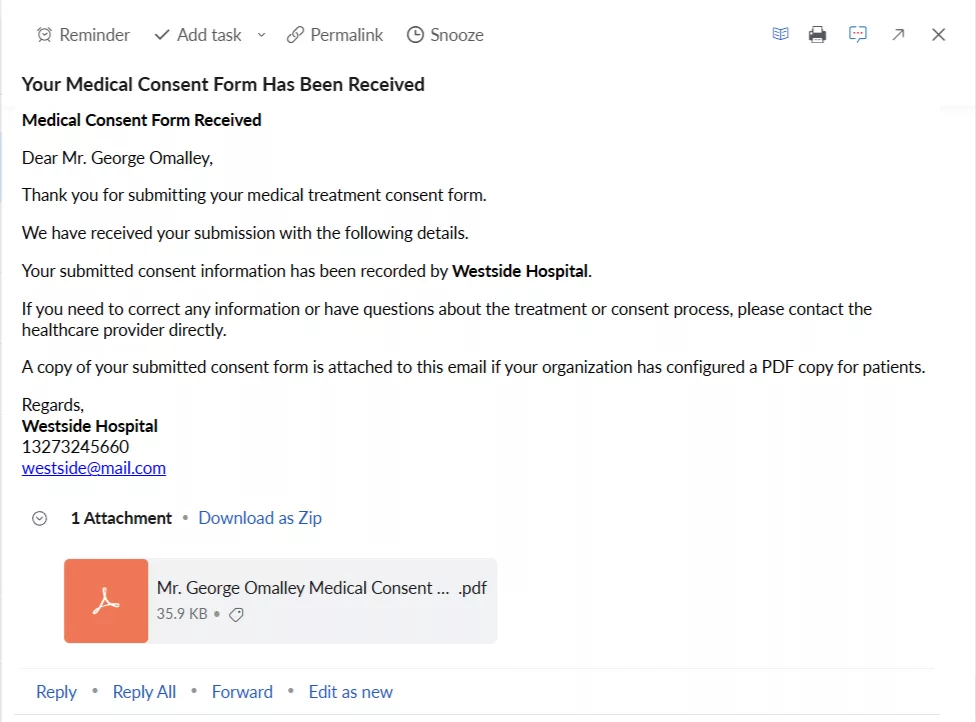
After configuring the email template, the user receives the confirmation email with their submitted details and, if configured, the completed PDF attached.
Is Collecting Digital Signature in Forms Legally Binding?
This is where you should be careful with wording.
Adding a signature field to a WordPress form does not, by itself, guarantee that every signature or agreement will be legally binding.
Electronic signature laws differ between countries and can depend on factors such as consent, signer identification, the type of document, intent, record retention, and the way the signed information is preserved.
So if your form is being used for a contract, medical consent, regulated process, employment document, or another legally important agreement, check the requirements that apply to your jurisdiction and use case.
Bit Form provides the technical ability to collect and store a signature with form data. It should not be treated as legal advice or as a guarantee that a particular agreement satisfies a jurisdiction’s electronic signature requirements. The same distinction is important when evaluating other WordPress signature tools. Current WordPress solutions commonly describe their signature features in terms of electronic signing, but legal validity still depends on the circumstances.
Conclusion
A good digital consent process should leave both sides with a clear answer to one question. What exactly did the person agree to?
That is why the form should be built around the consent statement first and the signature second. Collect the information you need, make the agreement clear, give users an easy way to sign, and keep a reliable record of the completed submission.
If you are already using WordPress, Bit Form gives you the core pieces needed to build that workflow. Its Signature Field handles the electronic signature, while email notifications and PDF templates can help you document the submission and send them to both the admin and user.
Start with a simple consent form, test the complete submission process, and add extra fields or automation only when they solve a real need.
Frequently Asked Questions
What is a digital consent form with signature?
A digital consent form with signature is an online consent form that records a person’s agreement and collects their electronic signature as part of the same submission. It can replace a paper-based process when digital consent is suitable for the use case.
Can I add a digital signature to a WordPress form?
Yes. Bit Form includes a Signature Field that users can sign with a mouse, touchpad, or touchscreen. The signature is processed as an image and stored with the form submission.
Is the Bit Form Signature Field available for free?
No. The Bit Form’s Pro plan includes the Signature Field.
Can I make the signature field required?
Yes. Bit Form’s Signature Field includes a Required setting, so you can make the signature mandatory before the form can be submitted. You can also customize the error message shown when the required field is left blank.
Can I generate a PDF from a signed consent form?
Yes. Bit Form Pro includes PDF generation, and its PDF templates can use submitted form fields and smart tags.
Are signatures collected through WordPress legally binding?
Not automatically. Whether an electronic signature is legally valid depends on the jurisdiction, type of agreement, consent process, signer identification, and other requirements. For legally important documents, get appropriate legal advice for your situation.


Related Blog

How to Let Users Edit Their Own Form Submissions in WordPress

How to Create a Real Estate Lead Capture Form in WordPress

