When picking the best WordPress form builder for your site, you need to decide between new technology and tried-and-true dependability. WordPress users have been using Contact Form 7 since 2007. It has more than 5 million active installations. But newer tools like Bit Form are changing the way forms are made with better features, better performance, and better value.
This comprehensive comparison will help you find the Best Alternative to Contact Form 7 that has the latest features and is easy to use. We’ll look at everything, including performance metrics, real-world usability, advanced conditional logic, multi-step form capabilities, and drag-and-drop form builder interfaces.
After reading this analysis, you’ll understand why Bit Form is the best Free Alternative to Contact Form 7 and why thousands of website owners are making the switch from traditional solutions.
You can use Contact Form 7 for free, but you should think about what real value means in the competitive world of WordPress form builders today. With Contact Form 7, you get solid core features like unlimited form creation, email notifications, and basic field types, all at no cost.
But when looking at the requirements for modern form building, the comparison becomes especially interesting when you look at what Bit Form offers as a free alternative to Contact Form 7 without any extra addons.
| Features | Bit Form Free | Contact Form 7 |
| Fields | 38+ | 10+ |
| Drag and Drop Builder | ✅ Yes | ❌ No |
| Form Preview | ✅ Yes | ❌ No |
| Advanced Integration | ✅ Yes ( 50+) | ✅ Yes ( 2 ) |
| Conditional Logic | ✅ Yes | ❌ No |
| Multi-Column Layouts | ✅ Yes | ❌ No (Requires CSS) |
| Spam Protection | ✅ Yes | ✅ Yes |
| Calculation | ✅ Yes | ❌ No |
| Email Notification | ✅ Yes | ✅ Yes |
| Multi Step Form | ✅ Yes | ❌ No |
| File Uploads | ✅ Yes | ✅ Yes |
| Field Customization | ✅ Yes | ❌ No |
| Pre-built Templates | ✅ Yes | ❌ No |
| Phone | ✅ Yes | ✅ Yes |
| Date | ✅ Yes | ✅ Yes |
| Time | ✅ Yes | ❌ No |
| Password | ✅ Yes | ❌ No |
| Repeater | ✅ Yes | ❌ No |
| Divider | ✅ Yes | ❌ No |
| Hidden Field | ✅ Yes | ❌ No |
| Rating | ✅ Yes | ❌ No |
| Entry Preview | ✅ Yes | ❌ No |
| Live Form Preview | ✅ Yes | ❌ No |
| Conversational Form | ✅ Yes | ❌ No |
| Built in Styling | ✅ Yes | ❌ No |
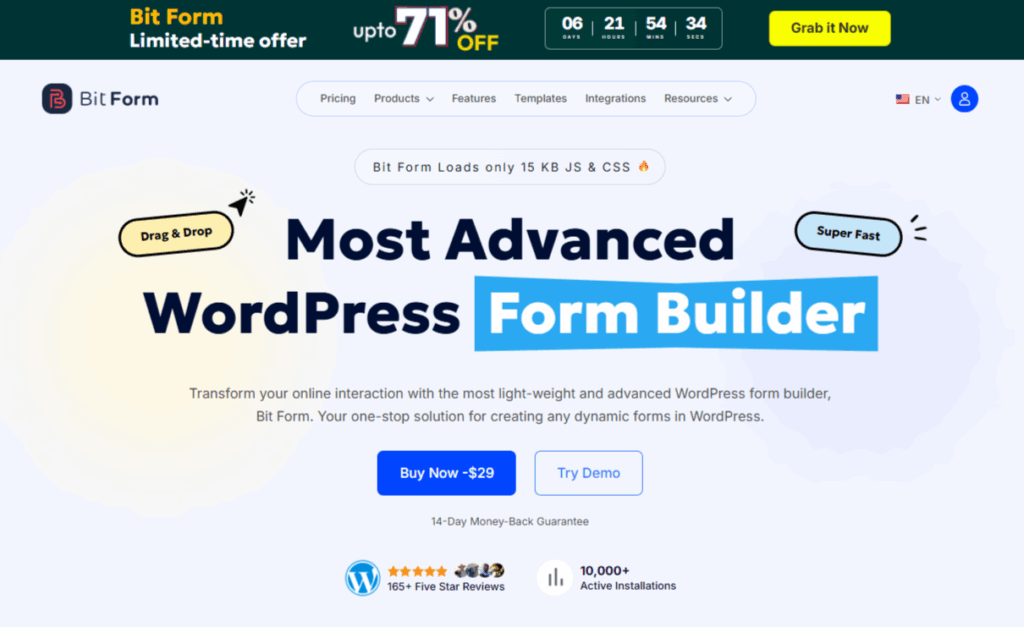
Bit Form is a modern, lightweight WordPress form builder plugin that revolutionizes how you think about forms by treating them as complete data management systems rather than simple contact collectors.
What sets Bit Form apart as the Best Alternative to Contact Form 7 is its commitment to providing premium-level features, like advanced integrations, conditional logic, and powerful automation workflows, completely free. While competitors lock these capabilities behind expensive paywalls.
Contact Form 7 has been one of the oldest WordPress form builder plugins. Over the years, it has maintained a steady number of users because it is easy to use and makes simple forms.
It is known for being lightweight, but this simplicity often means that it doesn’t have many advanced features or modern, easy-to-use interfaces. It has basic features like form validation, email notifications, and spam protection.
Nevertheless, Contact Form 7 is still the most popular choice among users who want an easy way to make forms, especially for those who don’t need a lot of advanced features.

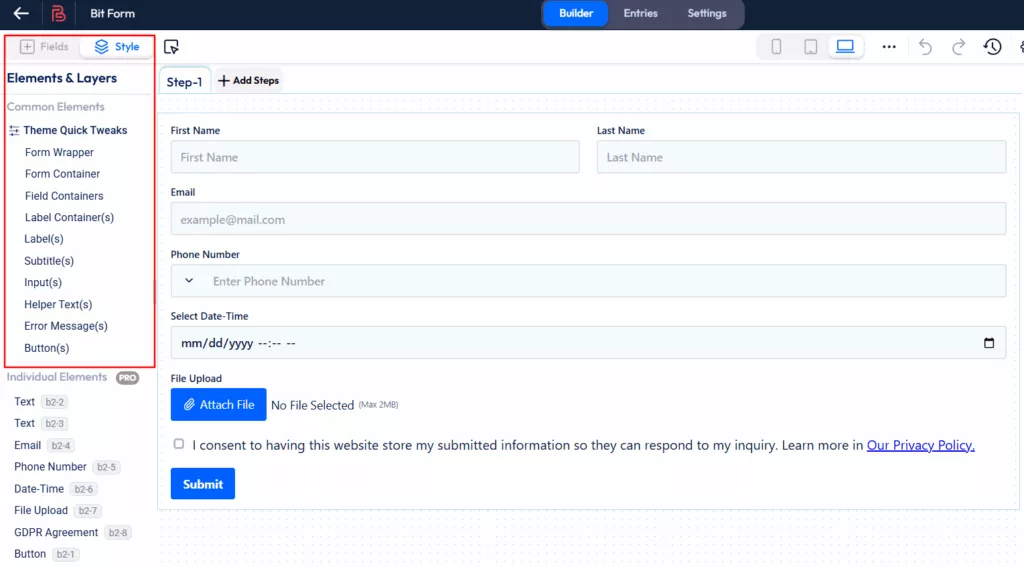
Bit Form has a clean, easy-to-use interface that feels like it belongs in modern WordPress. The drag and drop form builder focuses on clean design and lets you see changes right away with a real-time preview feature. This user-friendly form builder makes it easier for new users to learn how to use it, while giving experienced users more ways to customize it.

Click on the “Style” button to start customizing your form. In the free version, you can adjust common elements, and if you want to style individual fields, you’ll need to upgrade to the Pro version.
Now it’s time to set up the conditional logic. Just click on “Settings” and go to “Conditional Logic”. The top section lets you set when an action should happen, whether it’s when a record is created, edited, or deleted.
Plus, you can control if it runs immediately, on form load, during validation, or only after the form is submitted.

In the next section, where the magic happens! You can use logical operators like “OR” and “AND” to define more complex relationships between multiple fields.
Need to check multiple fields at once? No problem! With the option to add “AND” or “OR” groups, you can build more sophisticated rules that require specific combinations of conditions.

And finally, you can get even more specific! Nested conditions, like “Else If” and “Else,” allow you to define alternative actions based on different criteria.

Once you’ve set up your conditional logic, go ahead and click on the Builder. After that, hit Update to save your changes.

Now, click on “Preview” to see how your form looks before you publish it.


When you’re ready to publish your form on your WordPress site, simply click the “Publish” button. You’ll then get a shortcode. Copy the generated shortcode and paste it into any page or post where you want the form to appear. Easy, right?

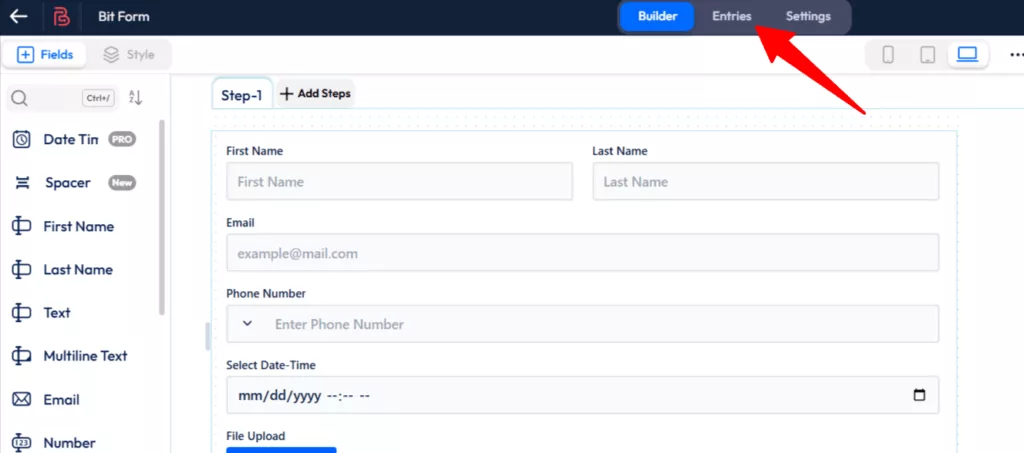
After submitting a form, click on “Entries” to view and manage all the submission data collected from your form.
You can also export your form data by clicking on the “Export Form Data” icon.

To check detailed insights, just click on the “View Analytics Report” button.

There are handy “Filter Options” too, so you can sort submissions by date or check specific entry statuses.

If it’s a job application or survey form, just scroll down, and you can also view an “Advanced field-wise report“. You can switch between different chart views, and on the right side, you’ll find a quick summary of the data.

Contact Form 7 uses a shortcode-based system that is very different from other systems. It has a form markup editor that lets you directly control the HTML structure by adding code manually.
The interface uses shortcode-based field insertion, which means that users need to know basic syntax, like [text* your-name] for required text fields. This is mostly useful for developers who are comfortable with code.
You need to know CSS to style and customize this text-based configuration system because the plugin’s minimal interface focuses on functionality over looks. This method gives experienced developers the most freedom and control, but it is much harder for non-technical users who prefer visual form-building tools to learn. This is one major reason why many users seek a Contact Form 7 alternative with visual editing capabilities.

Bit Form offers over 50 integrations, all available in the free version. Additionally, by installing the Bit Integrations plugin and selecting Bit Form as a trigger, you can connect your forms with more than 150 applications, all without any additional cost. This makes it an exceptional free alternative to Contact Form 7 for users who need powerful integrations. Bit Form includes popular tools like:

 Note
Note
An additional advantage is that by installing the Bit Integrations plugin ( a sister plugin from the same team ), you can select Bit Form as a trigger in the Bit Integrations dashboard and connect it with over 150+ apps. This makes it one of the most powerful options for advanced integrations with WordPress form functionality.
Contact Form 7’s integration approach relies on third-party addons. While the core plugin is both free and lightweight, bit it lacks built-in connections to popular CRMs, email marketing tools, or payment gateways.
This means users often have to install several extensions or premium addons to link Contact Form 7 with the platforms they depend on. As a result, both the setup time and overall costs can increase, especially when you compare it to other form builders that offer built-in integrations. So if you’re looking for an alternative to Contact Form 7 with native integrations, Bit Form is the clear winner.
Choosing the best WordPress form builder plugin isn’t just about adding fields; it impacts everything from lead generation, customer engagement, online payments, and even user sign-ups. To make your decision easier, here’s a detailed side-by-side comparison of Bit Form and Contact Form 7.
| Features | Bit Form | Contact Form 7 |
| Drag and Drop Builder | ✅ Yes | ❌ No |
| Resources (CSS + JS) | 15.3 KB | 30.93 KB |
| Pre-built Templates | ✅ Yes | ❌ No |
| Input Fields | 50+ | 10+ |
| Built-in Style | ✅ Yes | ❌ No |
| Multi Step Form | ✅ Yes | ❌ No |
| Conversational Forms | ✅ Yes | ❌ No |
| Advanced Calculation | ✅ Yes | ❌ No |
| Live Preview | ✅ Yes | ❌ No |
| Advanced Payment Fields | ✅ Yes | ❌ No |
| File Uploads | ✅ Yes | ✅ Yes |
| Built-in SMTP | ❌ No | ✅ Yes |
| Free Features | Comprehensive | ⚠️Limited |
| Multi-Step Form | ✅ Yes | ❌ No |
| Free Integrations | 50+ ( built in ) | 2 ( buit in ) |
| Conditional Logic | ✅ Yes | ❌ No |
Bit Form takes a straightforward approach to pricing that reflects its focus on providing value rather than just features. It offers four well-structured pricing plans to meet the needs and budgets of different users. The Starter plans ($29 a year or $91 for life) are great for people who only use one site and want full access to all features without any restrictions.
The Agency plans ($99/year or $194/lifetime) give agencies and developers who manage more than one client site unlimited site licenses with the same full set of features.

Contact Form 7 is free, but the total cost depends on the required extensions. When your form requirements get more complicated, you might find yourself needing additional addons, which can bump up your total investment.
When you look at the total cost, it’s clear that for similar features to what Bit Form offers for free, users of Contact Form 7 could end up spending anywhere from $100 to over $200 each year on various extensions. This really highlights how cost-effective Bit Form’s paid plans are in comparison, making it the most budget-friendly Contact Form 7 alternative
Both Bit Form and Contact Form 7 offer excellent support and resources, including documentation and video tutorials, ensuring users can easily find help and guidance.
One of the biggest strengths of Bit Form is its dedicated support team. Users consistently praise the quick response times, helpful guidance, and hands-on problem-solving approach. You can always get in touch with Bit Form’s team, whether it’s through live chat, email, or the active Facebook community. The reviews of support on the Bit Form homepage make it clear how much users appreciate this helpful and friendly support.
Contact Form 7 has been serving millions of websites for over 15 years. It’s simple and has a massive ecosystem. It’s suitable for you if you’re a developer who prefers code-based solutions and doesn’t mind managing multiple plugins for features and integrations.
Start with Bit Form if you want a modern, feature-rich WordPress form builder that grows with you. The free version is more than what many premium plugins offer, so it’s perfect for testing before committing to paid plans.
Modern User Experience
Integration Excellence
Feature-Rich Foundation
Recommendation: Start with Bit Form’s free version to experience the difference. You’ll get more functionality for free than Contact Form 7 offers.
Bit Form offers significantly more features in its free version compared to Contact Form 7, including 36+ field types, conditional logic, multi-step forms, and 50+ integrations.
The main difference is the approach. Contact Form 7 uses shortcode-based form creation requiring code knowledge, while Bit Form offers a drag-and-drop visual builder.
Bit Form is more beginner-friendly with its intuitive drag and drop interface, real-time preview, and pre-built templates. Contact Form 7 requires basic HTML/shortcode knowledge, making it more suitable for developers.
Contact Form 7 remains viable for simple contact forms and users comfortable with shortcodes. However, for modern features like conditional logic, multi-step forms, and advanced integrations, Bit Form offers better value even in its free version.
Bit Form is significantly faster, using only 17.65 KB of memory compared to Contact Form 7’s 30.93 KB. Bit Form also loads 5 times faster (0.01s vs 0.05s page load time).
Yes, both are considered lightweight, but Bit Form is more optimized. Contact Form 7 uses 30.93 KB while Bit Form uses only 17.65 KB, making Bit Form the lighter option.
No, Contact Form 7 doesn’t include conditional logic in its core plugin. You’d need third-party addons for this feature, while Bit Form includes it free.
Contact Form 7 doesn’t support multi-step forms natively. Bit Form includes multi-step form functionality in its free version.
Bit Form offers 36+ field types, including advanced options like rating, repeater, and password fields. Contact Form 7 provides only 10+ basic field types.
No, Contact Form 7 uses shortcode-based form creation. Bit Form provides a full drag-and-drop visual builder with a real-time preview.
Both support file uploads, but Bit Form offers more advanced file management features and better integration with cloud storage services like Dropbox and OneDrive.
Contact Form 7 has 2 built-in integrations and relies on third-party addons for more. Bit Form offers 50+ native integrations in its free version, plus 150+ additional integrations via the Bit Integrations plugin.
Only through third-party paid add-ons. But Bit Form includes HubSpot, Zoho CRM, and other CRM integrations in its free version.
Bit Form has native WooCommerce integration and better e-commerce form capabilities. Contact Form 7 requires additional plugins for advanced WooCommerce integration.
Bit Form offers live chat, email support, and an active Facebook community with a dedicated support team. Contact Form 7 primarily relies on WordPress forums and community support.
Bit Form excels with conditional logic, multi-step forms, CRM integrations, and lead capture optimization features. Contact Form 7 is basic for lead generation.





 EN
EN  ES
ES  DE
DE