

 DE
DE  EN
EN  ES
ES  PT
PT  IT
IT  JA
JA  ID
ID 5 Formidable Forms Alternatives You Should Compare First

Looking for Formidable Forms alternatives? Stop scrolling, grab a coffee, and settle in. We’ve got a lineup worth checking out.
Formidable Forms is difficult to replace with a single like-for-like plugin. Someone using it for a contact form needs something very different from someone using Views, calculations, payments, or a data-driven directory. So rather than ranking nine form builders based on the same criteria, this guide looks at which alternative makes sense for each kind of Formidable Forms user.
Here, we’ve compared the 5 strongest options by real use case, pricing, key features, and the trade-offs worth knowing.
Zusammengefasst:
Here’s a quick guide to the five alternatives to Formidable Forms and what each one is best suited for.
- Bit Form: Praised for its generous free version, affordable pricing, and easy-to-use builder. It’s worth considering if you want advanced WordPress forms without a complicated building process and add-ons.
- Fluent Forms: A good fit for lead generation, registrations, payments, and marketing integrations. It also offers a Formidable form importer.
- Ninja Forms: Suits users who want a free core plugin and the option to add paid features as needed.
- Gravity Forms: Worth considering for complex WordPress projects that need developer tools, APIs, and customizable workflows.
- PaymentForm.io: Best suited to payment-focused forms for products, donations, tickets, and memberships, without requiring a WordPress-only setup.
What Are You Actually Trying to Replace in Formidable Forms?
A useful alternative to Formidable Forms should cover the tasks your site depends on. Before comparing plugins, separate the features you need to keep from the extras you rarely use.
Simple and Advanced WordPress Forms
For contact forms and lead forms, focus on editing, spam protection, notifications, and entry management. For applications or registrations, add file uploads and multi-step layouts to your checklist.
Formidable supports multi-page forms with progress indicators. When comparing alternatives, check whether you can recreate the steps and navigation your visitors already use.
Conditional Logic and Calculations
Showing a follow-up question and calculating a quote are different jobs. Formidable supports both conditional field visibility and calculations based on form inputs. Its calculations can also handle dates and totals across repeated fields.
Look beyond a feature list that simply says “bedingte Logik” or “calculations.” Test the rules and formulas your forms actually need, including what happens to totals when an answer changes.
Front-End Data and App-Like Workflows
Collecting submissions is not the same as displaying and managing them on your site. Formidable Views can turn entries into searchable directories, tables, calendars, and other front-end displays. It also supports entry editing for approved users.
If your site relies on these features, compare layouts, search filters, and access permissions. Replacing the form alone would leave part of your setup unfinished.
Payments and Transactions
Look beyond whether a tool has a payment integration. Formidable’s Stripe integration supports one-time and recurring payments, along with actions tied to payment status.
For orders, donations, or memberships, match the gateway and billing options you use. Then check transaction fees and whether confirmation emails or integrations can wait until payment succeeds.
WordPress Ownership Versus Hosted Forms
Decide whether your forms need to stay inside WordPress. Formidable requires a WordPress site, so keeping that setup is a separate decision from changing the form builder. Hosted tools such as PaymentForm.io let you share standalone form links without your own website. They belong on the shortlist when WordPress is no longer a requirement.
Compare where entries are stored, how you can export them, and any submission or storage limits. Also check whether your forms need access to WordPress users or site content.
Formidable Forms Alternatives at a Glance
Before getting into the individual tools, it helps to see where they differ at a glance. The five options below do not try to replace Formidable in the same way. Some are better suited to advanced WordPress forms, some keep things simpler, and some take a payment-first approach.
Disclosure. Features and pricing were checked on October 6, 2026. Prices are in US dollars, and promotional offers may change.
| Alternative | Platform | Choose it mainly for | What to watch for | Free starting option | Pricing model |
| Bit Form | WordPress | Easy-to-navigate interface + affordable | Template library is small | Ja | Annual + lifetime |
| Fließende Formulare | WordPress | Broader feature set +fast | Additional 1.9% fee on free-plan Stripe payments | Ja | Annual + lifetime |
| Schwerkraft-Formulare | WordPress | Developer ecosystem and extensibility | No permanent free core | Nein | Jährlich |
| Ninja-Formulare | WordPress | Modular approach | Advanced add-ons can accumulate | Ja | Free + add-ons/memberships |
| ZahlungsFormular.io | Hosted | Payment-centric use cases | Not intended as a complete Formidable clone | Ja | Free + paid |
Best Formidable Forms Alternatives by Use Case
1. Bit Form for Advanced WordPress Forms and Flexible Licensing

Best fit
Bit Form is a strong Formidable Forms alternative if you want to enjoy a generous free version and lifetime pricing. Also, it suits well if you want to stay inside WordPress but don’t necessarily need to build the same type of data-driven applications that Formidable Forms is known for.
Why it belongs on this list
You do not have to start with Pro to build a useful form. Bit Form’s free version includes unlimited forms, submissions, and features from basic to advanced, including conditional logic, multi-step forms, file uploads, form templates, email notifications, and app integrations. That gives you flexibility to build any form that your business needs before even paying for the features.
Also, with Bit Form, users can do dynamic calculations that go beyond adding two number fields. For example, they can easily build complex forms like mortgage calculators, fuel cost calculators, und vieles mehr.
Talking about the paid versions, every paid plan includes the full feature list; nothing is hidden. It involves PDF generation, partial submissions, user registration, custom post types, and payment integrations. This makes Bit Form a relevant alternative to Formidable Forms when several of those features need to work together in one WordPress setup.
Where it differs from Formidable Forms
Formidable has a particularly strong built-in system for turning submissions into front-end content. Its Views can display entries as tables, grids, calendars, directories, charts, and other layouts.
Similarly, Bit Form has its own front-end Views and editing tools. You can display entries in a table, choose the fields shown, and control which user roles can edit submissions. But its broader feature set puts more emphasis on building and automating the form workflow itself.
So, if your project revolves around advanced forms, calculations, payments, conditional workflows, PDFs, and integrations, Bit Form is worth a close look.
What to know before switching
The template library is small; payment gateways and PDF generation require Bit Form Pro. For a directory or client portal, test front-end permissions and entry editing before committing to a migration. Those details matter more than recreating the visible fields.
Pricing snapshot
You’ll get a single-site Pro at $25 per year, and $99 for lifetime. Then Unlimited-site offers are listed at $79 per year and $199 lifetime.
2. Fluent Forms for Lead Capture and Everyday Business Workflows

Best fit
Fluent Forms suits WordPress sites that need a mix of lead forms, quizzes, registrations, payments, and marketing integrations.
Why it belongs on this list
Fluent Forms’ free plan is also as useful as Bit Form. Moreover, the builder supports more than 60 input fields, pre-built templates, multi-step forms, conditional logic, calculations, file uploads, payment forms, surveys, quizzes, and integrations. It also provides tools for managing, filtering, exporting, migrating, and reporting on submissions.
Pro adds numeric calculations, multi-step forms, file uploads, and a broader integration set. It also supports creating WordPress posts from submissions. That gives you a route for collecting articles, listings, or other user-submitted content rather than copying each entry into a post yourself.
Its advanced features cover several areas where users might otherwise turn to Formidable. That makes it suitable for everything from lead forms and registrations to calculators and payment forms.
Where it differs from Formidable Forms
Fluent Forms explicitly states that it does not offer a direct equivalent to Formidable Views. Creating a post from a submission is not the same as building a searchable, editable display of form entries. A project that depends on Views needs a separate plan for that part of the site.
On the migration side, Fluent Forms provides an importer for Formidable forms. That may reduce rebuilding work, but it is still worth testing imported rules, notifications, and integrations before replacing a live form. Do not treat a successful import as proof that the complete workflow is ready.
What to know before switching
Stripe payments in the free version carry an additional 1.9% Fluent Forms fee, on top of Stripe’s charges. Pro removes that additional fee, although Stripe’s processing fees remain.
Pricing snapshot
Single-site pricing starts at $63 for the first year. The lifetime deal for single-site starts at $279.
3. Ninja Forms for a Free Core With Optional Add-Ons
Best fit
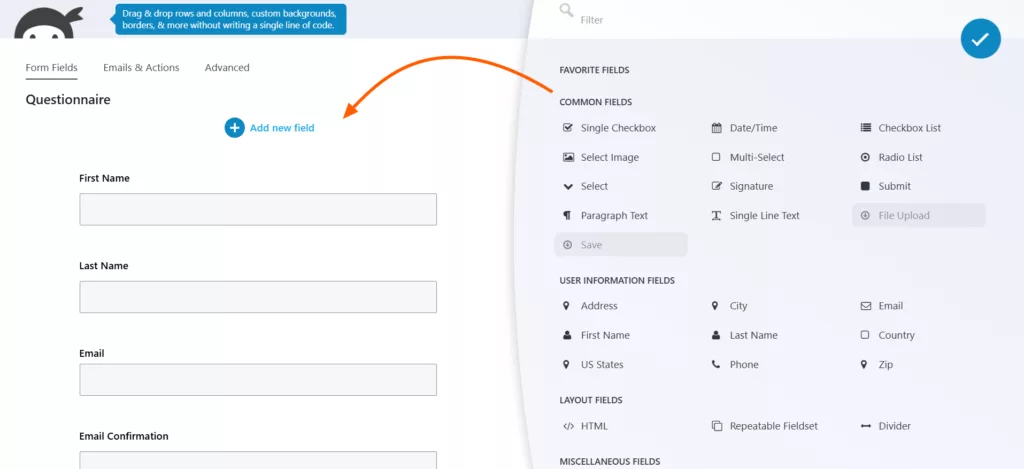
Ninja Forms is for users who want to start with a free WordPress form builder and purchase specific functionalities as their needs grow. Premium features are available individually via add-ons or through bundled memberships.
Why it belongs on this list
This alternative to Formidable Forms takes a different route from usual form builders; it follows a modular approach. That approach works well if you don’t want to pay for a large collection of features you won’t use. Its core plugin is free and provides the foundation for creating forms, while additional functionality can be added through extensions.
You get calculations, repeatable fieldsets, unlimited forms and submissions, and entry management. You can view, edit, search, and export submissions without buying a membership.
Calculations are a particularly useful reason to include Ninja Forms in this comparison. You can assign numeric values to choices and use those values in formulas. That supports practical uses such as a quote estimate, order total, or scored questionnaire. Collecting a payment from the result is a separate capability that needs a payment extension.
You can test that core setup first, then decide whether additional features justify the cost.
Where it differs from Formidable Forms
Formidable is more heavily positioned around complex forms and what you can do with the submission data. In that case, Ninja Forms is easier to understand if you think of it as a modular form-building system.
So the better choice depends on the project. If you want a flexible starting point and only need certain extensions, Ninja Forms can work well. If you already know you need calculations, advanced workflows, data management, PDFs, payments, and other capabilities together, compare the complete cost and setup before deciding.
What to know before switching
With increasing requirements, the number of add-ons and cost will increase significantly, which might be difficult for growing businesses. Check the payment gateway and integrations included in each membership. The current Plus plan includes conditional logic, file uploads, multi-step forms, and PayPal. The Pro plan adds tools such as Stripe, user management, and CRM integrations.
Pricing snapshot
Ninja Forms Core is free. Plus is advertised at $59.40 for the first year, while Pro is $119.40 for the first year. And individual add-on prices vary.
4. Gravity Forms for Custom Development and Connected WordPress Workflows

Best fit
Gravity Forms is useful for WordPress developers, agencies, and businesses that need to build complex, customized, and data-driven forms rather than simple contact pages. Its developer tools include APIs, action hooks, filters, and frameworks for building custom fields and add-ons.
Why it belongs on this list
Gravity Forms’ conditional logic reaches beyond showing and hiding fields. Rules can also control notifications, confirmations, integrations, and payment processing. That matters when one form needs to produce different outcomes based on the information submitted.
For example, a request form could send enquiries to different departments while passing only selected submissions to a connected service. Instead of maintaining separate forms for each route, you can manage those paths through conditional rules. The exact integrations available depend on your license and installed add-ons.
For developers, the appeal is the ability to extend that behavior. Gravity Forms provides tools to work with forms and entries programmatically, modify submission processing, and connect external applications through its REST API. Those are concrete reasons to consider it for a custom WordPress project, rather than choosing it simply because it has a long feature list.
Where it differs from Formidable Forms
Both are capable of handling calculations, conditional logic, payments, integrations, and complex workflows.
The difference is more about what you want to build around those forms.
Gravity Forms has a strong developer ecosystem and API, which is useful when standard settings aren’t enough and you want to extend or customize the behavior of your forms.
Formidable, meanwhile, puts more emphasis on using form data to build things such as directories, front-end displays, charts, and application-style WordPress experiences.
That makes Gravity Forms a particularly strong alternative for custom WordPress workflows.
What to know before switching
Match your license to the workflow, not just the site count. Payment integrations such as Stripe and PayPal require Pro or Elite. Features such as user registration, advanced post creation, and the official Webhooks Add-On are listed under Elite.
There is no free tier.
Pricing snapshot
Annual licenses start at $59/year for a single site.
5. PaymentForm.io for Payment-focused forms without any Website

Best fit
ZahlungsFormular.io is worth considering when the main purpose of your forms is collecting money, regardless of whether you have a WordPress site or not. It is a hosted checkout platform with forms that can be shared through a direct link or embedded on a website.
Why it belongs on this list
PaymentForm.io is a module-based tool that is organized around the transaction. However, it is not the same as Ninja Forms. Here, you pay once for all the modules.
Its modules cover physical and digital products, donations, fundraising, event tickets, contracts, and memberships. That makes it a different kind of Formidable Forms alternative not another general-purpose WordPress plugin.
For product sales, it supports variations, inventory limits, discounts, and shipping calculations. For donations, it offers fixed or custom amounts and recurring contributions. These are useful distinctions when the information you collect is closely tied to what someone is buying or funding.
Also, there is an Event ticket module which supports ticket types, quantity limits, and QR-code check-in.
Where it differs from Formidable Forms
The main difference is where the system runs. Formidable’s Views tools work with form entries inside WordPress. PaymentForm.io manages its forms on a hosted platform, even when you embed them in a WordPress page. Most importantly, it doesn’t charge any platform transaction fee on any transaction; users only pay the gateway fees.
That is useful when you need a checkout link without maintaining a website. It is less of a direct fit when your existing forms create WordPress content, depend on site user roles, or feed a Formidable directory. For those jobs, assess a WordPress-native plugin first rather than assuming an embedded payment form replaces the full workflow.
What to know before switching
It is a standalone tool, not a WordPress form builder. Currently, PaymentForm.io has 8 different modules.
Compare the fee model as well as the subscription price. The Free and monthly Pro plans advertise no platform transaction fee. The lifetime offer has a separate 0.1% platform fee on successful transactions, and payment gateway fees still apply.
Pricing snapshot
PaymentForm.io offers a Free plan at $0 und Pro at $9 per month. A limited-time lifetime offer is listed at $49, with the separate transaction-fee terms described above.
Which Formidable Forms Alternative Fits Your Setup?
Narrow your shortlist by the requirement you cannot compromise on. Use the guide below to decide which tools deserve a closer look, rather than comparing all five on every feature.
Start with the part of your current setup you want to keep or improve. These are the tools worth shortlisting for each need.
| Your situation | Start by comparing |
| “I need advanced WordPress forms with the paid features bundled together, rather than sold as separate extras.” | Bit Form, Fluent Forms |
| “I build complex WordPress sites for clients and need hooks, APIs, and room for custom development.” | Schwerkraft-Formulare |
| “I already use Fluent apps and want form submissions added to the right contact lists and tags.” | Fließende Formulare |
| “I prefer a free core and want to buy extra features only when I need them.” | Ninja-Formulare |
| “I need multi-step forms and basic conditional logic without buying a paid license.” | Bit Form Free version |
| “I want a WordPress form builder with a lifetime license instead of annual renewals.” | Bit Form, Fluent Forms |
| “My forms are mainly for payments, donations, tickets, or memberships, and I do not need them tied to WordPress.” | ZahlungsFormular.io |
When your needs overlap, use the hardest requirement as the deciding factor. A quote form that sends leads to a CRM needs both accurate calculations and correct field mapping. Evaluate that combination, not each feature in isolation.
Compare the cost of the complete workflow, not just the plugin license. Like, the required extensions, renewal costs, any applicable payment fees, and the time needed to rebuild. For a lifetime plan, also check the site allowance and what support and updates include.
Should You Actually Switch From Formidable Forms?
Switching form builders is important when your current setup no longer fits your needs or budget or workflow. It is not logical to shift just because another plugin offers more features or a lower price.
If you use Formidable Views to build directories, listings, or front-end data displays, think carefully before switching. Those features are a major part of what makes Formidable different, and you’ll need to check whether an alternative can reproduce the same workflow.
But if you mainly use it for contact forms, lead generation, registrations, calculators, or payment collection, you may have more options to check out.
Before switching, list the Formidable features you actually use, compare the cost of getting those features elsewhere, and test your most important forms. Check notifications, payment processing, integrations, and existing entries before replacing the live setup.
The best Formidable Forms alternative is the one that covers your real requirements without adding unnecessary complexity or leaving gaps in your workflow.
Here are SEO-rich FAQs that add new search intent without repeating the main comparison sections too much.
FAQs
Is there a free alternative to Formidable Forms?
Yes. Bit Form, Fluent Forms, and Ninja Forms all offer free versions. The best choice depends on which features you need, such as conditional logic, calculations, file uploads, multi-step forms, payments, or integrations.
Which Formidable Forms alternative offers a lifetime license?
Bit Form and Fluent Forms currently offer lifetime licensing options. This can be useful if you want to avoid annual renewals, but you should still compare site limits, included features, support terms, and future update acces
Is switching from Formidable Forms worth it?
It can be worth switching if your current plan is too expensive, your workflow has changed, or another form builder better matches your needs. If you rely on advanced features such as Views, complex calculations, or front-end data management, compare those workflows carefully before moving.
What should I check before switching from Formidable Forms?
Review your active forms, payment gateways, calculations, conditional logic, email notifications, integrations, user permissions, stored entries, and front-end displays. Testing your most important workflows before replacing the live forms can prevent migration problems.


Verwandter Blog

7 Powerful Elementor Form Alternatives Worth Trying in 2026
8 Best Free Quiz Plugins for WordPress in 2026