
 JA
JA  EN
EN  ES
ES  DE
DE  PT
PT  IT
IT Fluent Forms vs Bit Form: Which WordPress Form Builder Wins in 2026?

Choosing the right WordPress form builder can make or break how well you collect data and how easy it is for users to use.
There are many choices, but when it comes to finding the best WordPress form builder, Bit Form and Fluent Forms are two plugins that come up frequently in conversations. Both have strong drag-and-drop form builder features, but they approach design, functionality, and user experience in very different ways.
If you’re starting a new WordPress site, looking for a new form solution, or just trying to figure out which lightweight WordPress form builder plugin is best for you, this detailed form builder comparison will help you figure it out.
In this blog, we’ll dive deep into their features, usability, pricing, and overall value to help you make a smart choice.
Table of Contents
Fluent Forms vs Bit Form: Quick Comparison
Choosing the best WordPress form builder plugin isn’t just about adding fields; it impacts everything from lead generation, customer engagement, online payments, and even user sign-ups. To make your decision easier, here’s a detailed side-by-side comparison of Bit Form and Fluent Forms.
| Features | Bit Form | Fluent Forms |
| Free Version | ✅ Yes | ✅ Yes |
| Resources (CSS + JS) | 15.3 KB | 48.5 KB |
| WP-Auth | ✅ Yes | ✅ Yes |
| Conditional Logic | ✅ Yes | ✅ Yes |
| Free Features | Comprehensive | ⚠️Limited |
| Advance Style Editor | ✅ Yes | ⚠️Limited |
| PDF Attachment | ✅ Yes | ✅ Yes ( Addon ) |
| Digital Signature | ✅ Yes | ✅ Yes ( Addon ) |
| Custom JS/CSS Code Editor | ✅ Yes | ✅ Yes |
| Annual Pricing | $29 (single site) | $63 (single site) |
| Lifetime Value | $194 (Unlimited site) | $719 (Unlimited site) |
| Built In SMTP | ✅ Yes | ❌ No |
| Integrations | 50+ ( built in ) | 56 ( built in ) |
| Free Integrations | 50+ | 19 |
Details Overview: Bit Form vs Fluent Forms
Bit Form: The Most Lightweight and Advanced WordPress Form Builder

Bit Form positions itself as a modern, all-in-one best WordPress form builder that focuses on clean design and powerful features. The first thing that stands out about Bit Form, its lightweight design and advanced integration capabilities.
It also offers powerful features for free, while most other form plugins lock them behind paid plans. The plugin treats each form as a full data collection and management system, not just a simple contact form. This is called “forms as a service.”
Fluent Form: The Fastest WordPress Form Builder

Fluent Forms has established itself as one of the more popular WordPress form builders, offering both free and premium versions. The plugin claims to be the fastest way to build a contact form for WordPress. It has a drag-and-drop from the builder interface that is supposed to make it easy for people of all skill levels to make forms.
Interface & User Experience Comparison
Bit Form: Modern Drag and Drop Form Builder Interface
Bit Form offers a highly intuitive and user-friendly interface designed for both beginners and advanced users. The drag and drop from the builder allows easy creation of forms without any coding knowledge, including complex multi-step form designs.
The form’s sleek, clean design makes this lightweight form builder plugin easy to use, and the many ways to customize it make it easy to fit in with the look of your website. The form preview feature lets users see changes as they happen, which makes the workflow more efficient, a key advantage for any WordPress form builder.

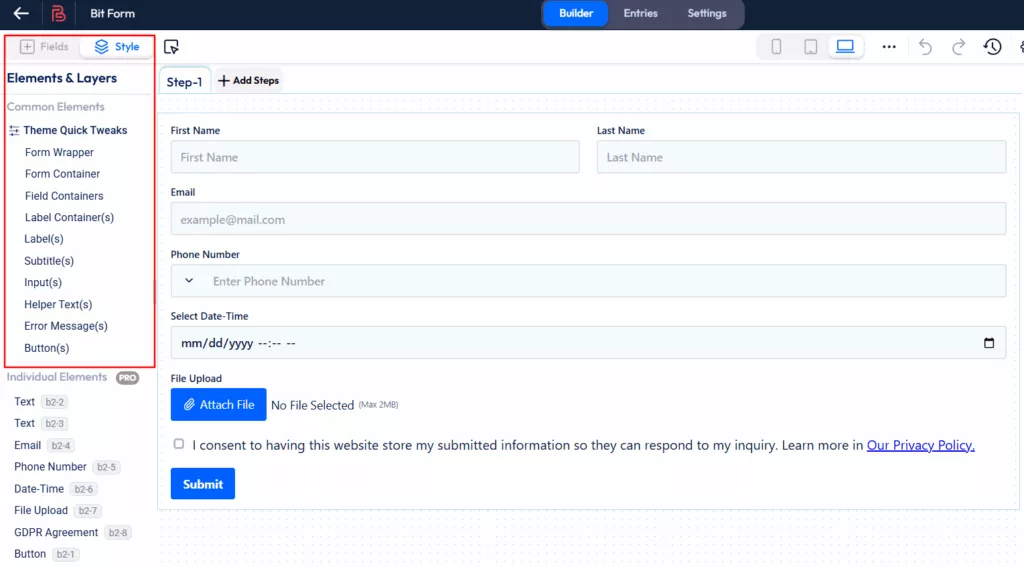
Click on the “Style” button to start customizing your form. In the free version, you can adjust common elements, and if you want to style individual fields, you’ll need to upgrade to the Pro version.
Now it’s time to set up the conditional logic. Just click on “Settings” and go to “Conditional Logic”. The top section lets you set when an action should happen, whether it’s when a record is created, edited, or deleted.
Plus, you can control if it runs immediately, on form load, during validation, or only after the form is submitted.

In the next section, where the magic happens! You can use logical operators like “OR” and “AND” to define more complex relationships between multiple fields.
Need to check multiple fields at once? No problem! With the option to add “AND” or “OR” groups, you can build more sophisticated rules that require specific combinations of conditions.

And finally, you can get even more specific! Nested conditions, like “Else If” and “Else,” allow you to define alternative actions based on different criteria.

Once you’ve set up your conditional logic, go ahead and click on the Builder. After that, hit Update to save your changes.

Now, click on “Preview“ to see how your form looks before you publish it.


When you’re ready to publish your form on your WordPress site, simply click the “Publish” button. You’ll then get a shortcode. Copy the generated shortcode and paste it into any page or post where you want the form to appear. Easy, right?

After submitting a form, click on “Entries” to view and manage all the submission data collected from your form.
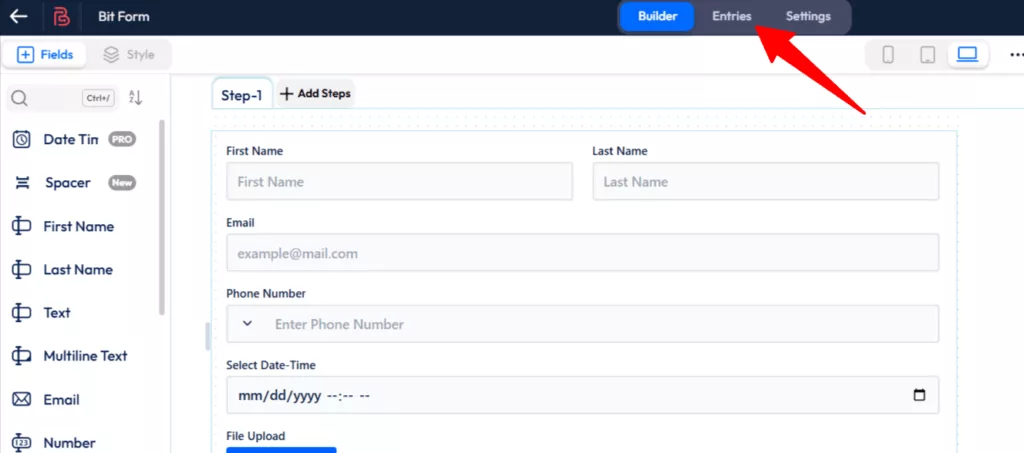
You can also export your form data by clicking on the “Export Form Data” icon.

To check detailed insights, just click on the “View Analytics Report” button.
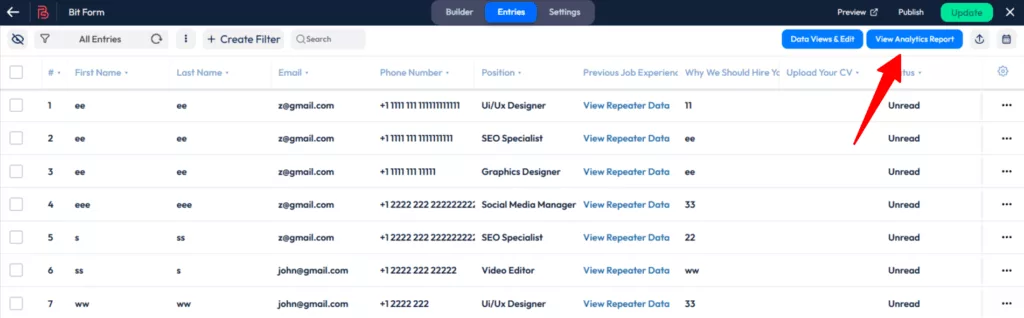
There are handy “Filter Options” too, so you can sort submissions by date or check specific entry statuses.

If it’s a job application or survey form, just scroll down, and you can also view an “Advanced field-wise report“. You can switch between different chart views, and on the right side, you’ll find a quick summary of the data.

Fluent Forms: Form Builder Interface
Fluent Form also has a simple drag-and-drop form builder interface that makes it easy to make forms. While it is user-friendly, some users may find the interface a little more cluttered than Bit Form, especially when accessing more advanced features.
The plugin offers a variety of form templates, which can save time, but the customization options are somewhat more limited in the free version. Overall, it is easy to use, but it may require more effort for in-depth customizations.

After creating a form, click on the “Preview & Design” button to check out how it looks before publishing it.

In the Preview section, you’ll see an option to customize your form using the default theme. If you want more flexibility, the Advanced Form Styler is available in the Pro version.

By clicking on “Entries,” you can easily view all the submission data. Plus, you have options to export and filter the data. However, if you’re looking for advanced features like visualizing survey results, those are available in the Pro version.

Advanced Integrations
Bit Form: Integration Powerhouse for Free
Bit Form offers over 50+ integrations, all available in the free version. Additionally, by installing the Bit Integrations plugin and selecting Bit Form as a trigger, you can connect your forms with more than 150+ applications, all without any additional cost. Bit Form includes popular tools like:
- Email marketing platforms: Mailchimp, Brevo, ActiveCampaign
- CRM systems: HubSpot, Zoho CRM
- Communication tools: Telegram, Twilio
- Productivity apps: Google Sheets, Zoho Project, Zoho Sheet
- File Storage & Management: Dropbox, OneDrive, Zoho WorkDrive
- E-commerce: WooCommerce

An additional advantage is that by installing the Bit Integrations plugin (WordPress Automation plugin from the same team), you can select Bit Form as a trigger in the Bit Integrations dashboard and connect it with over 150+ apps. This makes it one of the most powerful options for advanced integrations with WordPress form functionality.
Fluent Form
Fluent Form provides 56 native integrations with popular platforms and services. However, most of these integrations are available only in the Pro version.

Feature Analysis: Free Version Battle
When evaluating Bit Form’s free features, it becomes clear why Bit Form stands out as the superior choice for free users who require integrations and advanced fields:
| Features | Bit Form Free | Fluent Form Free |
| Advanced Integrations | ✅ Yes ( 50+) | ✅ Yes ( 19) |
| Multi Step Form | ✅ Yes | ❌ No |
| Conditional Confirmations | ✅ Yes | ❌ No |
| Conditional Logic | ✅ Yes | ✅ Yes |
| Ratings | ✅ Yes | ❌ No |
| Repeater | ✅ Yes | ❌ No |
| Slider | ✅ Yes | ❌ No |
| Image | ✅ Yes | ❌ No |
| File Upload | ✅ Yes | ❌ No |
| Phone | ✅ Yes | ❌ No |
| Image Upload | ✅ Yes | ❌ No |
| Color Picker | ✅ Yes | ❌ No |
| Title | ✅ Yes | ❌ No |
| Conversational Form | ✅ Yes | ✅ Yes |
| Analytics Report | ✅ Yes | ❌ No |
| Templates | 30+ | 25+ |
Price Breakdown: Value for Money
Bit Form’s Pricing List
Bitforms takes a straightforward approach to pricing that reflects its focus on providing value rather than just features. It offers four well-structured pricing plans to meet the needs and budgets of different users. The Starter plans ($29 a year or $91 for life) are great for people who only use one site and want full access to all features without any restrictions.
The Agency plans ($99/year or $194/lifetime) give agencies and developers who manage more than one client site unlimited site licenses with the same full set of features.

Fluent Forms Pricing List
Fluentforms has three main plans with tiered pricing. You can choose between an annual or a lifetime plan. The Single Site License costs $63 per year (or $279 for the whole life of the license) for one domain.
The more popular Agency License costs $127 per year (or $479 for the whole life of the license) for five domains. The Unlimited License, which costs $239 per year (or $719 for life), lets you use as many domains as you want.


Cost Analysis: Why Bit Form is the Most Affordable WordPress Form Builder
When it comes to getting the most features at an affordable price, Bit Form offers incredible value. Here’s why:
- For Single Sites: Bit Form offers better value at $29/year compared to Fluent Forms $63/year, which is more than 50% cheaper for the same feature access.
- For Agencies: The difference is even more dramatic. Bit Form’s unlimited sites plan costs just $99/year, while Fluentforms charges $127/year for only 5 sites. To get unlimited sites with Fluentforms, you’d pay $239/year, nearly 2.5x more expensive than Bit Forms.
- Lifetime Options: Bit Form’s lifetime deals are also superior $194 for unlimited sites versus Fluent Form’s $719 for unlimited sites, making Bit Form nearly 4x more affordable for lifetime access.
- No Feature Restrictions: Both plugins include all features across their plans, but Bit Forms delivers this comprehensive functionality at significantly lower price points across every tier.
Support and Documentation
Both Bit Form and Fluent Form offer excellent support and resources, including documentation, community access, and video tutorials, ensuring users can easily find help and guidance.
Bit Form provides:
- Live chat support
- Contact Form
- Email support
- Facebook community group
- WordPress Support Thread
- Youtube Videos
- Documentation
One of the biggest strengths of Bit Form is its dedicated support team. Users consistently praise the quick response times, helpful guidance, and hands-on problem-solving approach. You can always get in touch with Bit Form’s team, whether it’s through live chat, email, or the active Facebook community. The reviews of support on the Bit Form homepage make it clear how much users appreciate this helpful and friendly support.
Fluent Form offers:
- Email support
- Chat Support
- Documentation
- User community
- Video tutorials
Final Verdict: Which form builder wins?
There is no doubt that Fluent Forms is popular and has a good name in the WordPress community. A lot of people trust and depend on it as a good form builder. But just because something is popular doesn’t mean it’s the best deal.
The truth is that when you can get better features for a lot less money and get more powerful features for free, the choice is clear.
While Fluent Forms is a solid choice, Bit Form provides superior integrations, advanced conditional logic, and better support, all while being much more affordable.
Why Bit Form is the Best:
Unbeatable Value Proposition
- The best free version is: Without any additional cost, you can get more than 50 integrations, multi-step forms, and advanced fields.
- Pricing edge: Lifetime plans can be up to four times less expensive than Fluent Forms.
- No gatekeeping of features: All important features are available at all price levels.
Superior User Experience
- A modern, easy-to-use interface that feels natural and works well
- Real-time preview functionality for efficient workflow
- Better customization options that integrate seamlessly with any website design
Integration Powerhouse
- 150+ app connections (free) when combined with Bit Integrations (sister plugin)
- Automation features that will last and grow with your business
- No premium barriers are stopping important integrations
Recommendation: Try both free versions and see which one feels right for your workflow. In Bit Form’s free version, you’ll be amazed at what you get without spending any cost. The extensive integrations, advanced fields, and multi-step forms that other plugins charge premium prices for are all included.
FAQs
Which is easier to use, Bit Form or Fluent Forms?
Bitforms is generally easier to use due to its more intuitive interface and better user experience design. While Fluent Forms might seem simpler initially, Bitforms provides a more consistent and logical experience as you work with more advanced features.
Does Bitforms offer a free version?
Yes, Bit Form offers a free version that includes powerful features like over 50 integrations, multi-step forms, conditional logic, and advanced fields. All essential form-building tools are available at no cost.
Is Bitforms better than Fluent Forms?
For most users, yes. Bit Form is modern, lightweight, and offers better integrations, conditional logic, and support. Fluent Forms is popular, but Bit Form provides more long-term value and a professional experience.
Which WordPress form builder has the most integrations for free?
Bit Form offers the most free integrations, over 50 built-in integrations, plus access to 150+ more through the Bit Integrations plugin.
What’s the main difference between Bit Form and Fluent Forms?
The key difference is value accessibility. Bit Form includes 50+ integrations, multi-step forms, and advanced fields free, while Fluent Forms locks integrations behind premium plans. Bit Form is also 6x more lightweight and 10x faster.
Can I use file uploads in WordPress form plugins for free?
Yes, with Bit Form, you can use file uploads in your WordPress forms for free. Unlike many other form plugins, Bit Form allows this feature without requiring a paid upgrade. Simply add the file upload field and let users attach files effortlessly.
Which WordPress form builder is the most lightweight?
Bit Form is the most lightweight WordPress form builder, using only 17.65 KB of memory and adding just 0.01 seconds to page load times. This is more efficient than other form plugins and ensures your website stays fast.
Which WordPress form plugin should I choose in 2026?
Bit Form is the better choice for 2026, offering modern performance optimization, comprehensive free features, and transparent pricing with lifetime options. It delivers more value at every price point.
Does Bit Form really load faster than Fluent Forms?
Yes, according to WP Hive testing, Bit Form adds only 0.01 seconds to page load time while Fluent Forms adds 0.11 seconds – making Bit Form 10x faster for page loading.
Does Fluent Forms have more features than Bit Form?
While both are feature-rich, Bit Form provides better accessibility by including advanced features (50+ integrations, multi-step forms, analytics) free that Fluent Forms locks behind premium plans.
Which plugin has better multi-step form functionality?
Bit Form includes multi-step forms in its free version with advanced customization options. Fluent Forms requires a premium subscription for multi-step functionality.
Which has better automation capabilities?
Bit Form provides superior automation through its free Bit Integrations plugin, offering 150+ app connections. Fluent Forms requires a premium for advanced automation.

Related Blog
Best Lead Generation Form Builder for WordPress to 10X Conversions
Formidable Forms vs Bit Form: Why Users Are Switching in 2026?