
 JA
JA  EN
EN  ES
ES  DE
DE  PT
PT  IT
IT  ID
ID Best Gravity Forms Alternatives: Free & Affordable Options

Gravity Forms can handle everything from simple contact forms to payments, registrations, surveys, and more. But that doesn’t mean you need to pay for every feature. Because there are form builders that offer many useful functionalities at no cost.
Even if users go for Gravity Forms’ paid versions, a basic form can be easily built, but once you need advanced integrations, payments, signatures, surveys, or other add-ons, you’ll require a higher-priced license. And because Gravity Forms does not offer a free version, users who want to test a form builder without committing to a paid plan often start looking elsewhere.
That is why today we’ll explore some strong Gravity Forms alternatives that are worth considering if you’re thinking about switching. Whether you want a more affordable WordPress plugin or prefer a hosted form builder, there are options for different budgets and workflows. All six options give you a way to get started without buying a Gravity Forms license, but what you can do for free varies considerably.
Quick Answer
Gravity Forms alternatives give you more ways to match your forms to your budget, features, and workflow. Since Gravity Forms is a premium-only WordPress plugin with no permanent free version, users often compare it with free or lower-cost WordPress options.
- Bit Form: Affordable WordPress form builder for advanced form building, integration, and customization, without any extra add-ons.
- Fluent Forms: A strong form builder with a broad feature set and integrations, making it useful when you want more functionality and a mature tool.
- Formidable Forms A strong fit for calculation-heavy forms, applications, directories, and workflows that need to work with submitted data.
- Ninja Forms: Uses a modular add-on model, so you can start with its free core and add specific functionality as your requirements grow.
- Google Forms: A simple free alternative for surveys, registrations, and data collection, especially when you already use Google Sheets.
- PaymentForm.io: A hosted checkout tool built around payment-focused forms for products, donations, fundraising, tickets, memberships, and other transactions.
The right choice depends on what you need from your forms. If you want to stay with WordPress, compare the plugins based on features, integrations, licensing, and long-term cost. If you want to work outside WordPress, hosted options offer a different workflow.
Why Are People Looking for a Gravity Forms Alternative?
Gravity Forms is a well-established form builder with a large add-on ecosystem, so switching is not automatically the right move for everyone. The reason to look elsewhere usually comes down to what you need from a form builder and how much you want to spend.
Before comparing each tool, check why users look for Gravity Forms alternatives.
No free version
Gravity Forms is a premium-only WordPress plugin. There is a 14-day demo with access to the full feature set, but there is no permanent free plan.
For someone who only needs basic forms or wants to test a builder on a real website before paying, a free alternative can be more practical option.
Different features across license levels
Gravity Forms currently has 3 paid tiers: Basic, Pro, and Elite licenses at $59, $159, and $259 per year. The higher plans unlock additional add-ons, such as Stripe, Zapier, Slack, user registration, surveys, signatures, and other advanced functionality.
That tiered structure works well for users who know exactly which features they need. But if you want more flexibility without moving to a higher plan, it is worth comparing what other form builders include at similar price points.
You may not need a WordPress-only solution
Gravity Forms is built for WordPress. That is useful when your forms are tightly connected to your website, but it may not be ideal if you want a standalone form that you can share through a direct link or use across different platforms.
Hosted builders such as Jotform, Google Forms, and PaymentForm.io take a different approach. They can be useful when the form itself needs to exist independently from your WordPress site.
Your requirements may have changed
The form builder that worked for a simple contact form may not be the best fit once you start collecting payments, creating calculators, running registrations, or connecting forms to other tools.
Before switching, first make a list of features you use and want; don’t just move to a cheaper replacement.
Best Gravity Forms Alternatives at a Glance
| Gravity Forms Alternative | Type | Free Option | Paid Plan Starts at | Lifetime Plan | 最適 |
| Bit Form | WordPressプラグイン | はい | $25/year for 1 site | Yes ($99/one-time for 1 site) | Advanced WordPress forms with flexible pricing |
| フルーエントフォーム | WordPressプラグイン | はい | $63/year for 1 site | Yes ($279/one-time for 1 site) | Feature-rich forms with a free starting point |
| フォームidableフォーム | WordPressプラグイン | はい | Paid plans | いいえ | Calculations, applications, and data-driven forms |
| ニンジャフォーム | WordPressプラグイン | はい | Paid plans & add-ons | いいえ | Modular forms and extensions |
| Google Forms | Saas | はい | Free, included with Google accounts / Workspace | —- | Simple surveys and data collection |
| PaymentForm.io | Saas | はい | Paid | Yes ($49/one-time + 0.1% transactionn fee) | Payment, donation, fundraising, and selling forms |
This table gives readers a quick comparison. The next section can now go deeper into each Gravity Forms alternative.
WordPress Alternatives
1. Bit Form

Bit Form is a simple and affordable WordPress form builder suitable for basic contact forms to more advanced payment, registration, calculator, multi-step, and conversational forms. It uses a drag-and-drop builder, so you can create forms without writing code. Its feature set includes 50+ fields, conditional logic, calculations, integrations, file uploads, form scheduling, and entry management.
Bit Form is a strong alternative to Gravity Forms because of its generous free version with unlimited forms, advanced features(条件ロジック, multi step forms, file upload forms), and affordable pricing. It is a solid option if you want a form plugin that offers advanced features and integrations without any extra add-ons.
Features users may appreciate
- Drag-and-drop builder with 50+ form fields, including repeater, file upload, digital signature, address fields, and many more.
- 30+ pre-built form templates
- You can create conditional logic forms, 複数ステップフォーム, calculator forms, and conversational forms.
- Integration with multiple payment gateways, including PayPal, Mollie, Stripe, and Razorpay.
- Allows partial submissions; you can save incomplete form data instead of losing it when a visitor leaves.
- Allows scheduling forms to become available on a specified date and time.
- Generates PDF documents from submitted form data.
- Protects forms from bots using Google reCAPTCHA and Cloudflare Turnstile.
- Connect form submissions with 50+ third-party apps
- Allows users to edit submitted information from the front end.
- Advanced style editor so you can make your forms look like your business
What you might not like
- Template library is narrow
- For advanced functionalities like PDF generation, form abandonment, and payment integrations, you’ll need the paid version.
価格
Bit Form offers both free and paid plans. The free version comes with unlimited form submissions, 38+ form fields, spam protection, and form and email templates. They offer both annual and lifetime deals, which start at $25/year and $99/one-time.
最高
WordPress users who need a user-friendly builder and advanced forms without any add-on headache.
2. Fluent Forms

Fluent Forms is another WordPress form builder designed for contact forms, surveys, quizzes, registrations, payments, calculators, and more. It combines a visual drag-and-drop builder with 60+ input fields, templates, integrations, automation features, and entry-management tools.
It is a perfect Gravity Forms alternative because the reason is it is a lightweight and feature-rich form plugin. Fluent Forms also has a broad ecosystem of integrations and features for managing form data. That makes it relevant for users who need more than a simple contact form but still want to build everything inside WordPress.
Also, the plugin contains a migrator tool, with which you can migrate other plugins’ forms easily without any complexity.
Features users may appreciate
- ドラッグ&ドロップビルダー
- 60+ input fields covering different types of contact, registration, survey, payment, and business forms.
- Multi-step and conversational forms
- Conditional logic and calculated fields
- Accept payments via Stripe, PayPal, Mollie, Square, and other gateways
- Quiz and survey builder
- 60+ integrations with external platforms like CRM, email marketing, payment gateways, and other workflows.
- Hundreds of ready-made templates
- Reporting dashboard, review submissions, payments, and form performance from one place.
- Allow users to save unfinished forms and continue later.
- Retain information from incomplete submissions.
What you might not like
- Some advanced integrations and functionality require a paid license.
- Stripe integration is included in the free plan, but it costs users a 1.9% transaction fee, which is removed only when upgraded to the Pro plan.
- Since it has a large feature set, for beginners it can be more than you need for a basic contact form.
- Also, features like PDF generation and digital signature require add-ons.
- Payment, automation, and integration requirements should be checked against the specific plan you intend to purchase.
価格
Fluent Forms offers a free version with 25+ input fields and several advanced features. Its current paid pricing page lists annual plans starting at $79 for one site. It also offers lifetime licenses starting at $349 for one site.
最高
Users who want a broad set of form-building features and integrations and a generous free version.
3. Formidable Forms

This WordPress form builder is known for both ordinary forms and data-heavy projects. Along with contact, registration, survey, and payment forms, it can create calculators, display submitted data through custom views, generate PDFs, and build applications using form data.
Its biggest point of differentiation is its focus on calculations and data-driven forms. Formidable Views can turn submitted form data into directories, listings, calendars, and other front-end displays. Its calculator features can also be used for quote, mortgage, payment, BMI, and other calculation-based forms.
That makes it a Gravity Forms alternative for WordPress users whose requirements go beyond collecting submissions and extend into calculations, data display, applications, or more complex workflows.
Features users may appreciate
- Build forms that calculate prices, quotes, loan payments, and other values.
- Display submitted form data on the front end in formats such as directories and listings.
- Conditional logic to change form behavior according to user input.
- Create dependent dropdown fields where one selection affects another.
- Supports multiple payment options, including Stripe, PayPal, Square, and Authorize.net.
- Build scored quizzes, polls, NPS forms, and other interactive forms.
- Collect digital signatures and generate PDFs from form submissions.
- Front-end editing: allow users to edit submitted information from the front end.
- 300+ templates
What you might not like
- Has some complex features which is not user-friendly.
- For advanced features like views and integrations, you have to move to expensive Pro or Elite tiers.
- The free version is kind of restricted, with features like conditional logic, graphs, and style customization.
価格
Formidable Forms has a free WordPress plugin. Its current promotional pricing starts at $39.50/year for Basic. The pricing page states that these are introductory prices and that renewals are charged at the regular price.
最高
WordPress users who need calculations, dynamic data displays, advanced forms, or forms that function as part of a larger data-driven application.
4. Ninja Forms
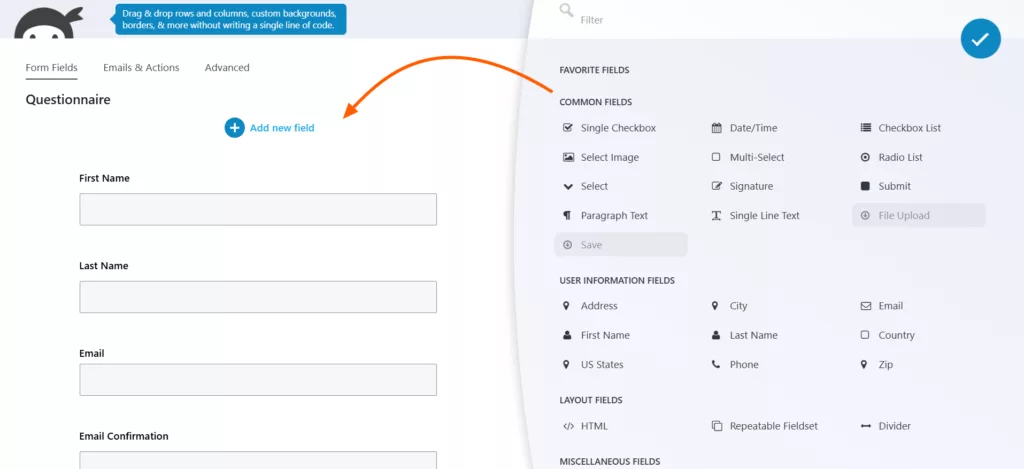
Ninja Forms takes a different route from many WordPress form builders. Instead of putting every advanced feature into one package, it uses a modular add-on model. The core plugin is free, and you can add specific functionality such as 条件ロジック, file uploads, payments, CRM connections, or email marketing when you need it via paid add-ons.
The free core plugin supports unlimited forms and submissions, while paid plans bundle additional extensions. Ninja Forms is a perfect alternative to Gravity Forms if you are shifting because you don’t want to commit to a large feature set from the beginning. You can start with its free core plugin and add functionality through its extensions as your form requirements become more specific.
Key features
- ドラッグ&ドロップビルダー
- The free version offers unlimited forms and submissions.
- 28+ form fields for common form-building needs.
- Search, filter, edit, and export submitted entries directly from WordPress.
- Smarter tools for data calculations
- 42 add-ons for different form functionalities
- Connect forms with payment services including PayPal, Stripe, Authorize.net, Elavon, and Recurly through available integrations.
- Email marketing and CRM integrations
- Capture information such as UTM parameters, referrer URLs, and browser data with the User Analytics add-on.
What you might not like
- The modular approach means costs can add up if you need several individual add-ons rather than a membership plan.
- Licenses are subscription-based for premium add-ons and memberships. If a license expires, you can continue using the extensions, but you no longer receive updates or support.
- Basic yet useful features like conditional logic, file upload, multi-step forms require add-ons.
価格
The core plugin is free. The paid plan starts at $59.40/year for the first year. The regular prices shown are $99, $199, and $499, respectively.
Ninja Forms also sells individual add-ons, and the starting price is $29.
最高
Users who want to start with a capable free form builder and prefer adding specific premium features instead of paying for a large feature bundle immediately.
Saas Alternatives
5. Google Forms

If you want a simple, free alternative and just want to collect information and organize the responses in Google Sheets, then go for Google Forms. It is a hosted form builder with which you can create surveys, quizzes, and forms, collaborate with other editors, collect responses in real time, and send responses directly to Google Sheets. Google also supports embedding forms on websites and sharing them through links, email, and other channels.
That simplicity makes Google Forms a Gravity Forms alternative for basic data collection rather than a direct replacement for every advanced WordPress workflow.
Features users love
- Build basic forms without learning a complex interface.
- Google Sheets integration
- Collaborative editing: Multiple people can work on the same form.
- Create graded quizzes with answer keys and automatic scoring.
- Review response data through built-in summaries and charts.
- Limit users to one response or allow them to edit submitted responses.
- Share the form through links, email, social platforms, or website embeds.
- Forms are stored within the Google ecosystem.
What you might not like
- It is not designed as a full WordPress-native form solution.
- Design customization is more limited than dedicated form builders.
- Google Forms includes basic answer-based branching, but its conditional logic is more limited than advanced WordPress form builders. Payment collection requires a third-party solution.
価格
It is free. Google Forms includes basic answer-based branching, while payment collection requires a third-party solution.
最高
Simple surveys, quizzes, registrations, internal forms, and data collection, especially when your workflow already relies on Google Sheets and Google Drive.
6. PaymentForm.io

If only collecting money online through your form is your concern, then you can try Paymentform.io. This is not a usual form builder. It is built around payment-based use cases such as product sales, donations, fundraising, event tickets, contracts, and memberships. It currently offers modules based on these use cases.
Since this is a cloud-based form builder, it works without a website. Select a module, customize it, collect required customer info, connect a payment gateway, share its direct link or QR code, or embed it on any existing site. If you don’t have a site, you can build a page around this payment form with its “Page builder” feature; no need for a domain or hosting.
PaymentForm.io therefore fits into this comparison for a different reason than most of the WordPress plugins. It is a useful Gravity Form alternative when the form itself is part of a payment or selling workflow rather than simply a way to collect contact information. Its Free and monthly Pro plans currently have no PaymentForm.io platform transaction fee, while the Lifetime Deal includes a 0.1% transaction fee.
Features users love
- Consists of 8 modules (Donation, Fundraising, E-commerce, Membership, Contract, etc)
- Add product variants for product selling.
- Create discount codes/coupons for purchases.
- Manage orders and payment information from one dashboard.
- Generate invoices from transactions.
- Track views, submissions, conversions, and sales with built-in analytics and integration with Meta Pixel and Google Analytics.
- Share forms through direct links, QR codes, and social media platforms.
- Host forms using a custom domain.
- Send payment and order information to other systems.
- Accept payments in multiple currencies.
What you might not like
- It is built around simple use-case payments, selling, collecting donations, etc.; it is not built for creating conditional logic forms, surveys, etc.
- It is not a WordPress-native plugin like Gravity Forms.
価格
Offers a free version. PaymentForm.io currently offers a monthly plan ($9/month) and a LTD plan ($49/one time), with the lifetime plan carrying a 0.1% transaction fee.
最高
Businesses, nonprofits, creators, event organizers, and organizations that need payment forms for digital product sales, donations, and fundraising without requiring a full website.
WordPress Plugin vs Hosted Form Builder
The alternatives above are not all solving the same problem. Some are WordPress plugins that live inside your website, while others are hosted platforms that manage the form separately.
That difference affects where your forms live, how you manage submissions, how much control you have over WordPress-specific workflows, and what you need to maintain.
WordPress form plugins
Tools such as Bit Form, Fluent Forms, Formidable Forms, and Ninja Forms run directly inside WordPress.
This approach makes sense when your forms are closely connected to your website. You can manage forms from the WordPress dashboard and connect them with other WordPress plugins and site functionality. Gravity Forms itself is designed specifically for WordPress and currently requires a paid license.
Advantages
- WordPress-native workflow: Build and manage forms from the same dashboard as your website.
- Closer integration with WordPress: Useful when forms need to interact with users, posts, WooCommerce, or other plugins.
- More control over your site: Forms and submissions can remain part of your own WordPress installation.
- No separate form platform required: You do not need another dashboard just to manage your forms.
- More suitable for WordPress-specific projects: Useful when the form is part of a larger WordPress workflow.
Things to consider
- You are responsible for keeping WordPress, plugins, themes, and hosting maintained.
- Plugin compatibility can matter when your site has many extensions.
- Your forms depend on the WordPress site being available and properly configured.
- Some advanced features may require a higher license or separate add-ons depending on the plugin.
Hosted form builders
Google Forms and PaymentForm.io take a different approach. The form builder and its infrastructure are managed outside your WordPress installation. Google Forms follows the same broad hosted model, although it focuses more on straightforward data collection.
This can be useful when you want a form that exists independently from your website. You can create it on the platform, share a direct link, or embed it on a website.
Advantages
- Works independently of WordPress: You can use the form even if your website runs on another platform.
- Direct sharing: Send people to a hosted form using a link without creating a WordPress page.
- Less WordPress maintenance: The platform handles its own infrastructure and software updates.
- Useful across multiple platforms: Embed the same form on different websites or digital properties.
- Separate form management: Your forms and submissions can be managed from the provider’s dashboard.
Things to consider
- Your form data is managed through a third-party service rather than your WordPress installation.
- Free plans often impose limits on submissions, storage, forms, or branding.
- Advanced features may require a higher subscription.
- WordPress-specific workflows may require integrations or additional setup.
- You need to review the provider’s data handling, export, retention, and account policies before using it for sensitive information.
Which Gravity Forms Alternative Should You Choose?
There is no single Gravity Forms alternative that fits every website. The better choice depends on what you need from your forms, where you want to manage them, and how much you want to spend over time.
Here is a practical way to narrow down the options.
If you want to stay with WordPress
Look at Bit Form, Fluent Forms, Formidable Forms, or Ninja Forms.
These tools run inside WordPress, so you can manage your forms from your website dashboard and keep your form workflow connected to the WordPress ecosystem.
Your choice within this group should depend on the features you actually need. Bit Form is affordable and offers annual and lifetime licensing, Fluent Forms has a substantial free version, Formidable Forms focuses heavily on calculations and data-driven forms, and Ninja Forms uses a modular add-on approach.
If price is your main concern
Go for the free alternatives or form builders with lifetime deals.
Fluent Forms, WPForms, Forminator, Ninja Forms, and Bit Form all offer free versions or free core plugins, which Gravity Forms doesn’t. And if a completely free option is your take, then try Contact Form 7. However, if you want integrations and advanced features like payment and email marketing tools, then you’ll need add-ons for that.
For paid alternatives, check what is included at the price you would actually pay after the first year. A lower introductory price does not necessarily mean a lower long-term cost. Because mostly they are the first-year price only; on renewal, users have to pay the original price.
If you need calculations or data-driven forms
フォームidableフォーム is worth a closer look.
Its feature set includes calculation tools, repeater fields, front-end data displays, and Formidable Views. If your form data needs to be calculated, displayed, or used as part of a larger workflow, then these features can be helpful for that.
If you want a beginner-friendly WordPress builder
Bit Form and Fluent Forms have a user-friendly interface and a generous free version.
The right choice depends on whether your priority is a simpler starting experience or having more advanced functionality available as your requirements grow.
If you want forms outside WordPress
Consider a hosted form builder such as Google Forms or PaymentForm.io.
These platforms let you create and manage forms independently from your WordPress installation. You can share forms directly through links or embed them on websites.
Google Forms is built for straightforward data collection and collaboration, while PaymentForm.io focuses specifically on payment collection.
If you want to manage several WordPress sites
Pay attention to site limits and licensing, not just the annual price.
Gravity Forms currently offers Basic for one site, Pro for three sites, and Elite for unlimited sites. Other plugins use different models. Some offer unlimited-site licenses, while others increase the number of supported sites at higher tiers.
For agencies and freelancers, calculating the cost across all the sites you manage gives a more realistic comparison than looking at the single-site price.
The most useful comparison matches your actual requirements. A free form builder can be a poor fit if you need an integration it does not support. Similarly, a more expensive form plugin may be unnecessary if you only need simple data collection.
よくある質問
Is there a free alternative to Gravity Forms?
Yes. Almost all of the tools discussed in this list offer a free version. If you need a completely free hosted option for simple forms and data collection, Google Forms is one option to consider.
What is the main reason to switch from Gravity Forms?
Cost is one common reason because Gravity Forms is a premium-only plugin. Other reasons include wanting an easier form-building experience, a free version with many useful features and integrations, affordable pricing, and a hosted form that works outside WordPress.
Is there a free version of Gravity Forms?
No, Gravity Forms does not have a free plan.
Which option is better for advanced calculations and data?
Formidable Forms works great for building advanced, data-driven WordPress applications and complex forms that turn submissions into front-end displays.u003cbru003eIt supports calculation forms, repeater fields, and front-end displays of submitted information. Bit Form also supports advanced calculations and entry management, so the choice depends on the specific workflow and features you need.
Which alternatives are suitable for payment forms?
Several tools support payments, but they approach them differently. WordPress plugins such as Bit Form, Fluent Forms, Formidable Forms, and Ninja Forms can add payment functionality to WordPress forms. PaymentForm.io is a hosted payment-focused form and checkout platform designed mainly for collecting payments, donations, fundraising, product sales, tickets, and similar transactions.


関連ブログ

8 Best Cognito Forms Alternatives in 2026 (WordPress & SaaS)

WPForms Too Expensive at Renewal? Explore Free & Lifetime Alternative