

 EN
EN  ES
ES  DE
DE  PT
PT  IT
IT  JA
JA  ID
ID Best WordPress Form Plugins with Payment Integrations in 2026

Nowadays, WordPress sites are collecting payments directly through forms. Online shopping and donations continue to increase. Global ecommerce sales are forecast to reach $7.4 trillion in 2025, and 85% of consumers now shop online.
WordPress powers about 43.5% of all websites worldwide. This means countless bloggers, business owners, and developers are looking for easy ways to accept payments on WordPress sites. Payment-integrated form plugins let you build donation, registration, or order forms that take money via gateways like PayPal, Stripe, Razorpay, and more.
Forms with payments can simplify your workflow. You can sell a single eBook or accept donations without setting up a full e-commerce store. Especially, offering on-page payments is easier for users. It speeds up purchases, boosts conversions, and fits modern expectations for one-page checkout experiences.
Below, I reviewed the top WordPress form plugins with payment integrations, highlighting their supported gateways and real-world use cases. Read on to see which plugin best fits your needs and which one stands out as the most feature-rich, budget-friendly choice for 2026.
Table of Contents
Why Payment Forms Matter in 2026
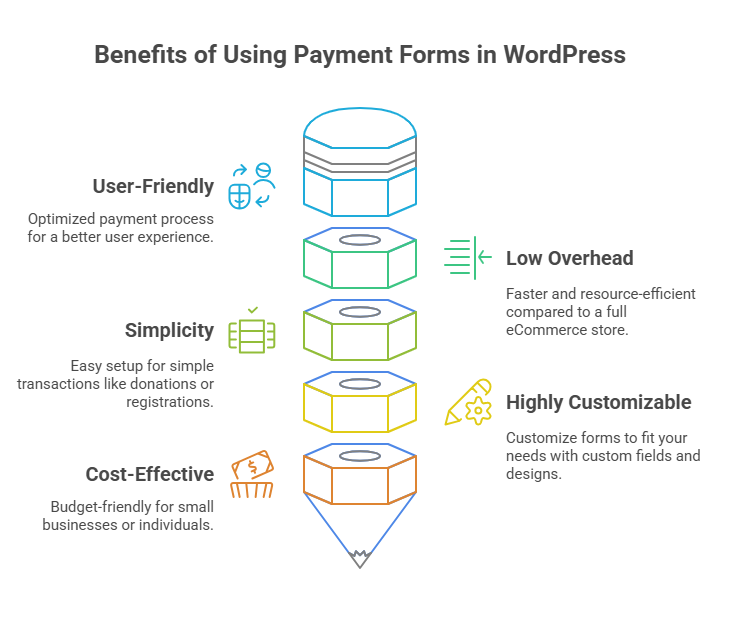
Online transactions are increasing day by day. As mentioned, global ecommerce is growing rapidly, and by 2025 it’s projected to approach $7.4 trillion annually. Most consumers shop online (around 85% of global consumers do), so any site selling products, services, or accepting donations should offer an easy payment method. Payment forms provide a lightweight solution; instead of building a complex store, you can place a simple form on a page to sell one product, collect one-time or recurring payments, take donations, or register attendees for events.
Payment forms can greatly improve the user experience. Rather than redirecting to a separate shopping cart or checkout page, users enter their information and pay right on the page. This single-page process reduces the complex process. For site owners, it means higher conversions and happier customers. Form plugins often handle receipts and customer data neatly, whereas a basic store plugin might require more setup. So, payment forms make selling and fundraising smoother.
WordPress dominates the web, and WooCommerce holds about 34% of the e-commerce market. It’s no surprise that WordPress users want advanced form payments. For selling a single guide, a non-profit taking donations, or a small business offering booking services, having a reliable payment form plugin is a must.
Explore What WordPress Payment Forms Can Do for You
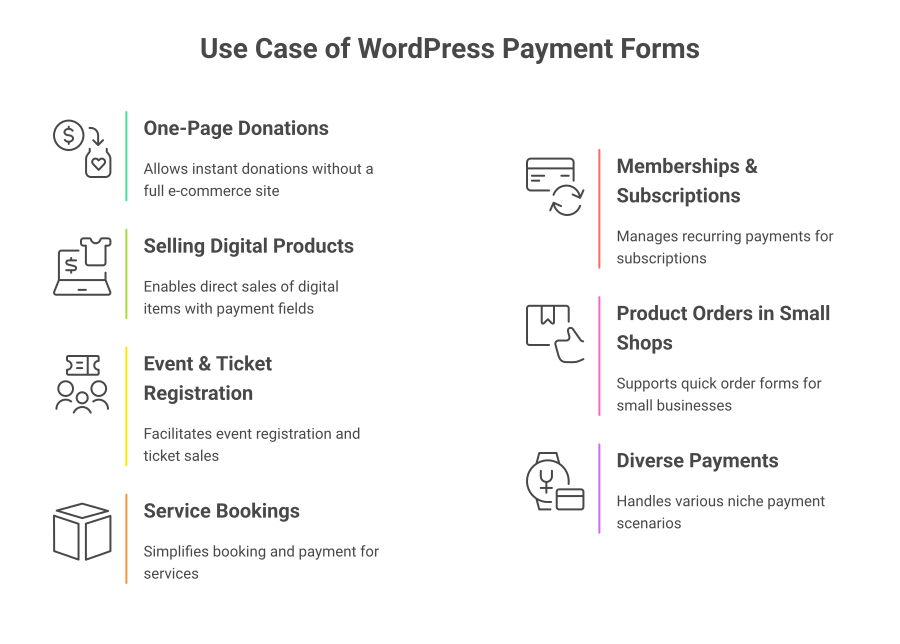
Payment-supported forms are useful in many real-world scenarios. Here are a few common use cases:
One-Page Donations: Charities or creators can collect donations right on a blog post or landing page. A donation form lets supporters give instantly, without a complete e-commerce website. For example, a nonprofit could use Bit Form or WPForms to set up a simple donation form with preset amounts or custom amounts.
Selling Digital Products: Authors, photographers, and educators can sell single items like eBooks, photo collections, or courses. Instead of launching WooCommerce, they add a payment field to a form. A purchase form can use Stripe or PayPal to charge the exact amount. Plugins like Bit Form work great here; you just create a form with product info and a payment button.
Event & Ticket Registration: Event organizers can create an event registration form that takes payment for tickets. For instance, a conference might use Bit Form to register attendees and process credit card or PayPal payments on the same page. Alternatively, a meetup could use Bit Form with Stripe to sell event tickets as soon as people RSVP.
💡 Follow this guide to create an Event RSVP Form with Conditional Logic in WordPress.
Service Bookings: Freelancers and agencies can let clients book and pay for services online. A simple booking form (date/time fields) can include a payment field for a deposit. Bit Form builder or WPForms can handle booking requests and payments without a full booking system.
Memberships & Subscriptions: Sites offering subscriptions (e.g., premium content or newsletter subscriptions) use payment forms for signups. For example, you might create a monthly membership form in Bit Form or WPForms, charging via Stripe or PayPal on a recurring basis.
Product Orders in Small Shops: Local bakeries, boutiques, or restaurants sometimes need a quick order form. Instead of a full e-commerce store, Bit Form can list items/quantities with conditional logic and take payment. You can add a payment field on this form, or you could manually fulfill the order.
Diverse Payments: Even niche cases like raffles, school fees, or consultations can be handled with a payment form. Any situation where you need to collect money online, a form plugin can fill that gap without heavy e-commerce software.
In all these cases, payment forms let visitors complete transactions on one page, increasing conversions and user satisfaction. If you need Stripe and PayPal for donations, many options work; if you need Razorpay (India) or Mollie (Europe), Bit Form or Fluent Form cover those needs.
Top WordPress Form Plugins with Payment Integrations
Below, I cover the leading WordPress form builder plugins that support secure payment gateways. For each, we note the strengths and which gateways are supported (PayPal, Stripe, etc.), and sample use cases (donations, eCommerce, event registration, etc.).
Bit Form – The All-in-One Solution for Modern WordPress Payment Forms

Bit Form quickly became a fan favorite for its combination of features, ease of use, and modern UI. It loads only 15 KB of JS/CSS (super light and fast) and uses a drag-and-drop interface for building any form. Bit Form is packed with advanced features, You can create multi-step forms, conversational forms, payment forms, simple to advanced contact forms with useful fields like currency, country, slider, repeater, advanced file upload, spam protection, and many more.
It even has an integrated style editor so you can edit colors and layouts without coding. It feels easy and flexible. Bit Form connects over 51+ integrations (CRMs, email tools, spreadsheets, etc.), advanced conditional logic, email notification with PDF, subscription forms, and priority support.
With Bit Form, you can build any type of payment form, such as donation forms, event registration forms, service booking forms, membership and subscription with recurring payments, product order forms, and many more.
Supported Gateways: PayPal, Stripe, Razorpay, and Mollie come built-in with Bit Form. These cover most global payment needs (Stripe and Mollie for credit cards, plus PayPal/Razorpay). Bit Form’s checkout forms are secure: payments go through the gateway (Bit Form doesn’t store card data) on a 128-bit SSL-secured site. Setup is quite easy, you just add a Payment field to your form, select the gateway, and fill API keys. Advanced options let you offer subscriptions or recurring payments.
Bit Form Pricing
| Plan | 1 site | 5 Sites | Unlimited Sites |
| Annual | $29.25 | $69 | $99 |
| Lifetime | $99 | $299.25 | $498.75 |
WPForms: Trusted, User-Friendly Forms with Payment Add-ons

WPForms is one of the most popular form builders in the WordPress ecosystem, known for its beginner-friendly drag-and-drop builder and wide usage. The free WPForms Lite handles basic contact forms (and some custom fields), but to accept payments, you need WPForms Pro or higher. WPForms is also strong in marketing integration (MailChimp, Zapier, etc.) and built-in spam protection.
Supported Gateways: WPForms supports PayPal (Standard or Commerce), Stripe, Square, and Authorize.Net. These cover credit cards and digital wallets. For example, Stripe and Square handle cards, or Apple/Google Pay, and PayPal covers PayPal and Venmo. Unlike Bit Form plugins, WPForms does not natively support Razorpay or Mollie.
WPForms Pricing
| Plan | Basic | Plus | Pro |
| Annual | $49.50 | $99.50 | $199.50 |
Fluent Forms: Feature-Rich Forms with Multiple Gateways

Fluent Forms is known for packing many features and functionalities, making it a popular choice for budget-conscious users. The plugin supports Stripe and PayPal, Square, Mollie, Razorpay, and more payment gateways. Fluent’s rich features make it handy for everything from booking forms to online store checkouts.
Fluent Forms is very flexible. You can create forms like donations, e-commerce orders, and subscriptions, and many more. For example, Fluent can create a donation form with custom amounts or an order form for selling a product bundle.
Supported Gateways: Fluent Forms supports PayPal, Stripe, Mollie, Paystack, Razorpay, and Square. Fluent Forms lets you accept one-time and recurring payments (subscriptions) too.
Fluent Forms Pricing
| Plan | 1 site | 5 Sites | Unlimited Sites |
| Annual | $47 | $95 | $179 |
| Lifetime | $244 | $419 | $629 |
Gravity Forms: Enterprise-Grade Payment Forms

Gravity Forms is a fully premium plugin (no free version beyond demos) and a long-time industry standard. It’s known for stability, a polished UI, and a diverse add-on library. If your site needs advanced workflows or better security, Gravity is a good option.
Gravity Forms is well-suited for serious online businesses and organizations. It handles complex use cases like tiered pricing, coupons, donations, or integrated sign-up+payment forms. Its strength is in customization. For example, you can add a payment form to a membership plugin to upgrade user accounts after payment. If you need enterprise-grade features, Gravity delivers. But it comes at a higher price and learning curve.
Supported Gateways: Gravity Forms directly supports Stripe, PayPal (Payments Standard/Pro/Express), Mollie, Square, 2Checkout, and Authorize.Net. (PayPal integration has multiple flavors, and for credit cards, there are Stripe or Authorize.Net add-ons.) It also works with Apple Pay and Google Pay via Stripe. In practice, you can quickly enable multiple payment methods on one form. Gravity will then handle receipts and status updates for you.
Gravity Forms Pricing
| Plan | Basic | Elite | Pro |
| Annual | $59 | $159 | $259 |
MetForm: Elementor-Based Forms with Payments

MetForm is a form builder that works inside the Elementor page builder. It’s ideal if you’re already using Elementor and want tight integration. MetForm offers basic forms and also a built-in Payment Method field.
MetForm is commonly used by shops or professionals who design their entire site in Elementor. For example, an Elementor-based website for a freelancer might have a booking form built with MetForm, where the user pays a session fee via Stripe. Or a small bakery might create a pre-order form within an Elementor landing page and take PayPal payments. MetForm’s payment form runs on your page without redirecting to WooCommerce, making it a lightweight alternative when you don’t need a full cart.
Supported Gateways: MetForm supports PayPal and Stripe by default. Those are enough for most local businesses or bloggers.
MetForms Pricing
| Plan | 1 site | 5 Sites | Unlimited Sites |
| Annual | $35 | $69 | $125 |
| Lifetime | $107 | $220 | $366 |
Comparison of Supported Payment Gateways in WordPress Forms
Below is a quick reference of which major gateways each plugin supports directly or via official add-ons.
| Plugin | PayPal | Stripe | Razorpay | Mollie | Square |
| Bit Form | ✔️ | ✔️ | ✔️ | ✔️ | ❌ |
| WPForms | ✔️ | ✔️ | ❌ | ❌ | ✔️ |
| Fluent Forms | ✔️ | ✔️ | ✔️ | ✔️ | ✔️ |
| Gravity Forms | ✔️ | ✔️ | ❌ | ✔️ | ✔️ |
| MetForm | ✔️ | ✔️ | ❌ | ❌ | ❌ |
| HappyForms | ✔️ | ✔️ | ❌ | ❌ | ❌ |
Each plugin’s gateway availability may depend on the license. For instance, Gravity Forms requires an Elite license to access Mollie and Authorize.Net, and WPForms needs the higher plan for Authorize.Net. Always check the latest documentation for the exact addons needed.
PaymentForm.io: Alternative Solution for Users Who Don’t Want a WordPress Site at All

While most WordPress form plugins require you to have a WordPress website, PaymentForm.io is a no-code form-based checkout platform that works completely independently. No WordPress, no hosting, and no website needed at all.
It is ideal for users who want to:
- Sell products
- Collect donations
- Run fundraising campaigns
- Sell event tickets
- Sell digital downloads
- Accept membership payments
…all without building or maintaining a full website.
Key Strengths:
- Dedicated modules for Single/Multi Product, Donation, Fundraising, Event Tickets, Digital Products, and Membership.
- Direct integration with multiple payment gateways like Stripe, PayPal, Razorpay, Mollie, etc.
- 0% platform fee (you only pay standard gateway fees)
- Share the form via direct link, embed code, QR code, or social media like Facebook, WhatsApp, Twitter, and more.
- Beautiful, ready-made forms with progress bars (for goal-based fundraising), instant digital delivery, PDF invoices, abandoned form recovery, and analytics dashboard
- Payments go directly to your connected gateway account. PaymentForm.io never holds your money.
Best For:
- Nonprofits, small businesses, course sellers, and social media sellers who want a fast, clean checkout experience without the complexity (or cost) of maintaining a website + form plugin.
If you already have a WordPress site and need forms embedded inside it, WP plugins like Bit Form or Fluent Forms are excellent. But if you want the simplest way to collect money online without a website, PaymentForm.io stands out as one of the cleanest dedicated solutions available.
Final Thoughts: Which Plugin Offers the Best Value in 2026?
All the plugins above are capable of building secure payment forms. The best choice still depends on your needs. Many users start with Bit Form or Fluent Forms because of the free Stripe/PayPal support and low cost. Bit Form, in particular, delivers all-in-one functionality: payment and calculation fields, integration to CRMs, and the flexibility of multi-step and conversational forms, all at a very affordable price.
If you run a large enterprise site or need the absolute broadest integration ecosystem, Gravity Forms is a proven choice. WPForms is ideal if you want a smooth beginner experience and are already invested in its ecosystem. For Elementor users, MetForm ensures your design stays in one editor.
Ultimately, look at your specific use case: what gateways you need, your budget, and which interface you prefer. All of the above plugins can safely process payments. In summary, for value and features, Bit Form is our top pick for 2026, with WPForms and Fluent Forms as strong alternatives depending on your workflow and growth plans.
FAQs
What are the best WordPress form plugins with payment integrations in 2026?
Bit Form, WPForms, Fluent Forms, Gravity Forms, and MetForm are top choices for 2026, offering secure payment integrations like PayPal, Stripe, and Razorpay.
How can I accept payments on my WordPress site?
Use a WordPress form plugin with payment integration, such as Bit Form, to easily add payment options like PayPal or Stripe directly on your forms.
Which WordPress form plugin supports PayPal and Stripe?
Bit Form, WPForms, Fluent Forms, Gravity Forms, and MetForm support PayPal and Stripe for easy payment processing.
How do I integrate Stripe with WordPress forms for payments?
With Bit Form, just add a payment field, select Stripe as the gateway, and input your API keys for seamless integration.
Can I use a WordPress form plugin for selling digital products?
Yes, Bit Form is great for selling digital products, allowing you to create a simple payment form without needing a full eCommerce store.
How to set up payment forms on WordPress without an eCommerce plugin?
Use Bit Form to create a payment form for donations, orders, or bookings directly on your WordPress page, without a full eCommerce plugin.

Related Blog

Best Beginner-Friendly WordPress Contact Form Plugins in 2026

Best AI Plugins for WordPress: Scale Your Business Fast in 2026