

 DE
DE  EN
EN  ES
ES How to Prevent Spam Form Submissions in WordPress
At some point in your online browsing, you must have completed a CAPTCHA, especially when filling out a form. But have you ever thought why you have to do it?
Forms are the easiest gateway on any website for numerous spambots. Because they are always open, accepting inputs without any anti-spam protection.
Spam form submissions can quickly turn a useful WordPress form into a messy inbox. Bots use open form fields to send fake entries, spam links, fake emails, and repeated requests. Over time, this can hurt lead quality, waste time, slow down your site, and create security risks.
If these suspicious submissions are not blocked early, it eventually damages your site’s reputation and security.
The good news is that you can stop most spam submissions with the right mix of CAPTCHA, honeypot protection, IP controls, submission limits, and email verification.
Therefore, to stop this form misuse and protect user data, you need the right prevention methods and a form plugin that offers strong anti-spam protection. Here, you’ll get both, so keep reading.
TL;DR
On a website, forms are the most targeted entry point for spam bots. They do it to gain backlinks, spread malicious links, misuse user data, and weaken your site’s security. To prevent spam form submissions, these strategies can work wonders:
- Google reCAPTCHA v3 runs invisibly and scores each submission between 0 and 1 based on user behavior, and considers and blocks the submission as a bot if the score is closer to 0.
- Cloudflare Turnstile verifies whether the person submitting your form is human or a bot. It runs invisibly without any user interaction.
- hCaptcha adds an image-based challenge that many basic bots cannot complete.
- Honeypot trap adds a hidden field to your form that only bots can view and fill. So, any submission with that field is considered spam and rejected.
- IP blocking and geographic filtering stop repeated spam attacks from known sources.
- Submission limits control bot floods by setting caps on entries by count, by user, or by time period.
- Double opt-in filters fake email entries before they reach your CRM.
- Multi-step forms can reduce simple bot submissions because many spam scripts are built to fill visible fields on a single page, not move through several steps with validation. through steps.
- Anti-spam plugins extend protection beyond your forms to comments, registrations, and other input points across your whole WordPress site.
Why Do Spam Form Submissions Happen?
How many of you knew that 47% of your form submissions are spam? They cause businesses to lose potential leads and spend their valuable time on filtering these bot submissions.
Now, the question is why they target online forms and what they get from them?
Well, these bot submissions are not random; they have certain intentions. For example, some want to improve their site’s SEO by gaining backlinks from these websites, some use it to share spam links, and others check if your site has weak security so that they can exploit it later.
Think of it like an open door on your website. Anyone can walk in and submit. Bots are built to find these doors automatically. One thing about bots are they can crawl websites and send hundreds of submissions in minutes. This way, attackers get to use your server resources and make your site weak.
The weakest spot of a website is the form input fields, as they are open. That’s the reason why preventing spam form submission is crucial.
How Spam Form Submissions Hurt Your Website
We’ve seen why spam submissions happen. Now let’s look at how they affect your site and the kind of damage they can cause. Let’s go through them one by one.
They ruin your data quality
When real leads get mixed with spam, it becomes harder to find potential customers. This leads to missed opportunities.
They hurt your website performance
As bots send hundreds of entries in minutes, this creates pressure on your server. As a result, your site slows down and performance decreases.
They damage your SEO and credibility
Spam submissions often contain suspicious links and irrelevant information, which, when they get indexed, damage your site’s SEO and credibility. And search engines like Google penalize websites that share phishing links or low-quality content.
They open doors to security risks
One of the dangerous damage spambots do to your site is that they weaken your security. They add some scripts or URLs that contain malicious content or take users to illegal websites. This leads to data leakage and bigger attacks.
Best Ways to Prevent Spam Form Submissions in WordPress
With that said, we know how bot submissions are hampering your business security and performance. Now the concern is how to stop them in reality.
Well, nowadays, businesses are fortunate enough because they don’t need fancy or dozens of tools to prevent a bot from submitting. Most of the WordPress form builders offer built-in anti-spam protection features. Here, the catch is to know which methods work effectively and how to combine them for maximum protection.
So, below I’ve listed some of the best ways to keep bots out of your WordPress forms.
Use Google reCAPTCHA
Google reCAPTCHA is one of the most popular and free tools for blocking contact form spam, without affecting the user experience at all. Yes, I’m talking about the “I’m not a robot” checkboxes that we often see when logging in to a page. It can precisely differentiate between humans and robots. In fact, in a survey conducted by DataDome, it was clear that forms with CAPTCHA reduced spam form submissions by 25% and kept the data integrity safe.
Besides, there are two versions of Google reCAPTCHA, v2 & v3. However, among them, version 3 is the best to use as it is invisible and requires no human interaction.
The best thing about this method is that you can set a threshold, which makes spam bot detection easier. If the threshold score is less than 1, the submission is considered spam, and when the score gets closer to 1, it is detected as human.
With that said, setting it up in WordPress forms is easy if you’re using a drag-and-drop form builder like Bit Form. The setup takes only a few minutes:
- Gehe zu App Settings in your Bit Form dashboard, then navigate to reCAPTCHA, and select reCAPTCHA v3.
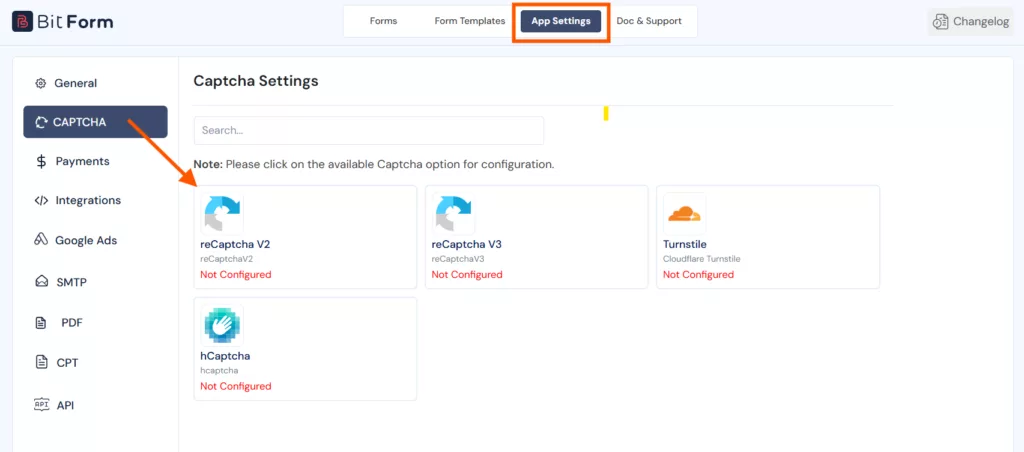
- Click the link to open the Google reCAPTCHA Admin console and register your site. Add a label (for example, “My Site v3”), select reCAPTCHA v3 as the type, and enter your domain name.
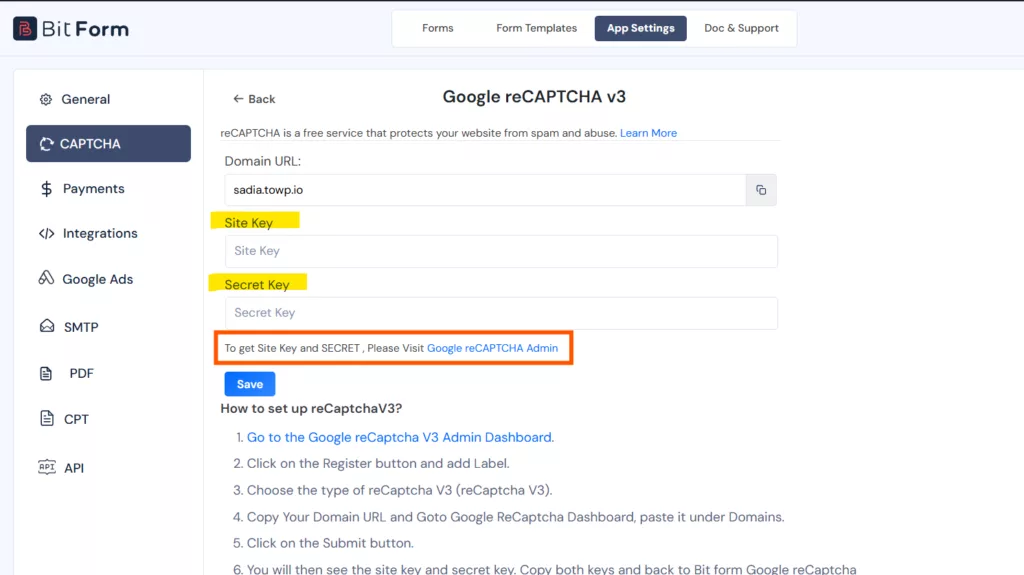
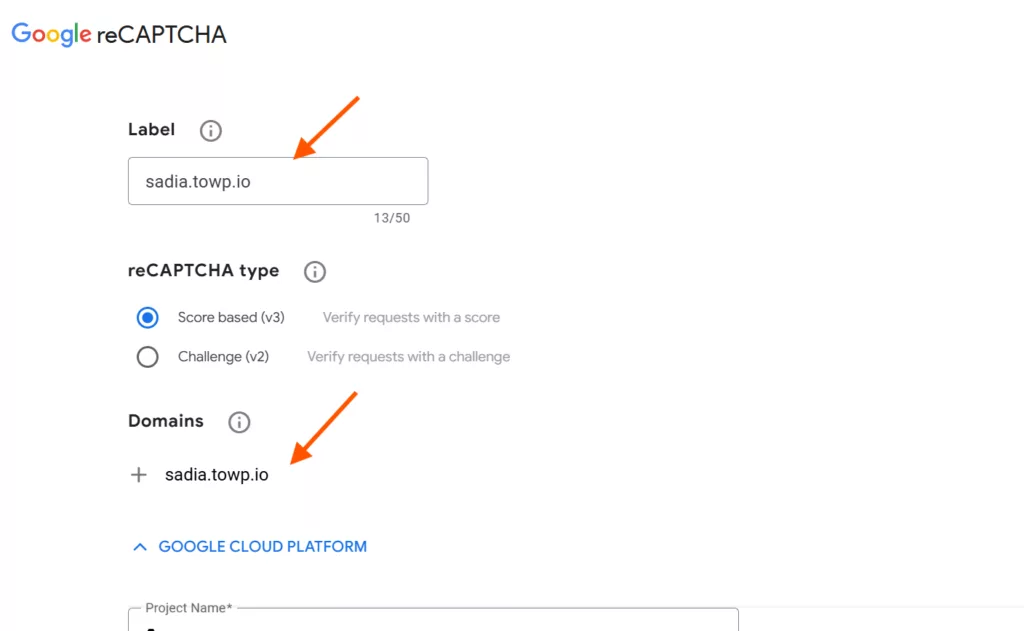
- Copy the Site Key und Secret Key from Google and paste them into the corresponding fields inside Bit Form.

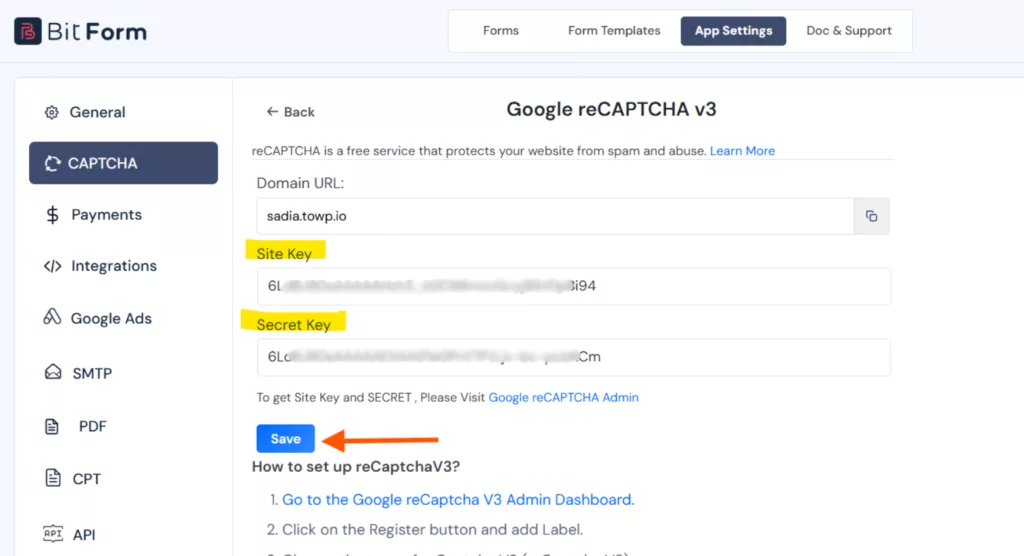
- Open your form, go to Formular-Einstellungen, and toggle on Enable reCAPTCHA v3.
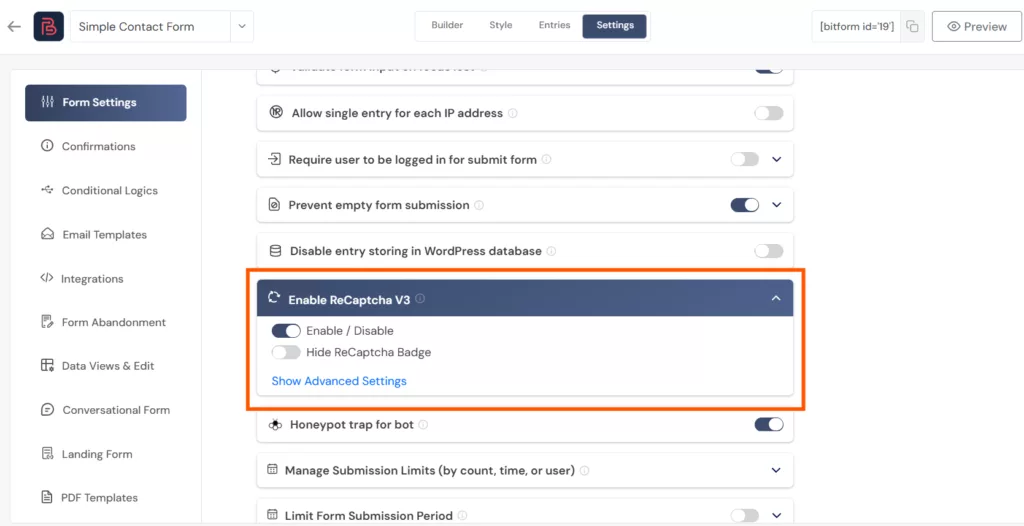
- Under Advanced Settings, you can set the Tolerance Level. A score less than 1.0 indicates spam.
- If you prefer a clean look, enable the Hide reCAPTCHA Badge toggle.
The reCAPTCHA v3 badge will appear in the bottom-right corner of the page where the form is embedded.

Use Cloudflare Turnstile
Cloudflare Turnstile is a strong alternative to Google reCAPTCHA, built for privacy protection. It stays invisible and doesn’t require human interaction, like solving puzzles.
To set up, follow the same steps as you did earlier for reCAPTCHA. Go to App Settings in your Bit Form dashboard, then navigate to reCAPTCHA, and select Cloudflare-Drehkreuz.
- Now, go to the Cloudflare Turnstile CAPTCHA admin dashboard, create a free Cloudflare account, and navigate to the Drehkreuz Abschnitt.
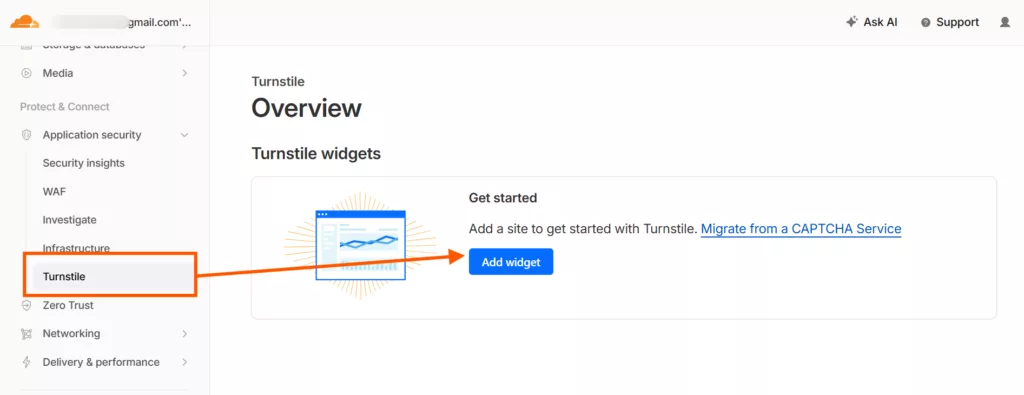
- Add your site and copy the Site Key und Secret Key.
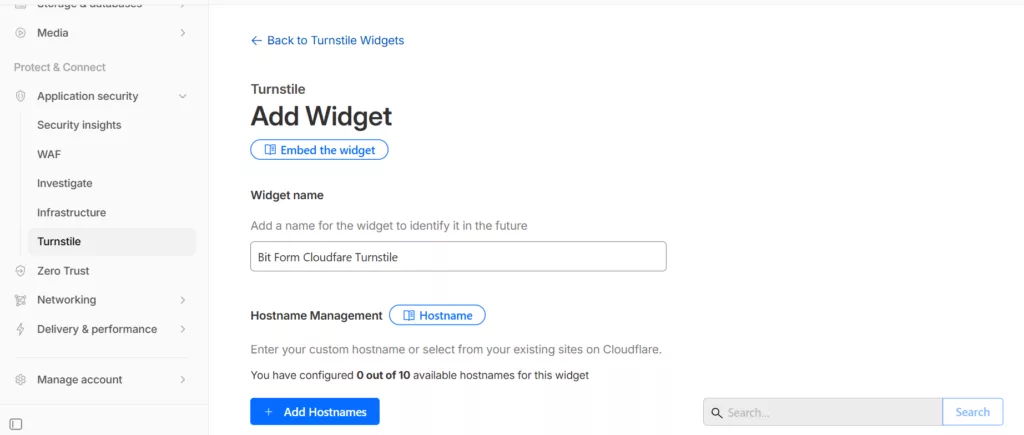
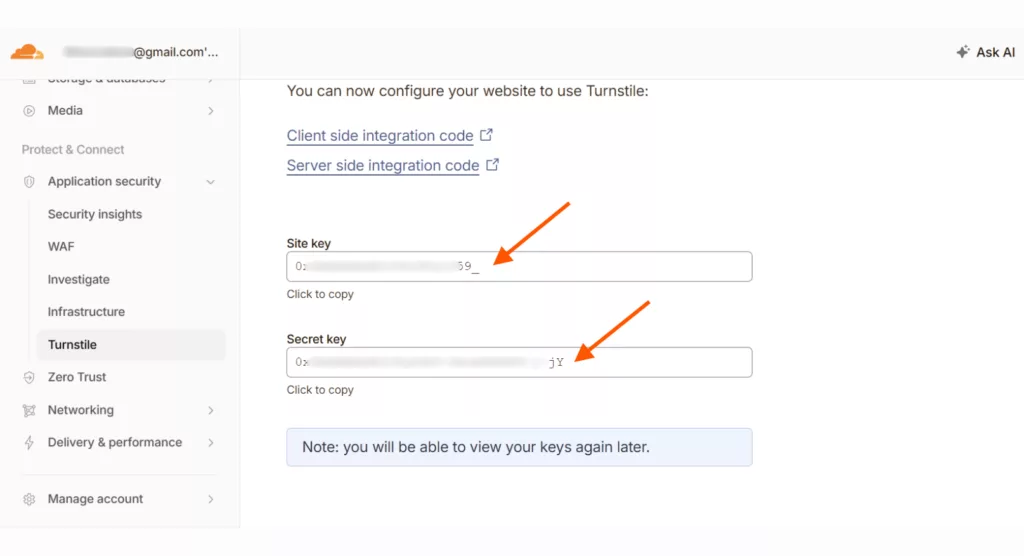
- Again, go to App Settings and enter your Turnstile credentials. Now, in your form builder, drag the Cloudflare Turnstile field into your form.
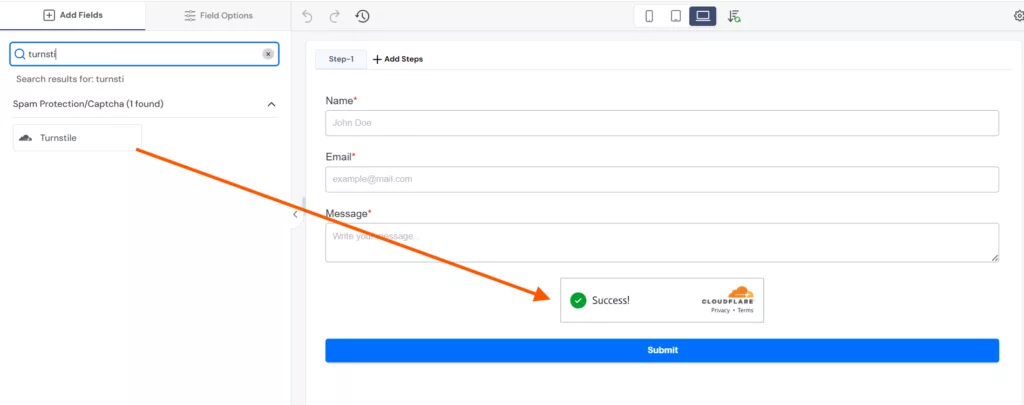
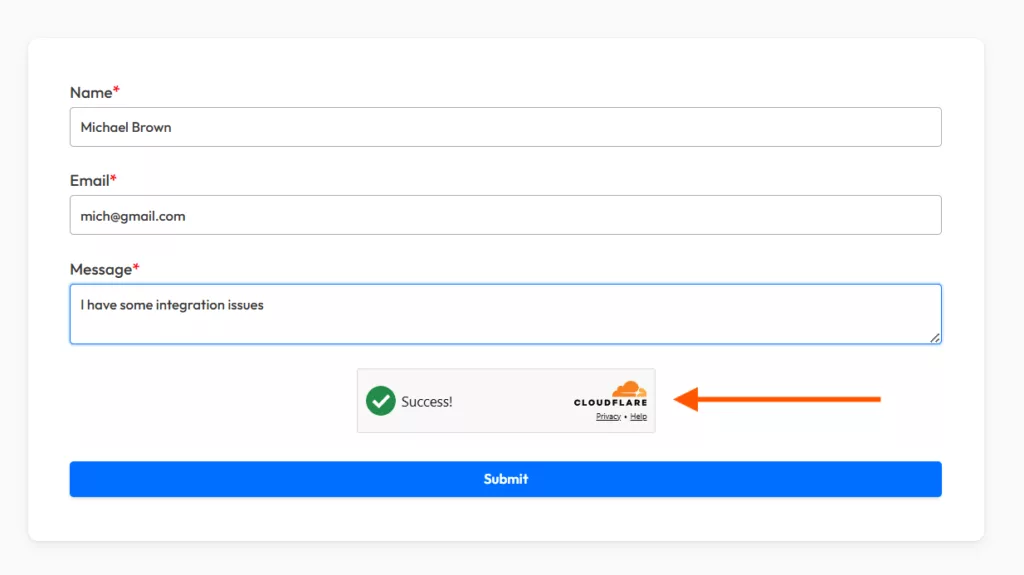
Now save everything and preview the form. You can see a small box at the bottom of your form.
Enable hCaptcha
hCaptcha is another type of CAPTCHA that also works well in detecting spam bot submissions, but the approach is different. It asks users to identify images. Bit Form includes hCaptcha as a free drag-and-drop field.
You can easily add it just like we did with Cloudflare and Google reCAPTCHA. Follow this documentation to configure hCaptcha.
Activate the Honeypot Trap
A honeypot is a hidden field in your form that humans cannot see, but bots can. This is because bots scan HTML code and fill all other form fields automatically. They are different from CAPTCHA; there are no checkboxes, no badges, and no puzzles. They secretly work in the background to stop contact form spam.
To enable it in Bit Form, follow this path: Form Einstellungen → Enable the Honeypot Trap for Bot option and save your settings.
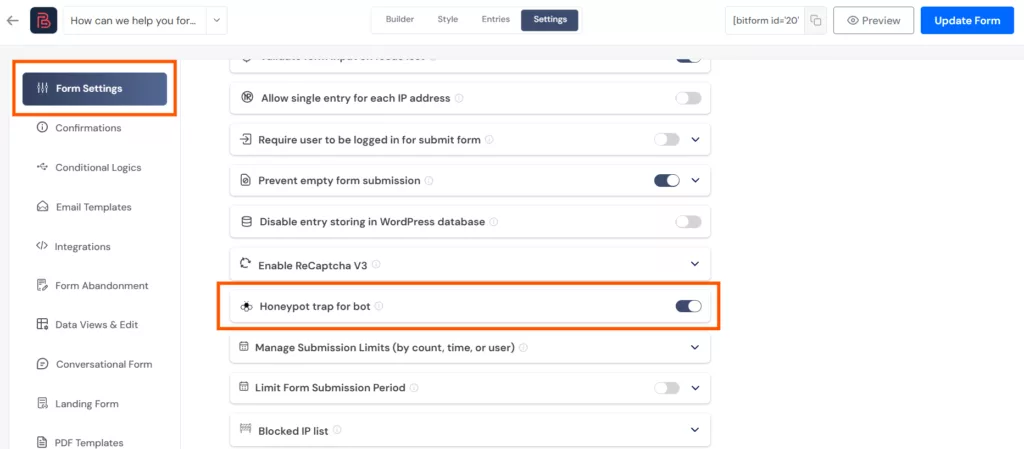
Automatically hidden fields will be created in your form. When a bot fills them in, the submission is blocked, and an error message is shown.
Block Specific IP Addresses and Filter Geographic Locations
If you notice multiple submissions from the same IP addresses, block them immediately. They are the sources of spam submissions. This is especially useful for targeted spam attacks rather than broad bot traffic.
Wondering how to do it? Well, with Bit Form it’s easy!
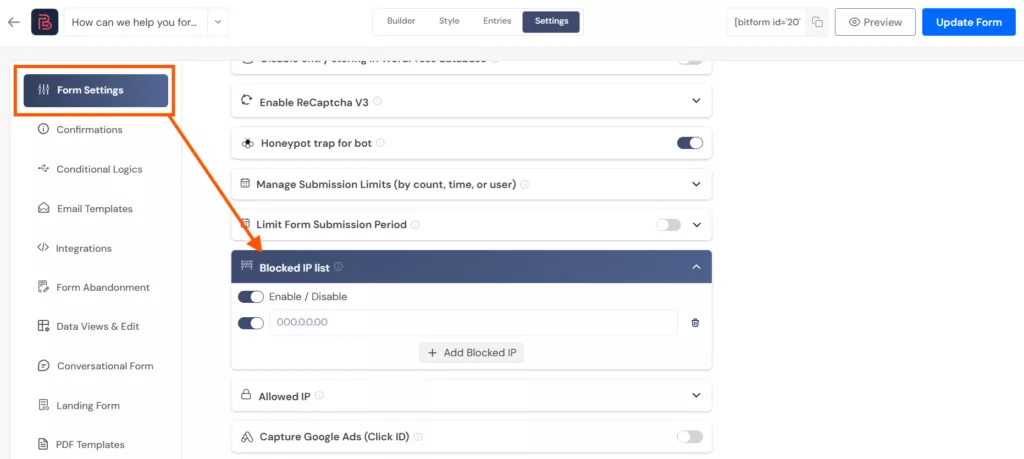
Navigate zu Form Einstellungen und verwenden Sie die Blocked IP List option. First, enable the option → enter the IP addresses you want to restrict, and save. Submissions from those addresses will no longer be accepted.
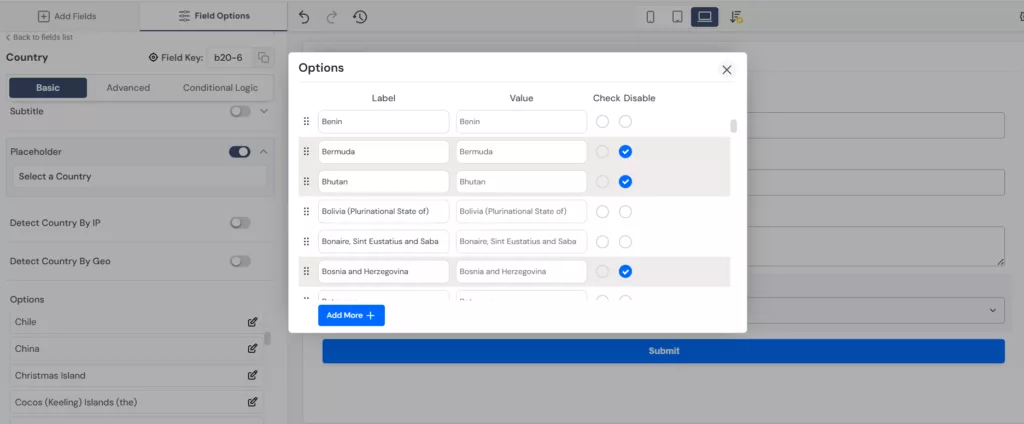
If your business is limited to certain countries or serves specific regions, then filter those geographic locations and block unwanted form submissions.
Set Submission Limits
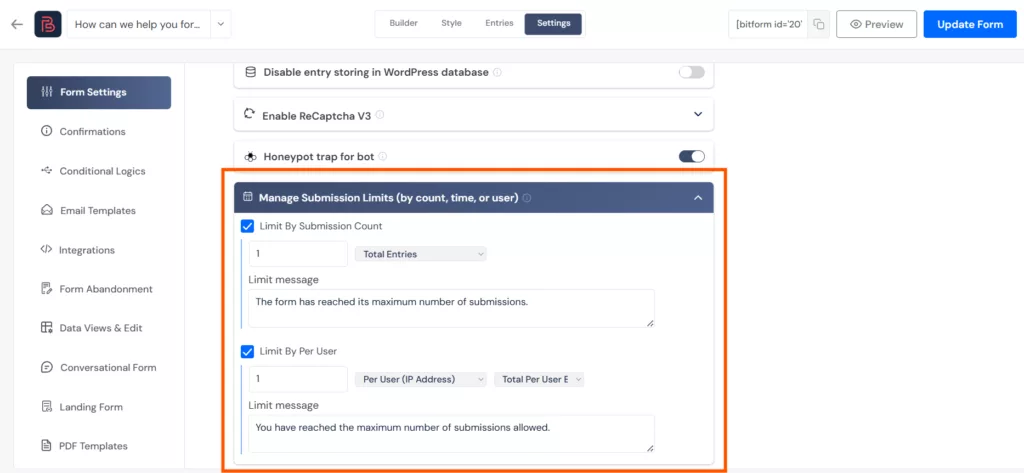
Another method to prevent spam form submissions is setting submission limits. Bots usually submit constantly in bulk. You can stop this in three ways using Bit Form:
- By Count, setting the threshold number of form submissions. Suppose your form is taking 200 entries. When it has reached the limit, a message will be shown accepting no further entries.
- By User, blocks the same IP from submitting a form more than once.
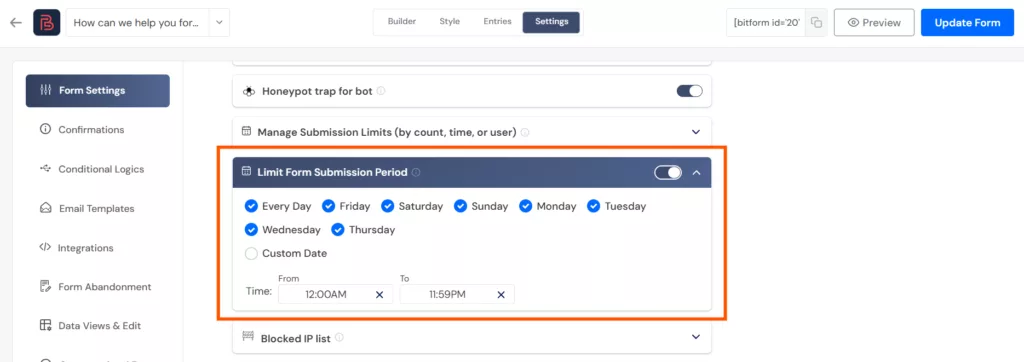
- By Time limits how many times a form can be submitted within a specific window (per day, week, or month).
Use Double Opt-In for Email Fields
Did you know that, in Shopify’s email marketing study, they stated that using double opt-in for email fields reduces spam form submissions by 40%? That’s true! Double opt-in is a verification step where users are asked to verify their email addresses, and this step is only noticed by a human.
This method does not just block bots from submitting, but also filters out unverified entries from reaching your CRM. It is essential for newsletter sign-up forms and anywhere where emails matter.
Sie können configure the double opt-in settings in Bit Form in just a few steps.
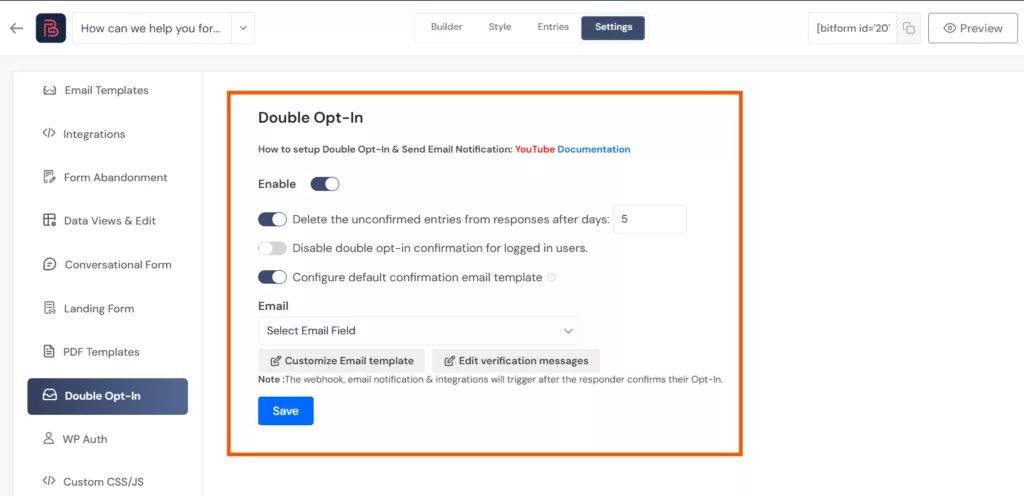
Use multi step forms
Make it harder for spambots to fill the form. One of the smartest ways to do that is by creating multi step forms. Real users generally move through each section by clicking the next button, but spam bots are not designed to interact that way with the forms. They do not look for remaining steps or wait for validation.
There is a user experience benefit also. That is, users are more likely to complete multi step forms as they are shorter and easier to complete.
Use Anti-Spam WordPress Plugins
Sometimes you need an extra layer of protection beyond what your form builder offers. For example, you can use an anti-spam plugin like Akismet and Jetpack. They filter contact form spam by checking it against a large database of known spam, like repeated phrases bots commonly use, suspicious links, fake email addresses, and IP addresses.
The best thing about these tools is that they not only stop spam form submissions but also keep your comment section and webpages safe from bots. Therefore, when these anti-spam protection tools and other prevention methods listed above are combined, your website’s security improves significantly.
Keep your Forms Safe from Bots
One fact that is not going to change is that bots are not going away. They are and will be there. In fact, they are getting more intelligent and aggressive day by day. This means your forms will have to be more protected so that these spam bots do not affect your site’s security and cause data leakage.
By implementing the prevention methods covered in this article, like CAPTCHA, honeypot traps, and limiting submissions, you can keep your forms safe. These anti-spam protection techniques not only prevent form misuse, but also improve the user experience, and keep your whole digital business site safe from malware threats.
So what’s the wait for? Apply these smart methods and make the forms difficult for bots today!
FAQs
What are spam form submissions?
A spam form submission is a fake entry submitted via your contact form by an automated bot. The reason behind it varies; some want to gain backlinks, share malicious links, and others want to exploit your site and blackmail you. They mainly attract poorly optimized forms.
How do I stop spam form submissions in WordPress?
You can stop spam form submissions in WordPress by using methods such as Google reCAPTCHA v3, Cloudflare Turnstile, honeypot fields, IP blocking, and submission limits. These anti-spam protection features are usually present in most form builders.
How do I know if my WordPress form is being targeted by bots?
Some of the common signs include a sudden spike in form submissions with no real inquiries, entries with random names, invalid email addresses or phone numbers, entries with malicious links, and a large number of submissions from the same IP address.
Can spam form submissions affect my Google search rankings?
Yes. If bot submissions plant phishing links inside your database and those links get indexed, Google can penalize your site for hosting harmful content. Spam activity can also slow your server response time, which is a direct ranking factor. Keeping your forms protected is as much an SEO concern as it is a security one.
Can bots bypass CAPTCHA protection?
Sophisticated bots can bypass basic CAPTCHA, especially older v2 implementations. This is exactly why relying on a single method is not enough. Layering multiple protections together, such as Google reCAPTCHA v3 combined with a honeypot field and submission limits, makes it significantly harder for even advanced bots to get through.

Verwandter Blog

Create a WordPress File Upload Form for Free: Beginner’s Guide

Add reCAPTCHA to WordPress Contact Form to Prevent Spam Submission