

 ID
ID  EN
EN  ES
ES  DE
DE  PT
PT  IT
IT  JA
JA 7 Powerful Elementor Form Alternatives Worth Trying in 2026

Do you really need another plugin if Elementor already has a form builder?
For a simple contact or signup form, probably not. Elementor’s Form widget can handle common fields, multi-step forms, submissions, email notifications, and post-submission actions.
The decision gets less straightforward when your form becomes a bigger part of your website workflow. For example, when you need payments, conditional logic, calculations, advanced integrations, and specialized submission management, it can change what you need from a form builder.
That’s when people usually start looking for Elementor Form alternatives.
So, today we’ll explore some of the best alternatives to the Elementor Form builder, what each form builder does better and where it may fall short, so that you can choose the builder that matches your use case.
Singkatnya
Looking for the best Elementor Form alternatives? The right choice depends on your form requirements, budget, and how you want to manage submissions.
- Bit Form is a fit for users who want an affordable form builder with useful features like various field types, conditional logic, free integrations, and built-in entry management.
- Fluent Forms offers a visual builder, ready-made templates, and tools for connecting forms to other services.
- Gravity Forms suits complex forms that need advanced workflows and an extensive add-on ecosystem.
- Formidable Forms is useful for calculators, directories, and displaying submitted data on your website.
- Ninja Forms offers a free core plugin with optional paid features and add-ons.
- Contact Form 7 is a free option for basic contact forms, with a more manual setup.
- PaymentForm.io provides hosted payment forms and shareable checkout links.
You can keep Elementor for page design and embed forms created with other plugins, so switching builders doesn’t mean rebuilding your website.
Why Look for an Elementor Form Alternative?
Elementor’s Form widget supports custom fields, multi-step forms, submission storage, email notifications, and post-submission actions. But what if you need advanced conditional logic, calculations, payment workflows, specialized integrations, or more control over how submissions are handled? That’s why alternatives exist.

Here are a few reasons why you might consider an Elementor form alternative.
- Plan limitations: Some features, such as form submissions and integrations, depend on your Elementor plan. You may want to compare the total cost with a dedicated form plugin.
- Different form-building workflows. You may prefer a dedicated builder with its own templates, field controls, and submission management.
- You want forms to work independently of Elementor: If your website uses Elementor everywhere, keeping forms inside Elementor is convenient. But what happens if you later redesign a page, switch page builders, or want to reuse the same form somewhere outside an Elementor page? In that case, a dedicated form plugin is more suitable. You can use it anywhere you want.
- You need more control over submissions: Although Elementor now lets users collect, view, manage, and export form submissions from the WordPress dashboard. But submission management can become a bigger requirement as the number of entries grows. You might want to organize, filter, edit, process, or use submitted data in more specialized ways.
- Specific form requirements like conditional logic, advanced integrations, fields like rating, repeater, or data-handling features for your project.
- Elementor supports reCAPTCHA, Honeypot, and Akismet integration on eligible plans. If you need a different spam-filtering service or more specific controls, compare the available options in dedicated form plugins.
- You might need hosted forms: If you need shareable checkout or donation forms outside WordPress, checkout tools like PaymentForm.io may fit your workflow better.
This isn’t about missing any feature; it is more about whether you want your form functionality tied to your page-builder setup or not.
With Elementor, your form and page design live in the same environment. That’s good when you’re already committed to Elementor. A standalone form plugin gives you another approach: Elementor handles the page, while the form plugin handles the form.
For some websites, that separation makes future changes easier because changing the page builder doesn’t necessarily mean rebuilding every form.
7 Best Alternatives to Elementor Form in 2026
The right alternative depends on whether you need a simpler form-building process, more advanced submission workflows, or a separate payment solution. The table below gives you a quick look at today’s pick before we compare each one in detail.
Elementor Form Alternatives at a Glance
| Form builder | Works inside Elementor editor | Free version | Starting paid price | Submissions stored | Best suited for |
| Bit Form | Yes, via shortcode or render widget | Generous free version | $25 per tahun | Yes, in WordPress | Users building different types of forms |
| Fluent Forms | Yes, via shortcode or render widget | Ya | $63/year | Yes, in WordPress | Businesses with connected workflows |
| Bentuk Gravitasi | Yes, via shortcode or integration | Tidak | $59/tahun | Yes, in WordPress | Complex form requirements |
| Formidable Forms | Yes, via shortcode or integration | Ya | $39.50/year | Yes, in WordPress | Data-driven forms and applications |
| Formulir Kontak 7 | Yes, via shortcode | Ya | Gratis | No, not by default | Simple form needs |
| Ninja Forms | Yes, via shortcode or render widget | Ya | $59.40/year | Yes, in WordPress | Users who want to add features over time |
| FormulirPembayaran.io | Yes, via embed | Yes, free forever | $9/month | Yes, in its hosted dashboard | Payments, events, donations and products |
Catatan: Regular prices and promotions can change, so verify the current figures on each provider’s pricing page.
The free version column indicates whether a free offering exists, not whether every feature mentioned is included. Paid features, license limits, and pricing should be checked against each product’s current plan before you decide.
Here, most of the Elementor form alternatives are drag-and-drop form builders, except Contact Form 7 and Paymentform.io, and all of them are compatible with the Elementor page builder.
1. Bit Form
Best suited for users who need flexible form building, conditional logic, and submission management in one builder, all without any add-ons.

If you’re looking for Elementor’s built-in form widget because you need more control over form fields, conditional logic, or submissions, Bit Form is worth considering. It’s an affordable, easy-to-use WordPress form builder with a drag-and-drop builder that allows you to create forms in its own editor and then add them to Elementor pages.
Moreover, Bit Form includes diverse form fields, supports multi-step forms, conditional logic forms, calculation forms, and 50+ free integrations. So, you can collect user contact details and send the submission to the platforms your team uses.
Features that are worth looking at
- Unlimited forms and submissions
- 50+ form fields, including dropdowns, file uploads, signatures, address, rating, date pickers, and more.
- Supports conditional logic forms, multi-step forms, and conversational forms; all of these make complex forms easier to navigate and complete.
- Accept payments through Stripe, PayPal, Mollie, or Razorpay and create calculator forms.
- Review and export submissions from the WordPress dashboard, and use its front-end create, read, update, and delete capabilities for supported data-management workflows.
- Connect form submissions with 50+ (more than 327+ with Bit Integrations) other services instead of manually moving the data between tools.
- Protect forms from spam submissions via Google reCAPTCHA, Cloudflare Turnstile, hCaptcha, and honeypot.
- Generate PDFs from submitted form data and capture partial submissions
Limitations to keep in mind
- Bit Form does not have a huge library of pre-built templates (currently offers 30+).
- For more integration, you’ll need another plugin(Bit Integrations) to be installed.
- Not as popular as other renowned form plugins. And for some advanced features like payment integrations, PDF generation, and signature fields, you’ll need the paid tiers.
Harga
Bit Form offers a free version and paid annual and lifetime plans. The pricing distribution is given below:
| Rencana | Current listed Price | Sites |
| Starter (Tahunan) | $25 per tahun | 1 |
| Starter (Seumur Hidup) | $99/one-time | 1 |
| Agensi (Tahunan) | $79/year | unlimited |
| Agensi (Seumur Hidup) | $199/one-time | unlimited |
The paid plans include all features, with the main differences being the number of sites and the duration of updates and support.
2. Fluent Forms
Fluent Forms is a good fit if you want a feature-rich form builder without moving away from WordPress.

It is another solid Elementor form alternative that comes with a visual builder and powerful features like hundreds of templates, 1-click form migration, numeric calculations, and many more. It also offers specialized form types such as conversational forms, surveys, quizzes, and payment forms. Also, you can send form data to 60+ platforms, including email marketing, CRM, and project management apps.
Features that are worth looking at
- Supports dynamic forms like conditional logic, multi-step, conversational, quizzes, and surveys.
- Integrates with 60+ platforms and services, including payment gateways, CRMs, and more.
- Submission management and reporting to review submission and payment data.
- Form scheduling and access controls
- Hundreds of Reusable form templates
- Form analytics & Visual data reports
- Migrate from other form plugins without any hassle
Limitations to keep in mind
- Some integrations and advanced tools require a Pro license.
- The free version includes Stripe integration, but it comes with a 1.9% transaction fee.
- Some features like PDF generation dan digital Signature need add-ons.
- For beginners, the plugin and its huge feature set might be a bit overwhelming.
Harga
Fluent Forms currently offers both annual and lifetime licenses.
| Rencana | Current listed price | Sites |
| Single Site | $63/year | 1 |
| Agen | $127/year | 5 |
| Unlimited | $239/year | Unlimited |
| Single Site Lifetime | $279 | 1 |
| Masa Berlaku Agen | $479 | 5 |
| Unlimited Lifetime | $719 | Unlimited |
3. Formidable Forms
Best suited for Users who want to turn form submissions into calculators, directories, dashboards, or other data-driven features.

You may consider Formidable Forms if your forms need to do more than just collect information. One of its popular features is that it is great at building front-end views, calculators, directories, and other WordPress applications from form submissions.
For more advanced sites, it can also handle payments, PDFs, form abandonment, user registration, signatures, surveys, quizzes, and integrations such as Zapier and Google Sheets.
Features that are worth looking at
- Data-driven views, display submitted form data on your website through tables, grids, calendars, or other front-end views
- Calculators and advanced calculations to build quote forms, cost estimators, order forms, and other forms that calculate totals automatically.
- Useful fields like digital signature, repeaters and cascading fields let users add multiple entries and create dependent fields where one selection changes the available options in another.
- Display submitted form data on the front end, which is useful for directories, listings, profiles, and member dashboards.
- Integrates with multiple payment gateways such as Stripe, PayPal, and others.
- Form abandonment tracking, so you can follow up with users who started but did not complete a form.
- Allows visitors to create or update WordPress user accounts directly through a form.
- Generate PDFs from form submissions.
- Create feedback forms, assessments, and quizzes with support for structured responses and scoring.
- Third-party integrations.
Limitations to keep in mind
- The more advanced functionality is found in the higher-priced plans.
- Its data-display and application-building features can be unnecessary if you only need ordinary contact or lead forms.
- The free version is limited
- Some integrations and advanced workflows depend on the plan you choose.
Harga
Formidable Forms offers a free plan and currently has four main paid plans:
| Rencana | Current listed price | Sites |
| Dasar | $39.50/year | 1 |
| Plus | $99.50/year | Up to 3 |
| Bisnis | $199.50/year | Up to 7 |
| Elite | $299.50/year | Unlimited |
These are currently displayed as 50% introductory discounts. The site notes that renewals are charged at the full price.
The plan you choose matters quite a bit. For example, calculators, surveys, quizzes, form abandonment, signatures, and several other advanced capabilities are available from Business upward rather than across every paid tier.
4. Ninja Forms
Best suited for Users who want to start with a free form builder and add individual features as their requirements grow.
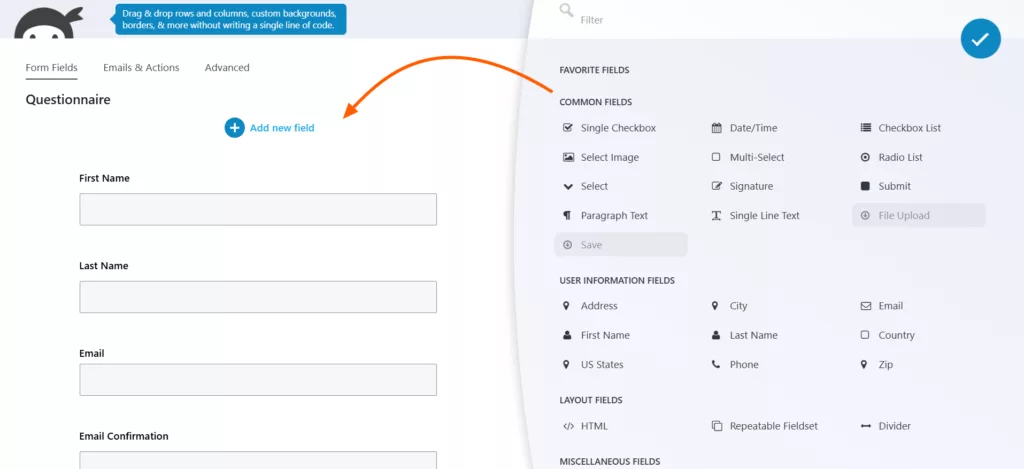
Ninja Forms is a WordPress form builder that follows a flexible modular approach. That is, the core plugin is free, and functionalities like conditional logic, payment integrations, file uploads, third-party integrations, and exporting form submissions can be added individually via add-ons.
This is a perfect Elementor Form alternative if you don’t want to buy a package filled with features you won’t use. You can start with its free core plugin, then add things when you need them.
Features that are worth looking at
- Create any type of dynamic forms for quotes, order forms, quizzes, etc with its smart calculation tools.
- 28+ form fields
- Supports conditional logic forms, multi-step forms, and file upload forms
- The free version offers unlimited forms and submissions.
- Spam protection with Anti-Spam, reCAPTCHA, hCaptcha, Cloudflare Turnstile
- Manage entries from WordPress and export submission data when you need to move or analyze it outside the form dashboard.
- 42 add-ons, including Payment and donation integrations, CRM and marketing integrations, automation, and webhooks.
Limitations to keep in mind
- Many basic features are add-ons rather than part of the free version.
- The cost can increase gradually when you need several individual add-ons for different features.
- Some important features are tied to specific plans. For example, Conditional Logic, File Uploads, and Multi Step Forms are included with Plus, while several CRM and automation integrations start with Pro.
- Paid licenses are subscription-based, and updates and support stop when the license expires, although the extensions can still be used.
Harga
Ninja Forms currently has a free Core version plus three paid membership plans. The prices below are the currently advertised first-year prices; the site notes that the 40% first-year discount does not carry over to renewal.
| Rencana | First-year price | Sites |
| Core | Gratis | Unlimited |
| Plus | $59.40/year | 3 |
| Pro | $119.40/year | 20 |
| Elite | $299.40/year | Unlimited |
5. Gravity Forms
Best suited for Businesses and developers who need complex forms, conditional workflows, and extensible integrations.

If you are shifting from Elementor Forms because your forms need more than basic lead collection, then try Gravity Forms. It offers a dedicated builder for creating complex data collection and workflow processes. It supports conditional logic, multi-page forms, file uploads, payment collection, and integrations through its add-on ecosystem. Unlike Elementor Forms, it is a separate plugin with its own form editor and licensing structure.
It also gives developers flexibility to customize the plugin through its API, webhooks, and hundreds of actions and filters.
Features that are worth looking at
- Visual form editor: Build forms with drag-and-drop fields and pre-built templates.
- Multi-page forms to split long forms into multiple pages and Save & Continue, allowing users to save their progress.
- Accept payments through Stripe, PayPal, Square, and other payment add-ons.
- Advanced data collection: Add partial entries, surveys, quizzes, signatures, geolocation, user registration, and other capabilities through the appropriate licenses/add-ons.
- Workflow integrations: Route form data to CRMs, email platforms, automation tools, and external services.
- Developer tools: Use REST API, webhooks, and 500+ hooks to customize form behavior and connect custom workflows.
Limitations to keep in mind
- There is no free version.
- Important features are plan-dependent: Payment integrations such as Stripe are available with Pro and Elite rather than Basic.
- Advanced features can require Elite: Partial entries, conversational forms, surveys, signatures, user registration, and several other features are included at the Elite level.
- The pricing is annual: Users who need several advanced capabilities may need to move to a higher license rather than simply adding one inexpensive feature.
- It can be more than you need: If your requirement is only a basic contact or newsletter form, many of its advanced workflow capabilities may go unused.
Harga
No free version. Gravity Forms currently offers three main licenses:
| Rencana | Harga | Sites |
| Dasar | $59/tahun | 1 |
| Pro | $159/year | 3 |
| Elite | $259/year | Unlimited |
The Basic license includes several marketing add-ons. Pro adds payment and automation integrations such as Stripe, PayPal, Zapier, Slack, and Trello. Elite includes all add-ons, including user registration, conversational forms, partial entries, surveys, signatures, quizzes, and more.
6. Contact Form 7
Best suited for Users who need a basic contact form and are comfortable with a more manual setup.
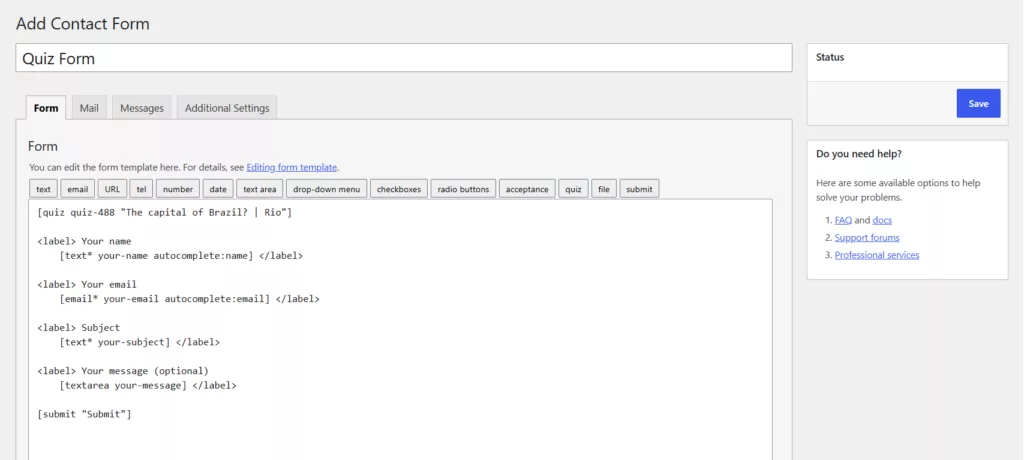
If you’re looking for a simple and free alternative to Elementor forms, then Contact Form 7 is for you. It takes a much simpler approach than most of the form builders on this list. It is a markup-based, open-source WordPress plugin designed primarily for creating and managing contact forms. WordPress.org currently lists more than 10 million active installations.
CF7 is great for basic form creation because it comes with common form elements: text, email, number, radio button, select menu, file upload, CAPTCHA, etc. It uses shortcodes and form markup rather than a visual drag-and-drop editor, so the setup is different from the Elementor Form widget. Moreover, it also has a large ecosystem of extensions. That means you can add functionality beyond the core plugin.
Features that are worth looking at
- Free and open source
- Markup-based form editor: create forms using tags.
- Add file-upload fields when you need visitors to attach documents or other files.
- Spam protection integrations such as reCAPTCHA and Cloudflare Turnstile through its available integrations.
- Email configuration: Define how submitted form data is sent through the Mail settings.
- Extension ecosystem: Third-party extensions can add capabilities such as database storage, redirects, conditional fields, multi-step forms, and additional integrations.
- Elementor compatibility: You can place a Contact Form 7 form inside an Elementor page using Elementor’s Shortcode widget or other compatible embedding methods.
Limitations to keep in mind
- Not a visual drag-and-drop builder, so beginners might find it challenging to use.
- Advanced functionality often means extensions: Features such as database storage, conditional fields, redirects, or multi-step workflows may require additional plugins.
- Submissions do not get stored.
- Styling CF7 with CSS can be tough and limited, or else you can use a dedicated visual styler plugin.
Harga
Contact Form 7 itself is free. There is no Pro version or paid core license to purchase.
However, the cost calculation can change if your project needs third-party extensions. Some advanced functionality is provided through separate plugins, and those extensions can have their own pricing and support terms.
7. PaymentForm.io
Best suited for Businesses, creators, nonprofits, event organizers, and freelancers who primarily need a simple way to collect payments through forms without setting up a full online store.

If the main reason you’re looking for an Elementor form alternative is payment collection, PaymentForm.io takes a more focused approach than a general-purpose WordPress form plugin in this list. It is a no-code, hosted form-based checkout platform that lets you create payment forms without a website and share them through a direct link, QR code, or embed them on a website.
It currently offers 8 modules for different use cases like selling products, tickets, accepting donations, managing memberships, creating contracts, and collecting regular form submissions. Simply, choose a module based on the type of transaction you’re handling, connect a payment gateway, add the information you need to collect, and publish the form. Also, FormulirPembayaran.io does not charge any transaction fee.
Key features
- Module-based approach: offers a total of 8 modules for e-commerce, donations, fundraising, event tickets, contracts, memberships, and other payment workflows.
- Multiple payment gateways: supports gateways including Stripe, Square, PayPal, Razorpay, Mollie, Square, and more.
- Set up recurring payment schedules for supported use cases such as donations, contracts, and memberships.
- For e-commerce forms, you can configure product variants, inventory, shipping charges, taxes, discounts, and order management.
- Create different ticket types, set availability and purchase limits, collect attendee information, and generate QR-code tickets for check-in.
- Generate invoices and create contracts with digital signatures and PDF generation.
- Publish forms through direct links, embeds, social sharing, or QR codes.
- Also includes built-in analytics, Google Analytics, Meta Pixel, webhooks, submission exports, and other management features.
Limitations to keep in mind
- It is a SaaS platform rather than a WordPress plugin: Your forms are created and managed on PaymentForm.io rather than entirely inside the WordPress dashboard.
- Some advanced features are Pro-only, like custom domains, built-in analytics, exports, webhooks, branding removal, and several other controls that are not part of the free tier.
- The platform is relatively new, so more features are on the way.
Harga
PaymentForm.io currently offers a free plan and a pro subscription:
| Rencana | Current price | Transaction fee |
| Gratis | $0/month | 0% |
| Pro | $9/month | 0% |
The Free plan includes unlimited forms, submissions, and transactions, along with access to all modules. Pro adds features such as custom domains, analytics, exports, webhooks, password protection, branding removal, and additional management controls. Standard payment-gateway processing fees still apply.
WordPress Form Plugin vs. Elementor Form Widget
Elementor’s built-in Form widget may be all you need for a simple contact form or lead capture page. But if your forms require more specialized features, a separate WordPress form plugin can give you a different set of tools without changing how you design your website.
The main difference is where you build and manage your forms. Elementor keeps form creation inside its page editor, while a dedicated plugin gives you a separate form-building and submission management interface. You can still use Elementor for page design and embed forms made with other plugins using a widget, shortcode, or supported integration.
When Elementor’s built-in Form widget may be enough
Elementor’s Form widget is a practical option when your requirements are straightforward, and you want to manage the form alongside the page.
- Simple contact and lead forms: Collect names, email addresses, messages, and other basic information without adding another plugin.
- Basic submission workflows: Send email notifications, redirect visitors to a thank-you page, or collect submissions in the WordPress dashboard with a compatible Pro plan.
- Page-level design control: Adjust form fields, buttons, spacing, and styling within the same editor you use to build the page.
- Common marketing integrations: Use its built-in actions to connect supported services such as Mailchimp, ActiveCampaign, Slack, and others, depending on your setup and plan.
When a dedicated WordPress form plugin makes sense
A separate form builder may be suitable in either ways: when your forms need features or workflows that are not available in your current Elementor setup, or when you want form management to remain independent of page design.
Consider a separate form builder when you need any of the following.
- More specialized form requirements like repeater fields, rating fields, calculations, conditional logic, or conversational workflows.
- More options for managing submissions like entry dashboards, filtering, exports, and front-end data management.
- Specific integrations like CRM, payment gateway, marketing service, or automation integration that fit your workflow.
- A different editing experience, some users prefer building and maintaining forms in a separate editor rather than configuring them inside each Elementor page.
- Plan and licensing considerations: Compare the cost of your existing Elementor plan with the cost of a separate plugin, including any paid add-ons needed for your required features.
You can keep Elementor for page design
Choosing an Elementor form alternative does not mean you have to stop using Elementor. You can continue designing your pages in Elementor and embed forms created with other form plugins.
For example, Bit Form has a dedicated Elementor widget so you can directly select the forms you want to embed. This way, the form plugin handles the form fields and submission settings, and Elementor handles the layout and surrounding page design.
Which Elementor Form Alternative Is Right for You?
The right choice depends on the type of forms you build, the features you need, and how you prefer to manage submissions. Some users may only need a simple contact form, while others may need advanced calculations, payment collection, or integrations with their existing business tools.
Here is a quick breakdown of how the options in this list fit different needs.
| If you need… | Consider |
| An affordable form builder with flexible fields, advanced functionalities like conditional logic, entry management, and spam protection without add-ons | Bit Form |
| A visual builder with a broad range of integrations, ready-made templates, and powerful form features | Fluent Forms |
| Complex forms with advanced workflows and an extensive add-on ecosystem | Bentuk Gravitasi |
| Calculators, directories, and front-end displays of submitted data | Formidable Forms |
| A free, straightforward contact form with a manual setup | Formulir Kontak 7 |
| A modular form builder with a free core plugin and flexibility to extend functionality by paying for the features they need individually | Ninja Forms |
| A hosted payment form or shareable checkout link that works without a website | FormulirPembayaran.io |
Tanya Jawab Singkat
Can I use a different form plugin with Elementor?
Yes. You can create forms using a separate form plugin and add them to Elementor pages through a shortcode, a dedicated widget, or an available integration. The exact method depends on the plugin.
Is Elementor’s Form widget enough for a contact form?
For many basic contact forms, yes. It supports common fields, email notifications, redirects, and submission collection. An alternative is worth considering if you need additional field types, specialized workflows, or integrations that your current setup does not offer.
Do I need Elementor Pro to use another WordPress form plugin?
No. Most dedicated form plugins have their own editors and can work independently of Elementor Pro. You can use Elementor’s free version for page design and embed forms from a compatible plugin using a shortcode or another supported method. However, individual plugins may have their own paid feature requirements.
What should I check before switching from Elementor Forms?
Check whether your current forms use email notifications, redirects, integrations, conditional logic, or saved submissions. Then confirm that your chosen alternative supports those needs and plan how you will recreate and test your existing forms before replacing them.


Blog Terkait

5 Formidable Forms Alternatives You Should Compare First

8 Best Free Quiz Plugins for WordPress in 2026