


 DE
DE  EN
EN  ES
ES  PT
PT  IT
IT  JA
JA  ID
ID Best WordPress Form Builders with a Lifetime License (No Yearly Renewal)
Are you tired of renewing your WordPress form plugin’s annual subscription? You’re not alone. Many WordPress site owners and developers just like you find themselves locked into yearly subscriptions just to keep forms working and secure.
However, you might not know or have considered that several modern form builders offer lifetime deals (one-time payment, no renewal) along with yearly deals. That’s why, in this article, we’ll review the top WordPress form builders with a lifetime license option. Besides, we’ll see their key features, pricing distribution, and what you get for a single payment. Therefore, helping you pick the best long-term value for your needs.
Zusammengefasst:
Many top WordPress form plugins offer one-time licenses: pay once and get unlimited updates and support for life. But the real question is which one should you buy? Below I’ve listed some of the best form builders with lifetime deals:
| Plugin | Lifetime Price (1 site) | Lifetime Price (unlimited sites) | Builder Type | Am besten für |
| Bit Form | $99 | $199 | Standalone | Users who want a complete form-building feature set at an affordable price without separately paying for add-ons |
| Fließende Formulare | $279 | $719 | Standalone | Agencies that want to pay more upfront once for a long-established, actively maintained plugin instead of gambling on a newer name |
| MetForm | $132.30 | $485.55 | Elementor add-on | Elementor users who want to build and style forms directly within the Elementor workflow |
| Everest-Formulare | $199 | $799 | Standalone | Users who want an easy-to-use general-purpose form builder with advanced fields and multiple payment options |
| JetFormBuilder | $249 | $499 | Gutenberg block | Gutenberg users and developers building dynamic forms connected to WordPress content and custom fields |
Pricing note (as of August 2026): All prices shown are current promotional or list prices and can change without notice. Always verify the latest figures, site limits, and exact inclusions on the official pricing page before purchasing.
What Does Lifetime License Actually Mean
A lifetime license means you’ll pay once for a plugin and receive updates and support as long as the plugin stays active, without a renewal invoice. It is tied to the life of the plugin, not to a fixed number of years.
Before handing over a one-time payment, confirm what exactly a “lifetime deal” covers :
- how many sites it actually covers,
- whether “lifetime” includes ongoing updates or just the current version,
- whether the plugin is still actively updated on WordPress.org,
- whether there’s a refund window if it doesn’t fit.
The plugins I’ve shortlisted say the same: “pay once, use forever”. The only difference is in functionality, budget, and approach. You have to choose the one that aligns with your budget and workflow.
Before proceeding, let’s have a quick idea of why users look for LTD deals in WordPress plugins.
Why a Lifetime Deal Actually Matters (and Who Should Skip It)
When you should look for form builders with Lifetime deals:
- You manage multiple client sites and are tired of tracking renewal dates across five different plugin dashboards.
- You’ve been running the same form plugin for 2+ years already and know you’re not switching soon.
- You’re building on a fixed budget so a one-time cost is easier to plan around than a recurring line item that competes with hosting and other renewals every year.
- You’re an agency reselling websites, where a single unlimited-site license covers every client without buying a new license per project.
LTD licenses are not necessarily a suitable or smart choice for everyone. An annual plan may be better if:
- You’re not sure you’ll still be using this specific plugin in two years. Like, you can cancel a yearly license ($79/year) anytime, rather than a $349 one-time purchase.
- You only need one simple contact form, and the free version already covers it. Every plugin on this list has a capable free tier; don’t pay for features you won’t touch.
- Cash flow matters more than long-term savings right now. Lifetime deals save money over time, but they cost more on day one than a single year of the annual plan.
The math is simple: divide the lifetime price by the yearly price to find your break-even point. If that number is under 3–4 years and you’re confident you’ll still be using the plugin by then, the lifetime deal pays for itself. If you’re not confident, the annual plan is the safer bet.
5 Best WordPress Form Builders With Lifetime License
The WordPress form builders with a lifetime license discussed below differ quite a bit in pricing, licensing, features, and the type of website they’re designed for.
1. Bit Form
Bit Form is a lightweight, modern form plugin with a drag-and-drop form builder. It includes a broad range of form-building needs, like conditional logic, multi-step forms, conversational forms, PDF attachments, 50+ field types, Zahlungsintegrationen, and 50+ built-in integrations (Mailchimp, HubSpot, Zapier, and more), and many more features in all plans. No add-ons needed, unlike other form plugins. However, Bit Form’s template library is narrow and offers 30+ pre-built templates.
Some of the key features of Bit Form are:
- Modern, lightweight, drag-and-drop builder
- Various form types, like multi-step forms, conditional logic forms, conversational forms, calculator forms and more.
- Accept payment via multiple gateways: PayPal, Razorpay, Stripe, and Mollie.
- Spam protection using advanced analysis techniques: Google reCAPTCHA, Cloudflare Turnstile, and more.
- Smart features like PDF generation, form abandonment tracking, form analytics, and more.
- 50+ third-party integrations and 30+ form templates
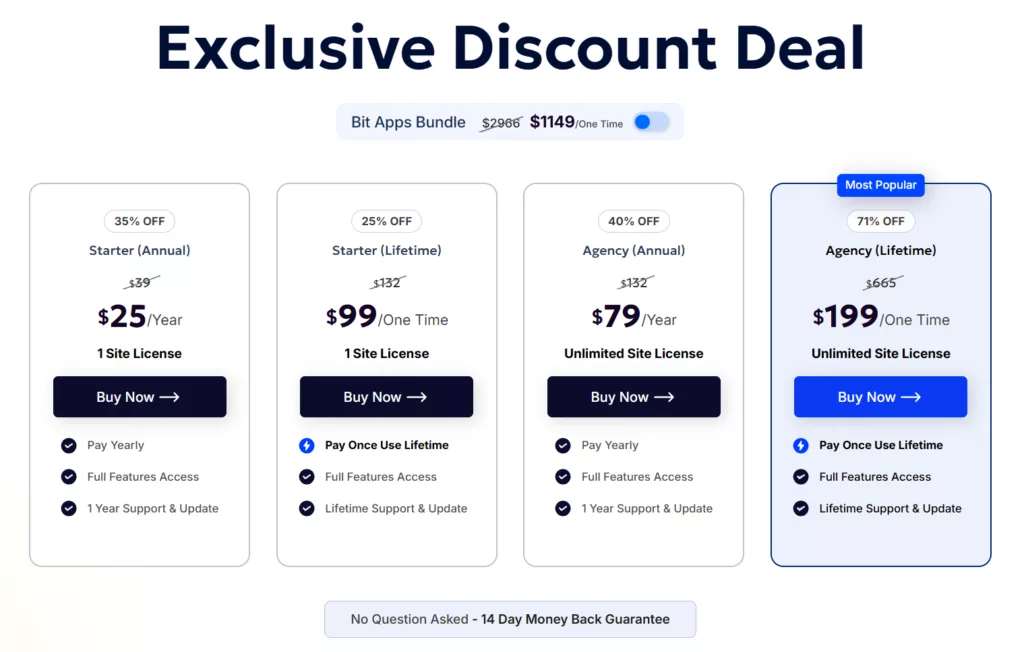
If we talk about licensing, Bit Form’s premium plans all include a lifetime license option.
Annual Plans:
- Starter: $25/year, 1 site, full feature access
- Agentur: $79/year, unlimited sites, full feature access
Lifetime deals:
- Starter: $99/one-time, 1 site, full feature access, lifetime support and updates
- Agentur: $199/one-time, unlimited sites, full feature access, lifetime support and updates
Bit Form has a very generous free version and Pro features as powerful and affordably priced. See what’s included free vs. Pro.
Best for: Small businesses, freelancers, and agencies who want the full feature set without paying per add-on, and who’d rather spend once than manage another annual renewal.
2. Fluent Forms

Fluent Forms, from WPManageNinja, is another feature-rich form plugin that comes with an intuitive builder, conditional logic, payments, conversational forms, quizzes and surveys, and 60+ integrations. With this form plugin, you can create dynamic forms like quizzes, surveys, multi-step forms, and conversational forms.
Some of the key features of Fluent Forms are:
- Drag-and-Drop-Erstellung
- 65+ input fields, including quiz, survey, and multi-column layout options
- Built-in AI form builder that generates a form from a text prompt
- Integration with 60+ platforms and apps.
- Customization using built-in styler and Gutenberg form styler.
- Integration with 8 payment gateways.
- Visual reporting with bar, column, and pie chart breakdowns of submissions
- One-click migration tools for moving forms over from other plugins
Its official lifetime and annual pricing runs in 3 tiers:
Annual Plans:
- Single Site: $63/year, 1 site, all feature access
- Agentur: $127/year, 5 sites, all feature access
- Unlimited: $239/year, unlimited sites, all feature access
Lifetime deals:
- Single Site: $279/one-time, 1 site, all feature access, unlimited updates and support
- Agentur: $479/one-time, 5 sites, all feature access, unlimited updates and support
- Unlimited: $719/one-time, unlimited sites, all feature access, unlimited updates and support
Best for: Agencies that want a mature, actively developed builder and don’t mind paying more upfront for that stability.
3. MetForm

If you’re looking for a form plugin that is Elementor-based and offers lifetime deals, then MetForm (by WPMet) is for you. It is an Elementor add-on for building contact forms, quizzes, polls, and even calculation forms. Over 600,000+ sites use MetForm to create custom forms. It offers advanced features like conditional logic, multi-step forms, and form analytics.
Some of the key features of MetForm are:
- A wide range of Elementor widgets covering every field type, arranged with Elementor’s native drag-and-drop
- Multi-step forms and smart conditional logic to show or hide fields based on user input
- Calculation fields for quotes, order totals, and pricing forms
- Custom field groups you can build once and reuse across multiple forms
- Direct Stripe and PayPal payment integration, plus WooCommerce checkout support
- 44+ pre-built templates covering booking, event, job application, and survey forms
- CRM and email marketing integrations (HubSpot, Mailchimp, Zoho CRM, FluentCRM, ActiveCampaign)
MetForm’s annual and lifetime licenses are planned as follows:
Annual Plans:
- Single Site: $44.10/year, 1 site, updates for 1 year
- Professionell: $101.15/year, 5 sites, updates for 1 year
- Agentur: $199.20/year, unlimited sites, updates for 1 year
Lifetime deals:
- Single Site: $132.30/one-time, 1 site, lifetime support and updates
- Professional: $285.60/one-time, 5 sites, lifetime support and updates
- Agentur: $485.55/one-time, unlimited sites, lifetime support and updates
Best for: Elementor-first website builders and agencies who want form building to live inside the same editor as everything else.
4. Everest Forms

Everest Forms is a popular form builder with a friendly drag-and-drop interface. It has a very generous free plan, which includes file uploads, entry management, and CSV export just like Bit Form. Moreover, the plugin provides 35+ fields, an AI form builder, multi-step and conversational forms, and six payment gateways: Stripe, PayPal, Square, Razorpay, Mollie, and Authorize.Net.
Some of the key features of Everest Forms are:
- 35+ form fields available, including repeater fields, file uploads, image uploads, survey fields, etc.
- Built-in AI form builder on every plan that generates a form from a plain-language description
- Six supported payment gateways: Stripe, PayPal, Square, Authorize.Net, Mollie, and Razorpay
- PDF submission generation for invoices, applications, and contracts
- Layered spam protection: Honeypot, reCAPTCHA, hCaptcha, and Cloudflare Turnstile
- 40+ pre-built templates spanning contact, lead-gen, survey, and application forms
- CRM and email integrations, including Salesforce, ActiveCampaign, Mailchimp, and Trello
Everest Forms’ annual and lifetime deal pricing is:
Annual Plans:
- Personal: $49/year, 1 site, all features access & add-ons
- Plus: $99/year, 5 sites, all features access & add-ons
- Agentur: $199/year, unlimited sites, all features access & add-ons
Lifetime deals:
- Personal: $199/one-time, 1 site, all features access & add-ons
- Plus: $399/one-time, 5 sites, all features access & add-ons
- Agentur: $799/one-time, unlimited sites, all features access & add-ons
Best for: Beginners who want to use a general-purpose form builder, start on the free version, get comfortable, and upgrade to a lifetime plan later without switching tools.
5. JetFormBuilder

JetFormBuilder, from Crocoblock, is built natively for the WordPress block editor rather than Elementor. It handles the basics such as multi-step forms, conditional logic, and calculated fields, but its real strength shows when you connect it to Crocoblock’s JetEngine plugin for dynamic, data-driven forms: post creation, user registration, and conditional actions tied to custom fields.
Some of the key features of JetFormBuilder are:
- 24+ field blocks that can be used to create forms like survey forms, appointment forms, booking forms, multi-page forms, etc.
- Works natively with Gutenberg, Elementor, and Bricks, not locked to one builder
- Pre-fills fields automatically using data from users, posts, custom fields, or a JetEngine query.
- Post-submit actions that go beyond email: create or update posts, register users, trigger webhooks, or redirect
- Conditional logic for both individual fields and entire post-submit actions
- Multi-step forms with page indicators and AJAX-based step transitions
- Supports WooCommerce, PayPal, and Stripe integrations.
It sells its own standalone lifetime tiers separate from its annual plans:
Annual Plans:
- Site Pro: $49/year, 1 site, 20 pro add-ons, regular updates
- Agency Pro: $129/year, unlimited sites, 20 pro add-ons, regular updates
Lifetime deals:
- Lifetime Site Pro: $249/one-time, 1 site, 20 pro add-ons, regular updates
- Lifetime Agency Pro: $499/one-time, unlimited sites, 20 pro add-ons, regular updates
If you also want the rest of the Crocoblock ecosystem: JetEngine, JetBooking, and 20+ other plugins, the full Crocoblock Lifetime plan (commonly discounted to around $649) works out cheaper than buying JetFormBuilder’s lifetime tier on its own.
Best for: Gutenberg-first developers building dynamic forms tied to custom content, not just a simple contact page.
Lifetime License vs Annual Subscription: Which Is Actually Cheaper?
Initially, it might seem that annual packages are cheaper since you pay a relatively small amount first compared to LTD packages. But if you’re planning to use the same form builder for a long time, then you must rethink your assumption.
With an annual subscription, you have to renew the license every year to manage your forms and their security. However, when you’re comparing WordPress form builders with a lifetime license, the price might look a bit intimidating. But you can’t overlook that you avoid those recurring license payments.
For example, suppose a form builder costs $100 per year and its lifetime plan costs $300. After three years, you would have spent roughly the same amount either way. If you continue using the plugin beyond that point, the lifetime option could offer better long-term value.
But price isn’t the only thing to compare.
Before choosing a lifetime deal, check:
- What is included: Does the lifetime plan include the premium features you actually need?
- Number of websites: A lifetime license for one site is very different from one that covers multiple or unlimited sites.
- Updates: Check whether future plugin updates are included.
- Support: Find out how long support remains available.
- Feature access: Some plans may have different feature limits, even when they are marketed as lifetime options.
So, a lifetime license isn’t automatically cheaper. It becomes more attractive when you already know you’ll use the form builder for several years and the lifetime plan includes the features, updates, support, and site allowance you need.
If you’re only building a few basic forms or you’re still testing different plugins, an annual or free plan may make more sense. But for a long-term WordPress project, comparing the total cost over several years gives you a much clearer picture than looking at the first payment alone.
What to Check Before Buying a Lifetime Form Builder
A lifetime deal can look like an easy way to cut recurring costs, but the price tag is only one part of the decision. Before paying upfront, look beyond the word “lifetime” and check what the license actually gives you.
Here are the things worth checking before choosing a lifetime WordPress form builder:
1. What does “lifetime” actually cover?
Does the lifetime plan cover the plugin itself, or does it also include future updates and support?
These aren’t always the same thing. Check the provider’s licensing terms to see exactly what remains available after your initial purchase.
2. How many websites can you use it on?
A lifetime license for one website may be enough for a personal site, but it can be limiting for freelancers and agencies.
If you manage multiple websites, compare the site limits carefully. An unlimited-site license may offer better value even when its upfront price is higher.
3. Are the features you need included?
Don’t choose a lifetime plan just because it has a long list of features. Check whether the features you actually need are included in that specific tier.
For example, you may need conditional logic, payment integrations, calculations, file uploads, or automation. If those features require a higher plan, include that cost in your comparison.
4. Are future updates included?
WordPress itself keeps changing, so your form plugin needs to keep up with it.
Before buying, check whether the lifetime license includes future plugin updates. This matters even more if the form builder is responsible for important functions such as payments, registrations, or lead collection.
5. Is support included?
When something goes wrong with a form, having access to support can save you a lot of time.
Check whether the lifetime plan includes ongoing support, how support is provided, and whether there are any restrictions.
6. Is the plugin actively maintained?
A lifetime deal is only useful if the product continues to be developed.
Check its recent update activity, WordPress.org listing, changelog, and overall development history. A cheap lifetime license isn’t much of a bargain if the plugin stops receiving meaningful updates.
7. What is the refund policy?
Even after comparing features and pricing, you may find that a plugin doesn’t fit your workflow once you start using it.
Check the refund window and conditions before purchasing. It gives you a clearer idea of your options if the product isn’t the right fit.
8. Will you use it long enough to justify the upfront cost?
This is the question that’s easiest to overlook.
If you expect to use the same form builder for several years, then searching for a lifetime form builder might be reasonable. But if you’re still experimenting with different plugins, a free or annual plan may be the safer choice.
The goal isn’t simply to find the cheapest lifetime deal. It’s to find a form builder that you’ll actually keep using and that gives you the features, updates, support, and site coverage you need.
Conclusion and Recommendation
Yearly renewal fees can add up over time. Choosing a form plugin with a lifetime license means you pay once and skip all future subscription costs. Also, a lifetime package makes the most sense when you already know you’ll use the same form builder for years. The decision must be made based on a couple of factors like the number of sites, included features, updates, support, and how well the plugin fits your WordPress setup.
In this roundup, Bit Form, Fluent Forms, MetForm, Everest Forms, and JetFormBuilder all offer such plans, saving you money on updates and support.
Among these, Bit Form currently offers one of the lowest lifetime deals. At the same time, Fluent Forms and Everest Forms provide more established ecosystems, while JetFormBuilder and MetForm remain the strongest choices for Gutenberg and Elementor users, respectively.
Mainly, you’ve to evaluate your needs (number of sites, integrations, form features) and pick the plugin whose lifetime deal gives you the best fit.
By choosing a lifetime plan today, you’ll avoid the hassle and expense of annual renewals tomorrow. Your next forms (and your budget) will thank you!
FAQs
Is a WordPress plugin lifetime license really forever?
It means you pay once and, as long as the company keeps supporting that license tier, you keep getting updates without a renewal fee. It doesn’t guarantee the company will exist in ten years, so a plugin’s track record matters more than the word “lifetime” on the pricing page.
Are lifetime deals better than annual plans?
Not necessarily. A lifetime deal can offer better long-term value if you’ll use the plugin for the long term. An annual plan may be a better choice if you’re still testing the plugin or only need it for a short-term project.
Do lifetime licenses include future updates?
It depends on the plugin and its license terms. Some lifetime plans include ongoing updates, while others may have different conditions. Always check the current pricing or licensing page before purchasing.
Can I use a lifetime form builder license on multiple websites?
That depends on the license tier. Some lifetime plans are limited to one website, while others cover several or unlimited sites. If you manage multiple websites, compare the site limits carefully.
Which is the best WordPress form builder with a lifetime license?
There isn’t one best choice for everyone. Bit Form is worth considering for users who want a broad feature set with a lifetime option(affordable one), while MetForm suits Elementor users and JetFormBuilder is a stronger fit for Gutenberg-based workflows. Your choice should depend on how you build and use your forms.


Verwandter Blog
8 Best WPForms Alternatives Compared: Features, Pricing & More
Die besten einsteigerfreundlichen WordPress-Kontaktformular-Plugins im Jahr 2026

