


 IT
IT  EN
EN  ES
ES  DE
DE  PT
PT  JA
JA  ID
ID 13 Reasons to Switch From Contact Form 7 to Bit Form

Contact Form 7’s feature freeze raises an important question for WordPress users. If the plugin will no longer introduce new features, how well will it meet your needs as your website grows?
Your existing forms may keep working, but won’t get any new feature updates. Only security issues will be fixed. The creator, Takayuki Miyoshi, announced the feature freeze at WordCamp Asia 2026. He added that version 6.2 will be CF7’s final major update. I guess it’s not shocking to my readers since it has appeared in plenty of headlines, and some of them even made it quite dramatic.
After that, users are already looking for better options to move.
So this post will solely discuss the Contact Form 7 Feature Freeze, what it means briefly, and present 13 legit reasons to switch from Contact Form 7.
In sintesi
CF7 is in feature freeze. Version 6.2 is planned as its final major feature release, with future updates focused on bug fixes and security. Consider switching to Bit Form if you want to:
- Build forms visually without editing form tags.
- Create dynamic forms with conditional fields and multi-step layouts without add-ons.
- Manage submissions directly from your WordPress dashboard.
- Connect forms to other tools through integrations and webhooks.
- Accept payments via more than one gateway.
- Add more functionality with file uploads, spam protection, calculations, and payment fields.
- Add multi-layer spam protection and advanced functionalities like form abandonment tracking, PDF generation, built-in editor, email templates, etc.
- Create more engaging forms like conversational forms, customizable layouts, and 50+ field types to collect the information you need.
Bit Form offers many of these capabilities in its free version, while some advanced options require Pro. You do not need to switch just because Contact Form 7 has entered a feature freeze. Switch when your current setup no longer meets your requirements.
What the Contact Form 7 Feature Freeze Actually Means?
So the freeze is easy to ignore, and easy to overreact to. But the consequences show up gradually. CF7 didn’t have conditional logic, multi-step forms, or a built-in entry management system. People always had to depend on add-ons for them. And that feature gap now stays forever.
Moreover, these add-ons are made by other developers. If one stops getting updates, you’re stuck. So there’s all the time a risk of something crashing out. And WordPress changes every year. A plugin in maintenance mode can usually keep up, but it won’t get smarter.
How Bit Form Compares With Contact Form 7
The biggest difference is how each plugin handles a growing form workflow. Contact Form 7 provides an HTML tag-based editor and supports basic form features. Bit Form comes with a drag-and-drop builder, built-in entry management, conditional logic, and multi-step forms, with many integrations available in its free version, without an add-on.
Next, here are some main reasons to switch from Contact Form 7.
| What you need | Modulo di contatto 7 | Bit Form |
| Build and edit forms | Tag-based editor. | Visual drag-and-drop builder. |
| Numero di campi | 10+ | 50+ |
| Save submissions | Requires an additional tool such as Flamingo for stored entries. | Built-in entry management in WordPress. |
| Layout con più colonne | no | Sì |
| Conditional fields | Yes, through add-ons. | Yes, built-in in the free version. |
| Moduli a più passaggi | Yes, through add-ons. | Yes, built-in in the free version. |
| Forme di conversazione | no | Yes, built-in in the free version. |
| Modelli | No template available | 30+ available (24 in the free version) |
| Connect other tools | Official integrations and third-party add-ons. | 50+ free integrations, including Google Sheets, HubSpot, Mailchimp, Zoho, Telegram, Zapier, Make, and n8n. |
| Protezione antispam | Supports options such as reCAPTCHA, Akismet, and Cloudflare Turnstile. | Built-in spam protection options, including reCAPTCHA, hCaptcha, and honeypot. |
| PDF generation | no | Sì |
| Modello di email | no | Sì |
| Editor di stile | no | Yes, built-in |
| Payment Gateway | Stripe integration. | Supports Stripe, PayPal, Razorpay, and Mollie. |
Why People Switch from Contact Form 7 to Bit Form (13 Solid Reasons)
Here are 13 practical reasons to consider switching.
1. Contact Form 7 won’t get new features anymore
The feature freeze announcement is one of the reasons why people look for Contact Form alternatives. When the plugin receives no new feature updates, then there is no point in staying. It basically means that what CF7 cannot do now, in the future there’s no hope it will do. You’ll keep covering gaps with add-ons, and those add-ons come from other developers who have to keep up with CF7.
Whereas Bit Form is an actively developed plugin and ships new features through regular releases.
2. Bit Form free version gives you more
CF7 is a free plugin but is limited. Bit Form is a freemium plugin. Its free version gives you more features than Contact Form 7. With Contact Form 7, the free plugin gives you a text editor, mail settings, a bunch of basic form fields, and connects with email marketing, payment, and anti-spam services.
Anything beyond that, like conditional logic, multi-step forms, or saved entries, needs another plugin.
On the other hand, Bit Form’s free version includes a drag-and-drop builder, unlimited forms and submissions, multi-step forms, conditional logic, 50+ integrations, form and email templates, and more. You get more working features before you spend anything. A few advanced ones, like payments and PDF attachments, are Pro.
💡Read More: For a more detailed Contact Form 7 vs Bit Form, you may give this guide a quick read. Here, both paid and free versions are compared side by side.
3. Build Forms Visually Instead of Editing Form Tags
Contact Form 7 uses a tag-based editor to define form fields. If you want to add a dropdown, change a field’s label, or rearrange the form, you need to work with its form-tag syntax and settings.
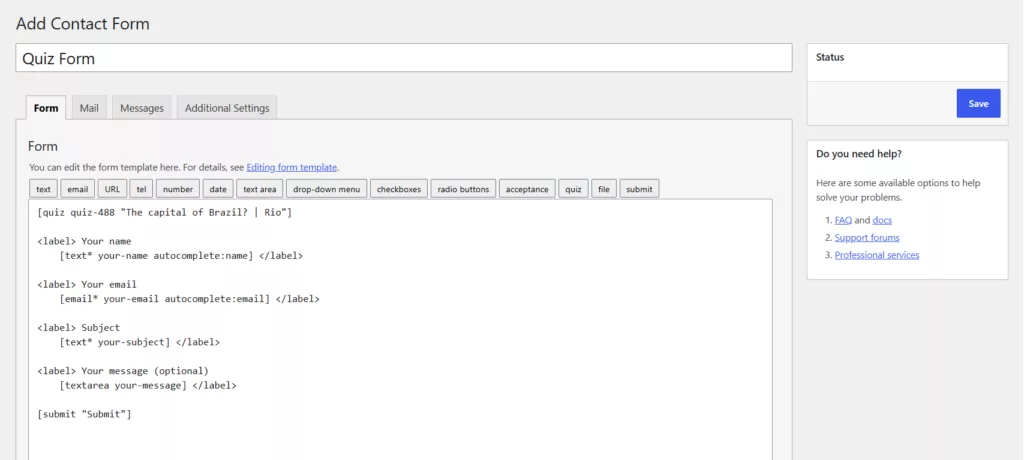
And Bit Form uses a drag-and-drop builder. You can add fields, arrange their order, and adjust their settings through the visual interface without manually editing form tags. This is especially useful when you regularly update forms or if you’re a non-tech user. With Contact Form 7, you need some technical knowledge just to build a form, but with Bit Form no need to write a single line of code.

4. Create Different Types of Forms With 50+ Field Types
A contact form may be all you need today. Later, you might need a file upload form for applications, a registration form for an event, or a quote request form that collects more detailed information.
Contact Form 7 supports common field types, including text, email, dropdown, checkbox, and file-upload fields. However, more advanced form workflows may require additional plugins or custom development.
Bit Form lets you build any form starting from simple to complex forms using 50+ different fields. Or, users can start with a ready-made template or even build a form from scratch, depending on what you need.
5. Built-In Conditional Logic Instead of Installing an Add-On
Contact Form 7 doesn’t include conditional logic in the core plugin, so showing a field based on users’ previous answer means installing an add-on like Conditional Fields for Contact Form 7. That’s one more plugin to keep compatible with every CF7 update.
With Bit Form, conditional logic is a built-in feature of the plugin and is in the free plan. You can configure rules in the builder to display relevant fields based on user input without installing an extra plugin. Plus, advanced conditional actions, such as applying conditions to notifications and integrations, require Bit Form Pro.

6. Break Long Forms Into Multiple Steps Without an Add-On
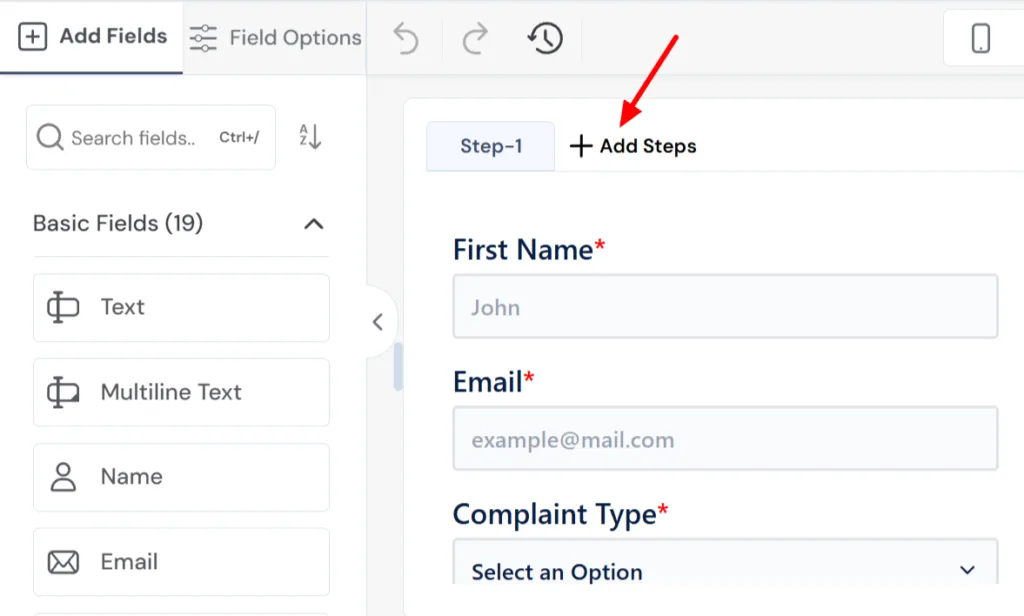
Contact Form 7 doesn’t offer a multi-step forms option, so breaking long forms into smaller sections means installing a separate plugin. That adds setup time and another dependency to maintain. With Bit Form, you’ll get a “+Add Steps” button; just click that and steps will be added. It is a built-in feature.
7. Manage Form Submissions Directly in WordPress
Contact Form 7 doesn’t store submitted messages anywhere. It emails them to you, and its own docs warn you can lose important messages if your mail server has problems. To save entries, you have to install Flamingo, a free companion plugin by the same author.
Whereas Bit Form saves submissions on your WordPress server by default, so you don’t need to set up anything extra to view them. Its additional entry-management features support tasks such as exporting data and reviewing submissions. This is useful for teams that need to track inquiries, review applications, or follow up on customer requests.

8. More payment options than Stripe
Contact Form 7 includes a free Stripe module that adds a card payment widget to your form, and if Stripe is all you need, it does the job. But if your customers want to pay another way, CF7 has no built-in option for it. Bit Form adds multiple payment fields such as Stripe, PayPal, Razorpay and Mollie. This gives your customers more ways to pay without adding a separate payment plugin.

9. Connect Forms to Business Tools and Automate workflows with webhooks and automation platforms
Form submissions often need to go somewhere beyond your WordPress website. You might want to add a new lead to your CRM, send a subscriber to an email marketing platform, or record inquiries in a spreadsheet.
Contact Form 7’s built-in connections cover Brevo, Stripe, reCAPTCHA v3, Turnstile and Akismet. You can surely extend it through third-party plugins and custom integrations.
Bit Form offers a broader set of integrations through its builder. Like, you can send form data to 50+ platforms like Google Sheets, HubSpot, Mailchimp, Zoho CRM, and Telegram. And they are free.
Nota: Before switching, check the Bit Form integrations directory to confirm that your required app and workflow are supported.
Sometimes, the tool you need is not available as a direct integration. You may want to send form data to a custom application, trigger a workflow, or pass information between several services.
Contact Form 7 can be extended through APIs, hooks, and third-party integration plugins, but these options may require more technical setup.
Bit Form supports webhooks and integrations that can connect form submissions to broader automation workflows. Depending on the services and configuration, you can use platforms such as Zapier, Make, or n8n to pass data between applications and trigger follow-up actions.
10. Create Conversational Forms Without Building a Custom Interface
Contact Form 7 does not include a native conversational form builder. Bit Form includes a conversational form feature that displays one question at a time (chat style). You can use this format for surveys, lead capture, feedback, or guided questionnaires where a step-by-step flow makes sense.
Forme di conversazione are not necessary for every use case, but having the option in the same builder gives you more flexibility when designing the form experience. Practically, these forms have a higher completion rate than static forms.
11. Style forms without writing CSS
Contact Form 7 customization options are limited. To change your forms’ style, you edit CSS style sheets, so you need to know CSS selectors and where to put your code.
In Bit Form, you get a built-in visual style editor, so you can easily adjust form layouts, colors, typography, spacing, and other appearance settings. You can also style individual fields and add custom CSS or JS if you want to go further. This means you can match the form to your brand without touching code.

12. Add Multiple Anti-spam protection layers
Contact Form 7 supports spam-protection integrations such as reCAPTCHA and Akismet. With Bit Form, you can add multiple spam protection layers to your form, including reCAPTCHA, hCaptcha, and Cloudflare Turnstile, for free and prevent spam form submissions.
13. Build Forms With Calculations, File Uploads, and Payment Workflows
Contact Form 7 supports file uploads and Stripe integration, but calculations and more advanced payment workflows may require additional tools or custom development.
Bit Form provides file upload fields in its free version, along with calculation features for tasks such as computing totals, scores, or prices. Its Pro version adds payment fields for gateways including Stripe, PayPal, Razorpay, and Mollie.
For example, you could build a quote form that collects a customer’s requirements, calculates an estimated total, and then uses a supported payment workflow if the project requires an upfront payment. The exact setup depends on the fields, calculation rules, and payment gateway you choose.
If your forms are becoming part of your sales or service workflow, having these capabilities within one builder can reduce the need to assemble several separate tools
Come passare da Contact Form 7 a Bit Form
If these reasons to switch from Contact Form 7 match your needs, you can recreate your forms in Bit Form without rebuilding your WordPress website. Follow these steps to migrate carefully.
1. Review your existing forms. Note the fields, required inputs, email notifications, confirmation messages, redirects, file uploads, and any extensions each form uses.
2. Install and activate Bit Form
3. Rebuild each form. Select a template that matches or create a form from scratch. Add the fields and recreate the behavior your existing form needs.
4. Configure notifications and integrations. Set up admin emails, user confirmations, conditional logic, and any required third-party connections.
5. Test before replacing the original. Submit test entries, check email delivery, verify required fields, and test redirects, file uploads, and conditional behavior where applicable.
6. Replace the form on your website. Once the Bit Form version works correctly, replace the Contact Form 7 shortcode or embedded form on the relevant page.
For the complete walkthrough, follow the existing guide on how to switch from Contact Form 7 to Bit Form. It covers reviewing existing fields, rebuilding forms, configuring notifications, replacing shortcodes, and testing before launch.
Conclusione
Contact Form 7 has served WordPress users for years, and it is a good fit for a basic contact form. But the feature freeze gives you a reason to think about your website’s future requirements.
The main reasons to switch from Contact Form 7 come down to your website’s feature and workflow needs. If you need a visual form builder, built-in submission storage, conditional fields, multi-step forms, or more integrations without managing extra plugins, Bit Form is worth evaluating. You can start with its free version and check whether it covers your needs before considering Pro.
You do not need to switch out of fear that your existing forms will suddenly stop working. Switch when the tools and workflow you need have outgrown your current setup. Before making the change, test your new forms and preserve any submissions you need to keep.
Most Asked Questions
Is Contact Form 7 abandoned?
No. It’s in a feature freeze. Version 6.2 is the last release with new features, and security and bug fixes continue. Its creator has said he isn’t abandoning it.
Will my Contact Form 7 forms stop working?
Not because of the freeze. Existing forms keep working. The risk builds slowly, as WordPress will change with time and add-ons you depend on fall behind.
Is it safe to keep using Contact Form 7 for now?
For a simple form on a stable site, yes. Security patches are still planned. It stops being a good fit once you need logic, steps, saved entries or payments beyond Stripe.
Can I import my Contact Form 7 forms into Bit Form?
No, there’s no built-in importer. You rebuild each form, which is why the steps above start with reviewing your fields, emails and redirects.
What happens to my old Contact Form 7 entries?
Contact Form 7 doesn’t store submissions by default. If you used Flamingo, export your entries as a CSV before you deactivate anything and keep it as an archive.
Is Bit Form free to use?
Yes. Bit Form’s free version includes a drag-and-drop builder, unlimited forms and submissions, conditional logic, multi-step forms, entry collection, spam protection options, and many integrations. Features such as payment fields, advanced conditional logic, and PDF generation require Pro.
Do I need Pro to replace Contact Form 7?
Not for a standard contact form. You’d want Pro if you need payments beyond what Stripe in Contact Form 7 already covers, or per-field styling.


Blog correlato

How to Create an Employee Onboarding Form in WordPress
How to Create a WordPress Stripe Payment Form Without WooCommerce

