

 EN
EN  ES
ES  DE
DE  PT
PT  IT
IT  JA
JA Bit Form V3.2.0 Makes Conditional Logic Easier to Set Up and Manage
Following the release of Bit Form V3, we have continued refining the form-building experience around the way people create and manage forms.
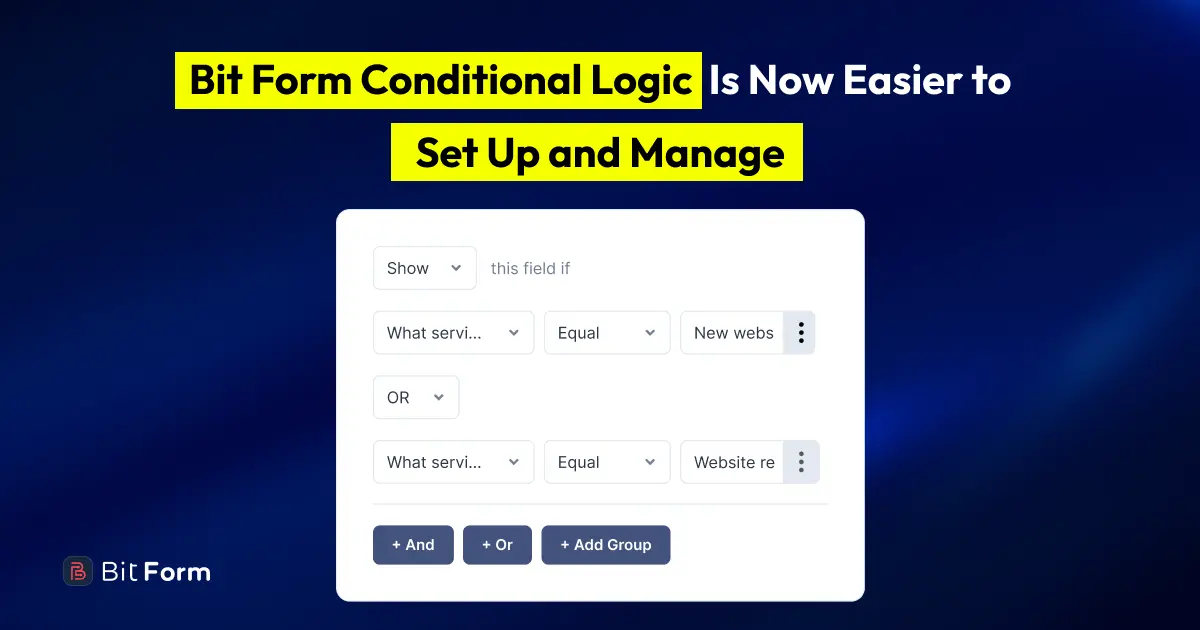
The Bit Form v3.2.0 update improves Conditional Logic to make it easier to access, understand, and use.
Confirmation messages, redirects, email notifications, and integrations can now run automatically from their own settings. Previously, you had to enable Conditional Logic for each of these settings. Now, you only need Conditional Logic when an action should run for specific submissions.
Basic Show/Hide Conditional Logic also remains available in Bit Form Free, so users can continue displaying or hiding fields based on form responses.
This means fewer setup steps for everyday forms, while Bit Form Pro users still have the deeper controls needed for advanced workflows.
Standard Form Actions Now Run From Their Own Settings
A confirmation message, redirect, email notification, or integration does not always need a condition.
Sometimes, you simply want an email to be sent after every valid submission. You may want every user to see the same confirmation message or reach the same thank-you page. Before this update, these actions were enabled through the central Conditional Logic settings.
Bit Form now handles these standard actions directly. Once you configure and enable a feature, it will run automatically based on its settings. There is no need to create a separate Conditional Logic rule just to activate it. For example, you can:
- Send an email notification after every submission
- Redirect all users to a thank-you page
- Display a standard confirmation message
- Send every new entry to a connected application
You can also enable or disable each feature independently. Turning off one email notification or integration will not affect the other actions configured for the form.
Add Conditions to the Feature They Control
Some forms need different actions for different users.
You might want to send one email when a visitor selects “Sales” and another when they select “Support.” A user requesting a quote may need to reach a different page from someone downloading a resource.
For these situations, Conditional Logic is now available directly inside:
- Confirmation messages
- Redirect URLs
- Email notifications
- Integrations
The condition stays with the feature it controls. This makes each rule easier to find and understand when you return to edit the form later. For example, you can:
- Display a confirmation message based on a selected option
- Redirect users to different pages based on their answers
- Send an email only when a particular condition is met
- Run an integration for selected submissions
Each feature can have its own independent conditions, so you can build a more flexible workflow without placing every action inside one shared logic group.
Free Users Still Have Essential Field Conditional Logic
Basic show/hide field-level Conditional Logic remains available in Bit Form Free. You can get it under:
Builder → Field Options → Conditional Logic
Select the field you want to control, enable Conditional Logic, and choose whether that field should Show or Hide.
You can then select another form field, choose a comparison operator, and define the value that should trigger the action. You can then select another form field, choose a comparison operator, and define the value that should trigger the action. Depending on the selected field, you can choose from its available options or reference another form field value. For example, imagine a website project request form that asks:
What service do you need?
When the user selects Website redesign or Website maintenance, you can show an Existing Website URL field. For other service options, that field can remain hidden.

The free field-level settings include useful operators such as:
- Change
- Equal
- Not Equal
- Is Null
- Is Not Null
- Contain
- Not Contain
You can also connect rules with AND or OR and add condition groups when field visibility depends on several answers.
This gives free users the essential tools needed to create dynamic WordPress forms that adapt as someone fills them out.
Bit Form Pro Adds Full Conditional Workflow Control
Bit Form Pro includes the advanced Conditional Logic builder under:
Settings → Conditional Logics

This dedicated area is designed for workflows that need more than field-level Show/Hide rules.
You can create multiple logic groups, turn individual rules on or off, duplicate them, delete them, and arrange their priority through drag and drop. Inside each rule, you can build a structured workflow using If, Then, and Else.
- If checks the selected condition.
- Then defines what happens when it matches.
- Else controls what happens when it does not match.
For example:
- If: A user selects “No”
- Then: Show a specific field
- Else: Hide that field

You can add more conditions using AND or OR when the workflow depends on several field values. The Pro builder also lets you control when a rule takes effect. A condition can run:
- When the form loads
- When a user enters data
- During form validation
- When the form is submitted
- When a record is created
- When a record is edited
- When a record is deleted

This is useful when different actions should happen at different stages. For example, a field can change while the user is completing the form, while another action can wait until the submission has been validated.
Advanced Conditional Logic can control several parts of a field, not only its visibility. Available actions include:
- Show or hide a field
- Enable or disable a field
- Make a field read-only or writable
- Set or change its value
- Update its label
- Change its subtitle
- Change its title
The Pro builder also provides additional matching options, including Start With and End With, for more precise conditions.
These controls are helpful for application forms, registrations, surveys, onboarding forms, calculations, and other workflows where several fields need to respond together.
How Conditional Logic Is Now Organized Across Free and Pro
Basic field Show/Hide Conditional Logic remains available in Bit Form Free. Free users can continue creating dynamic forms with multiple conditions, AND/OR rules, and condition groups.
Standard confirmation messages, redirects, email notifications, and integrations also continue to work without Conditional Logic. You do not need Bit Form Pro simply to enable these features for regular form submissions.
Advanced Conditional Logic is now available in Bit Form Pro to comply with WordPress.org plugin guidelines. This includes conditional control for confirmations, redirects, email notifications, and integrations, along with If, Then, and Else workflows, execution settings, and broader field actions.
Bit Form Pro is only required when you need these features to respond to specific conditions or perform more advanced actions.
Bit Form Free and Pro Conditional Logic at a Glance
| Capability | Bit Form Free | Bit Form Pro |
| Show or hide a selected field | Yes | Yes |
| Configure field logic inside the builder | Yes | Yes |
| Combine rules with AND or OR | Yes | Yes |
| Create multiple condition groups | Yes | Yes |
| Build If, Then, and Else workflows | No | Yes |
| Choose when an advanced rule runs | No | Yes |
| Enable, disable, or change field states through rules | No | Yes |
| Change field values, labels, subtitles, or titles | No | Yes |
| Add conditions to confirmations, redirects, emails, and integrations | No | Yes |
| Duplicate, reorder, and manage advanced rule priority | No | Yes |
| Run standard enabled features without conditions | Yes | Yes |
More Improvements Included in Bit Form V3.2.0
Conditional Logic is a major part of Bit Form V3.2.0, but the update also brings several improvements to form submissions, email notifications, PDF templates, and feature management.
More Control After Form Submission
The new After Submit Behavior setting lets you choose what happens after a user submits a form. You will get the setting under Settings> Confirmation> Success/Error Messages. You can:
- Hide the form
- Reset the form
- Keep the submitted values

This gives you more control over the post-submission experience without requiring additional logic or custom code.
Enable or Disable Each Feature Independently
Success Messages, Redirect URLs, Email Notifications, PDF Templates, and Integrations now include their own active status toggle. You can temporarily disable a configuration without deleting it, then enable it again whenever you need it.
This is useful when you want to pause a notification, redirect, PDF, or integration while keeping its settings saved.
Improved Email Notification Management
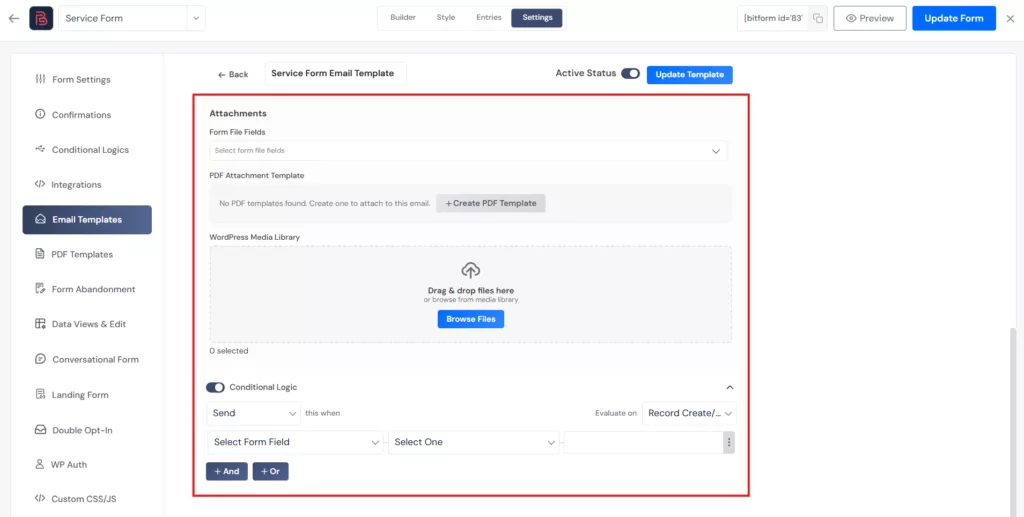
Email Notifications now include more configuration options and a redesigned editor for easier setup. You can configure:
- To
- CC
- BCC
- From Name
- From Email
- Reply-To Email
- Attachments
The email list now also displays Configuration Info and Status, making it easier to understand how each notification is set up. You can also select files from the WordPress Media Library and attach them directly to outgoing emails.
Conditional Email Routing in Bit Form Pro
Bit Form Pro now supports conditional routing in the Send To Email field. For example, when a user selects Sales, the notification can go to the sales team. When they select Support, it can be sent to the support team instead. Pro users can also attach multiple PDF templates to the same email notification.

Manage Email Attachments and Conditional Sending in One Place
The redesigned editor brings file-field uploads, WordPress Media Library files, and PDF attachments into one place for easier management. You can also apply Conditional Logic within the same screen to control when the email notification should be sent.
Better PDF Template Controls in Bit Form Pro
The PDF Template settings now include dedicated editors for PDF headers and footers.
The list view has also been improved with PDF Name and Settings Info columns, making templates easier to identify and manage.

These updates are useful when creating:
- Invoices
- Certificates
- Application copies
- Submission reports
- Other PDF documents generated from form entries
Refined Success Message Experience
The Success Message interface has been redesigned to make the settings easier to understand and manage. Its execution process has also been improved, so each Success Message can work independently based on its own status and conditions.
Important Fixes and Reliability Improvements
Bit Form V3.2.0 also includes fixes for several form-building and entry-management issues. The update fixes:
- A field name conflict when cloning composite fields with child fields
- Missing validation errors when a required field existed in the field list but was not included in the form layout
- Conditional Logic not running correctly during entry updates with the On Record Edit action
These fixes improve reliability during form creation, validation, and record management.
A Simpler Path From Basic Forms to Advanced Workflows
Bit Form V3.2.0 gives you a clearer way to manage both standard form actions and conditional workflows.
For everyday forms, you can configure Success Messages, redirects, email notifications, and integrations from their own settings and let them run automatically.
Bit Form Free continues to provide field-level Show/Hide rules for creating dynamic forms based on user responses. When a form needs more advanced behavior, Bit Form Pro adds feature-level conditions, execution controls, and flexible If, Then, and Else workflows.
This update keeps simple forms easy to manage while giving advanced users greater control where it matters. We will continue improving Bit Form to make WordPress form building more practical, flexible, and user-friendly.

Related Blog

Introducing Bit Form V3: A Cleaner, Faster WordPress Form Builder

