EN
EN  ES
ES  DE
DE  PT
PT  IT
IT  JA
JA  ID
ID 8 Best WPForms Alternatives Compared: Features, Pricing & More

People don’t look for WPForms alternatives out of curiosity. Either they realize the pricing is too high for them, they want a more user-friendly interface, or the features they need are not available on the basic plan.
To be honest, WPForms is popular for a reason: it combines an AI-assisted drag-and-drop builder with templates, payment forms, notifications, and a relatively approachable interface. Its current WordPress.org listing says it includes more than 2,100 templates, while features such as multi-page forms, file uploads, conditional logic, and additional payment capabilities sit within its broader paid offering.
But choosing an alternative doesn’t rely only on one or two factors. Some WordPress users may want more functionality in the free version. Others want lifetime pricing, Elementor-native editing, built-in integrations, entry management, a minimal open-source setup, or the ability to pay only for selected extensions.
These specific situations make the search for WPForms alternatives reasonable. However, if you’re thinking of sitting down and installing and testing all the popular plugins one by one, then you don’t have to. Here, I’ve compared 8 form builders from a practical perspective. Instead of simply counting features, we will look at what each plugin is known for, why people choose it, what you get for free, what to consider before using it, and the type of WordPress user it makes the most sense for.
TL;DR:
If you are looking for WPForms alternatives, the right choice depends on what you want from your forms and how much you want to spend.
- Bit Form is a strong option for advanced WordPress forms, especially if you want conditional logic, multi-step forms, calculations, payments, integrations, and workflow features at an affordable price.
- Contact Form 7 is best for a completely free, open-source approach, particularly if you are a developer or comfortable with technical setup.
- Fluent Forms offers a broad feature set with a generous free version and is worth considering for users who want advanced functionality without upgrading immediately.
- MetForm is the natural choice for websites built with Elementor because it fits directly into the Elementor workflow.
- Happyforms suits users who want a simpler visual form-building experience for everyday forms.
- Ninja Forms works well if you prefer a free core plugin that you can expand with paid add-ons as your needs grow.
- Everest Forms is a broad option for users who want visual form building, entry management, file uploads, and a path toward more advanced forms
- PaymentForm.io is a strong option if your main goal is to collect payments without building a WordPress site. It supports e-commerce, donations, fundraising, event tickets, contracts, memberships, and digital products with a 0% platform transaction fee.
There is no universal winner. Before switching from WPForms, compare the features you actually use, the free-vs-paid limits, pricing model, integrations, and the work involved in moving your existing forms.
Why do people look for WPForms alternatives?
WPForms is one of the most installed form plugins in the WordPress space, with more than 5 million active installations. It is popular for its AI-powered drag-and-drop form builder, wide range of pre-built templates, and more useful features. But still, there are some reasons why people look for alternatives, such as:
- WPForms free version doesn’t save submissions inside your WordPress dashboard; it only sends an email notification. For that, you’ll need a paid version. Also, you cannot view or export the individual backed-up entries while staying on the free Lite plan.
- Important features like Conditional logic, file uploads, and more all sit behind the Basic plan or higher. WPForms Lite can accept payments through Stripe, PayPal Commerce, and Square, but an additional 3% WPForms transaction fee applies.
- The advertised price isn’t the price you’ll actually pay long-term. On their official site, the Basic plan starts at $49.50 (introductory price), but the real buildup occurs at renewal. The pricing page states that introductory pricing applies only in the first year and renewals are charged at the full price. If you’ve one site, it’s okay, but if you’re running an agency, the cost increases significantly.
- Some negative WordPress.org reviews criticize freemium limitations and promotional prompts in the plugin dashboard.
- If your business runs on Salesforce or HubSpot, those integrations are available in the Elite plan, which is $299.50/year.
There are complaints that users have, but none of them make WPForms a bad plugin. It simply means it is not the right fit for everyone. If you have any of the above problems in common, then the following alternatives to WPForms are for you.
The 8 WPForms Alternatives Worth Considering
So, you might be looking for alternatives because you want more functionality in the free version or you want a lifetime license. But it is better to be clear that there are also some practical issues in the WordPress community. Users often compare form plugins based on the number of add-ons, the cost of premium functionality, submission management, and how much work is required to get a form running.
That is why I would not judge WPForms alternatives by feature count alone.
This list is based on what each plugin does better than WPForms, what it is known for, where it fits best, and what you should expect before moving your forms.
Quick comparison of the best WPForms alternatives
The table below focuses on the difference that matters most: what each builder gives you a reason to switch for.
Disclaimer: Prices below reflect the currently advertised annual prices and may include introductory discounts. Check each provider’s pricing page before purchasing.
| Plugin / Tool | Free Plan | Starting Price | Builder Type | Best suited to |
| Bit Form | Yes | $25/year (1 site) | Visual drag-and-drop builder | Businesses, agencies, marketers, advanced forms, automation-heavy sites |
| Contact Form 7 | Yes | Free. Offers add-ons | Shortcode-based | Developers who want zero cost, zero upsells |
| Fluent Forms | Yes | $63/year | drag-and-drop builder | Sites that need logic and entries without paying |
| Metform | Yes, but limited | $41/year | Elementor widget-based | Elementor websites and design-focused teams |
| Happy Forms | Yes | $89/year | Customizer-based live preview | Bloggers, portfolios, small-business sites, users prioritizing visual workflow |
| Ninja Forms | Yes | Depends on add-ons | Drag-and-drop builder | Users who prefer to start small and add advanced functionality later |
| Everest Forms | Yes | $49/year | Drag-and-drop builder | Beginners and small businesses wanting a generous free starting point |
| PaymentForm.io | Yes | Free; Pro starts from $9/month | Standalone no-code payment form builder | Businesses, creators, fundraisers, and sellers who need payment forms without a WordPress site |
Bit Form
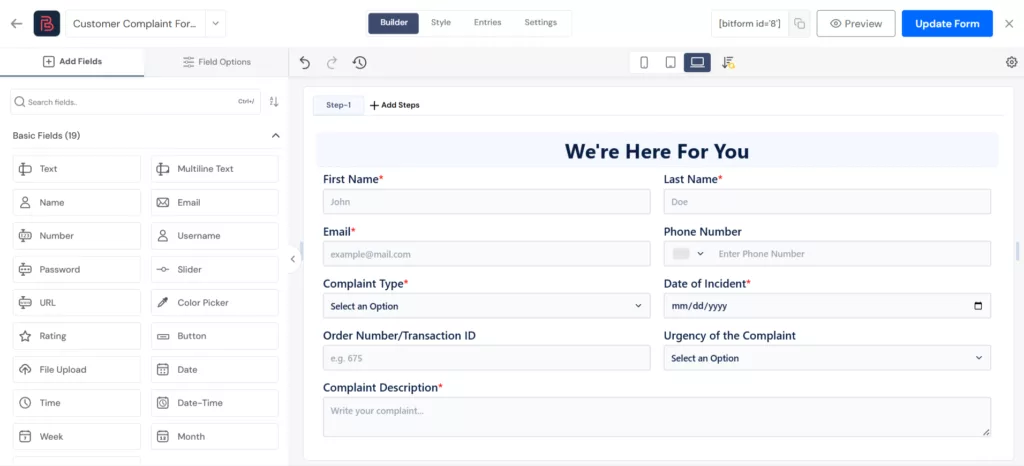
Bit Form is a relevant alternative if you’re leaving WPForms because it is costly and you want to create complex forms without adding more add-ons.
The plugin is designed for both beginners and advanced users; it has a drag-and-drop builder that lets users create forms such as basic contact, registration, calculator, multi-step forms, and conditional-logic forms, among others. Moreover, Bit Forms comes with 50+ form fields, which include file upload, signature, ratings, payment fields, repeater, CAPTCHA protection, and more. Additionally, for form creation, they have a shortcut; they offer pre-built form templates for common use cases.
The main reason why Bit Form is considered a WPForms alternative is that it doesn’t require any extra add-ons, and its free version is generous. It includes unlimited form creation and submissions, multi-step forms, conditional logic-based forms, 50+ fields total, 38+ free, email notifications, SMTP support, 50+ native integrations, stored entries, file uploads, and anti-spam protection, all in the free plan.
For advanced features like payment integrations, PDF generation, form abandonment, and partial submission tracking, you’ll have to go for the paid tier.
Notable features
- Drag-and-drop builder and user-friendly interface
- 50+ form fields such as signature, rating, file upload, address, repeater, etc.
- Unlimited forms and submissions
- Create dynamic forms like conversational, multi-step forms, conditional forms, calculators, and more.
- Visual style editor with modern form styling features
- Integrations with common payment gateways (PayPal, RazorPay, Mollie, Stripe)
- 30+ form templates and 50+ native integrations with platforms like CRMs, email marketing tools, etc.
- Advanced features like form abandonment tracking, PDF generation, analytics, email OTP verification, email notifications, and spam protection via CAPTCHA options.
- Live preview option
What to keep in mind
- The template library is still growing.
- Payment fields, advanced field styling, and some integrations are available in the Pro version,
Pricing and Verdict
| Pricing | Verdict |
| Free core plugin, and the paid plan starts at $25/year for 1 site. And the license renews at the same price you originally paid. | If you want a beginner-friendly form builder with basic to advanced features at an affordable price, then choose Bit Form |
📍Note: Check out the Bit Form free vs pro comparison to make a better decision.
Contact Form 7
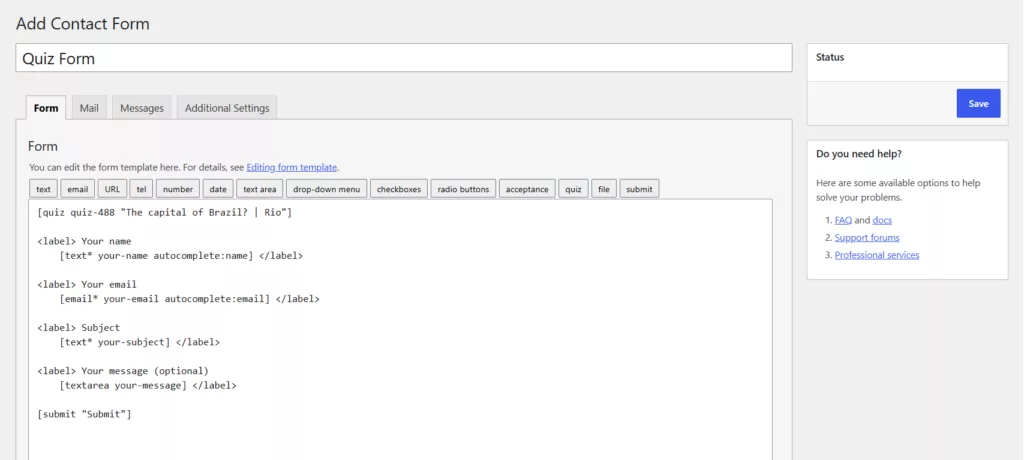
If you want a free WPForms alternative, then you should go for Contact Form 7. Well, it is not a drag-and-drop builder like others; instead, it works with HTML code. You create forms using shortcodes in a text editor. That makes it flexible for users comfortable with WordPress markup-style workflows, but less friendly for beginners.
Well, the reason CF7 is in the list is that, despite not being a visual form builder, the plugin is free, open-source, and has over 10 million active installations. It has been part of the WordPress ecosystem for years.
It supports basic field tags like text, email, URL, number, file upload, quiz, CAPTCHA, and radio buttons. You need all of them for a basic contact form. For extra features like conditional logic, payment gateway integrations, and storing submissions in your database, you’ll need extra add-ons.
One important update on Contact Form 7 is that at WordCamp Asia 2026, the founder confirmed that the plugin will not receive any major feature updates from now on. They’ll only fix bugs and security issues in the existing forms.
Notable features
- Completely free core plugin, with no premium tier at all
- Offers basic fields best for straightforward contact forms
- Minimal server load, which matters on shared or budget hosting
- Ajax-powered submission; forms get submitted without page reload
- It is extensible through a huge ecosystem of third-party add-ons for things like Mailchimp integration, payment integration, conditional logic, multi-step forms, file uploads, and more.
- Protects forms via Akismet, Google reCAPTCHA, and Cloudflare Turnstile
- Flexible code and markup-based form customization
What to keep in mind
- There’s no drag-and-drop builder, so building a form means editing shortcode tags like [text* your-name] directly.
- It also doesn’t store submissions inside the WordPress dashboard on its own. You’re relying on email delivery unless you add a separate entries plugin.
- Since the plugin will not receive any major feature updates. So it’s best to keep this in mind before using it long term.
📍Note: if you’re thinking about switching from Contact Form 7 to another form builder plugin like Bit Form, you can follow the migration process explained here.
Pricing and Verdict
| Pricing | Verdict |
| Free core plugin and paid add-ons available for adding functions | Contact Form 7 is still a fine choice for a developer who just needs a shortcode-based contact form and nothing else, forever, for free. |
Fluent Forms

Fluent Forms is another closest conceptual alternatives to WPForms in this group. This is also a user-friendly, drag-and-drop WP contact form builder with a huge user base. With Fluent Forms, you can create basic and complex forms containing conditional logic, reporting, calculations, email automation, integrations, quizzes/surveys, payments, and advanced styling.
Among the 60+ third-party integrations, Fluent Forms includes integration with FluentCRM, Fluent Support, MailChimp, Slack, MailPoet, and more in the free plan. Also, in the free version, you get powerful features like conditional logic, conversational forms, reusable templates, spam protection, email notifications, scheduling, and payment via Stripe.
However, if you want to accept payments via multiple gateways, create multi-step forms, style your forms, use third-party integrations, or run calculations, then you need to upgrade. The main differentiator of Fluent Forms from WPForms is its paid-plan structure. Fluent Forms’ pricing page currently says all features are included in its paid licenses.
Notable features
- Drag-and-drop visual form builder.
- Hundreds of reusable form templates
- 60+ form field types
- Multi-step, conversational, calculation, quiz, survey, PDF, and reporting functionality across the broader product.
- Among 60+ integrations, 12 are free (several marketing and Fluent ecosystem products).
- One-click form migration support from WPForms and several other form builders is listed on WordPress.org.
- Works well with 8 payment gateways.
- Customize forms in Gutenberg form styler and with its built-in styler
- Spam protection using reCAPTCHA, hCaptcha & more.
What to keep in mind
Free Stripe payment capability has a cost detail that belongs prominently in a commercial comparison. Fluent Forms states that Stripe payments are available in the free version, with a 1.9% transaction fee. Pro removes that additional fee and adds broader payment functionality.. A reader comparing “free payment forms” should know that before choosing.
Pricing and Verdict
| Pricing | Verdict |
| Free version available. Paid tier starts at $63/year for 1 site only for the first year. However, the renewal price is $79/year. | If you want a fast and feature-rich form builder, then Fluent Forms is for you. |
MetForm
MetForm has a very specific advantage that makes it different from most plugins on this list.
It is built around Elementor.
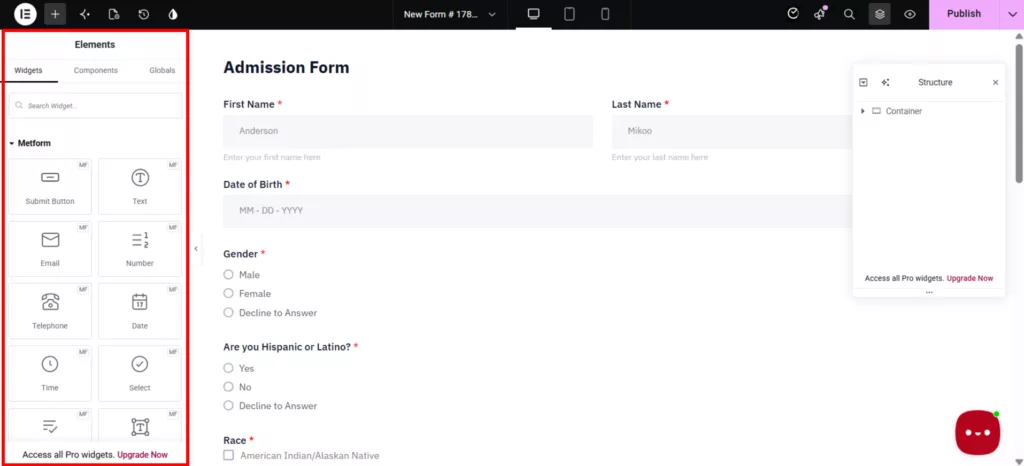
MetForm is an Elementor add-on, and its form fields work as Elementor widgets. That means users who already build their pages in Elementor can create and customize forms within a familiar visual workflow with real-time preview. MetForm also provides submission storage, conditional logic, multi-step functionality, integrations and progressively more advanced capabilities across its paid plans.
This is exactly why I would include it in a list of WPForms alternatives. You are not simply replacing one form builder with another. You are choosing a form tool that fits a particular page-building ecosystem.
With free and premium versions, MetForm stands out as the best option for WordPress users who are already using Elementor to design page layouts and customize their websites by adding customizable functional forms.
Notable features
- Elementor-based visual workflow and real-time preview.
- 39+ Elementor widget fields to create any type of form.
- 44+ form templates (Contact Form Templates, Booking & Calculation Form Templates)
- Form Submission via AJAX without Page Refreshes
- WordPress admin submission storage and user confirmation email capability.
- Form analytics data to track submissions and performance.
- Create smart conditional logic forms and multi step forms, and schedule forms.
- Convert forms to posts and create surveys and interactive quizzes.
- Integrate forms with 19+ third-party tools and services, including payment gateways, Mailchimp, HubSpot, Twilio, Google reCAPTCHA, and more.
What to keep in mind
It is an Elementor-based form plugin; to use it, you must be familiar with the Elementor ecosystem. Its starting plan (Personal) offers only the basic form-building and entry-management features, while features such as analytics, calculations, PayPal, Stripe, and several advanced integrations are reserved for higher tiers.
Pricing and Verdict
| Pricing | Verdict |
| A free version is available. Its Personal plan is currently discounted to $41 for the first year, and renews at $49. | Best for Elementor users |
HappyForms

HappyForms is one of the simplest WordPress form builders. It has a drag-and-drop, Gutenberg-ready builder. Users build forms directly inside the WordPress Customizer with a live preview, so you see the form update in real time as you add fields.
Moreover, the plugin provides you with a responsive output, multi-column layouts, multiple forms per page, confirmation messages/emails, and unlimited form submissions, emails and more. With the diverse fields and functionalities, you can create forms like order forms, donation payment forms, customer inquiry forms, and more.
So, HappyForms is a useful alternative for people who do not need a huge form automation system.
Notable features
- Gutenberg-ready drag-and-drop builder with live preview.
- 20+ customizable field types
- Responsive forms and one-click multi-column layouts.
- Unlimited forms, fields, emails, and submissions
- Spam prevention via honeypot and Google reCAPTCHA
- 50 style controls are listed among its core features.
- Enable people to save and resume their submissions, upload files, and manage submissions.
- Log IP addresses automatically and create multi-page forms.
What to keep in mind
- The form templates they offer are only usable when you download them from their site.
- And if you need CRM, email platform, or payment integrations, more design customization, conditional logic, or file upload, you need the premium license.
Pricing and Verdict
| Pricing | Verdict |
| Has a free version, and the paid plan starts at $89 for 1 site. | It is for WordPress beginners and small businesses who want form creation to stay uncomplicated and do not need add-ons. |
Ninja Forms
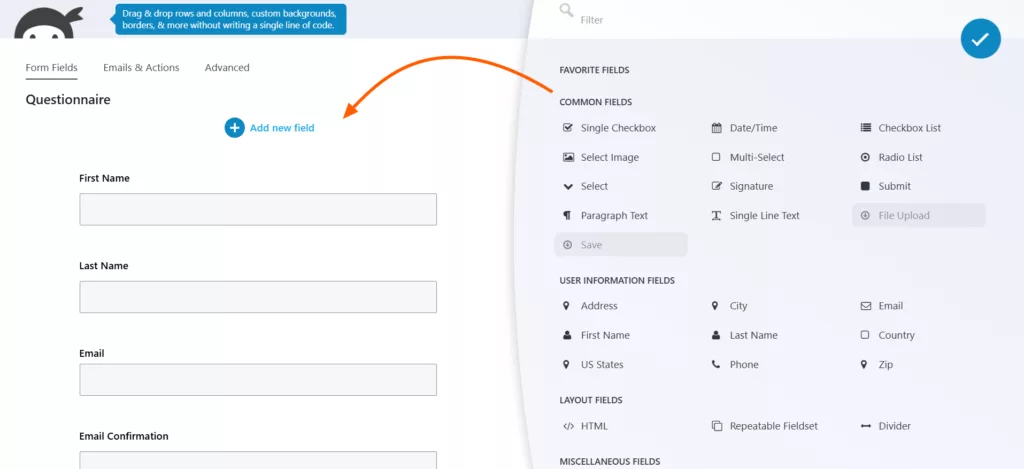
If you want a module-based WPForms alternative, then Ninja Forms is perfect for the job. It works differently from other plugins in this list. That is, the core plugin is free. But premium functionalities like PayPal, file uploads, conditional logic, and Mailchimp integrations is provided through add-ons that can be purchased individually. Also, it offers membership plans that bundle popular add-ons.
It follows the “only pay for what you need” approach. The core plugin offers 28+ free drag-and-drop fields, calculations, reusable fields, merge tags, email notifications, redirects, spam protection, unlimited forms and submissions, entry management, CSV export, and configurable local submission storage.
This can work well for a business that has a very specific need and does not want to buy a large package, although it makes feature-by-feature cost planning more important than with a single all-inclusive license.
Notable features
- 28+ drag-and-drop fields.
- Free calculations, customizable email notifications, redirects, templates, and import/export.
- Unlimited free forms and submissions with submission-management tools.
- Individual premium add-ons as well as bundled membership plans.
- Smart tools to do data calculations
- 40+ add-ons for advanced form features like conditional logic, file uploads, multi-step forms, layout & styles, integrations with external platforms (CRMs, email marketing)
- Integrates with 5 popular payment gateways (Elavon, Authorize.net, PayPal, etc).
What to keep in mind
- The modular model can be either a benefit or a budgeting complication, depends on the team. For example, common features such as conditional logic, file uploads, multi-step forms and advanced styling are available in Plus.
- Other integrations and gateways are distributed through higher bundles or individual add-ons. Therefore, a prospective user should list the exact features they need and price that configuration. Assuming that the lowest-priced bundle is ultimately the cheapest long-term WPForms replacement is illogical.
Pricing and Verdict
| Pricing | Verdict |
| The core plugin is free; also, the paid memberships start at $59.40 for the first year for Plus and renew at $99/year. | Choose Ninja Forms when a solid free core plus a pick-and-choose extension model fits your project. |
Everest Forms

Everest Forms is the AI form builder for WordPress users that covers simple forms and more advanced business workflows. It comes with a drag-and-drop builder, an AI form builder, 35+ field types, and 50+ ready-made templates, where you can find common forms like payment forms, quizzes, surveys, conversational forms, registration, and application forms.
The plugin also has more than 90,000 active installations on WordPress.org.
It is a practical alternative for users who want form entries, file uploads, email notifications, and spam protection in the free plan.
With this alternative to WPForms, users can build ordinary contact forms, lead-generation forms, payment forms, survey & research forms, and more complex interactive forms as the feature set expands.
Notable features
- Drag-and-drop builder with visual style customization
- AI Form Builder for generating forms from a plain-language description
- 35+ form fields, including file and image uploads
- Unlimited forms and submissions
- Entry management with search, sorting, filtering, editing, deletion, and CSV export
- 40+ Form templates for common use cases
- Multi-layer Spam Defense
- Integrates with various e-commerce platforms and payment apps.
- Survey, poll, and quiz features
What to keep in mind
- The free version gives standard forms, but for features such as multi-step forms, conversational forms, surveys, quizzes, and stronger spam controls, you’ll need the premium plan.
- Costly and overwhelming for growing teams.
Pricing and Verdict
| Pricing | Verdict |
| Offers a free version, and the paid plan starts at $49/year for 1 site for the first year, and it renews at $69/year. | Best for users who want a broad WordPress form builder with AI-assisted creation, visual customization, entry management, payments, and support for more complex forms. |
PaymentForm.io
All the tools I’ve listed above are WordPress-centric. What if a user does not use WordPress yet and is looking for alternatives to WPForms? Plenty of people might land here while looking for a way to collect a payment for something without even a website.
For that specific case, it’s worth knowing about PaymentForm.io, a no-code, form-based checkout tool built by Bit Apps.

It is a standalone SaaS tool that is built especially for those who don’t have a site and want to collect payments online without paying any transaction fee. It works something like this: pick a template, add details (prices, stock counts, variations, and tax or shipping rules), connect a gateway, share the form as a link, an embed, or a QR code, and track submissions. That’s it! No website, no platform transaction fee. You only have to pay the gateway fee.
Paymentform.io is a module-based tool that is built around specific use cases rather than a typical form builder. It currently has these templates:
- Donation module
- Fundraising module with progress bars and receipts
- Single-product E-commerce module
- Multiple-product E-commerce module
- Contract Module
- Event ticket module
- Digital E-commerce module (coming soon)
- Membership Module (coming soon)
Plus a client portal so buyers can check their own order status without emailing you about it.
It’s not a replacement for anything on the list above if you’re building a real WordPress site and just need a form embedded in it. But if the actual goal is “collect this payment as fast as possible without spinning up a website first,” it solves a different problem than WPForms was ever built to solve.
If I give you a more specific example: If you run a small fundraiser and only need a page where people can select a donation amount and complete payment. In that case, a dedicated payment-form platform may be worth considering instead of installing a general-purpose WordPress form builder and configuring several payment-related settings.
Pricing
Generous free plan available, and includes unlimited form creation, access to its modules, theme customization, 10+ field types, an invoice builder, unlimited submissions and transactions, a 0% platform transaction fee, and more.
The Pro plan begins at $9/month and adds functionality including Google Analytics, Meta Pixel, file exports, custom domain, abandoned-form tracking, built-in analytics, password protection, webhooks, branding removal, and event check-in QR functionality.
Which one should I choose?
The right choice depends on what you want to change.
Bit Form is a strong fit if you want a lightweight plugin with advanced functionalities, under budget. The features include pre-built templates, show/hide logic, conversational forms, unlimited forms and submissions, and many others.
Contact Form 7 makes more sense when your priority is a completely free, traditional open-source form tool and you are comfortable writing HTML code.
Fluent Forms is a strong candidate for users who want another mature all-rounder visual builder and has built-in migration support.
MetForm is naturally the best pick when your website is Elementor-based. Its forms are built around the Elementor workflow, so you can create and customize them within the same visual environment rather than managing a separate form-building experience.
HappyForms is a sensible choice when you want to keep form creation straightforward. Its live preview and drag-and-drop approach work well for everyday contact, feedback, survey, and inquiry forms.
Ninja Forms suits users who prefer a modular approach. You can start with its free core plugin and add premium functionality as your requirements grow.
Everest Forms is worth considering if you want a visual builder with a broad range of form-building and entry-management features.
PaymentForm.io is the better fit when your main goal is to collect payments without setting up a WordPress site or a traditional form plugin. It works well for e-commerce, donations, fundraising, event tickets, contracts, memberships, and digital products, with shareable payment forms and no platform transaction fee.
That is a more useful way to compare all the alternatives than trying to declare one form builder the winner for every WordPress site.
When should you actually switch from WPForms?
Not every WPForms user needs to switch. If your current forms work well, your integrations are set up, and the pricing fits your budget, changing plugins may create more work than it saves.
An alternative becomes worth considering when WPForms does not fit a requirement that matters to you. That could mean you need more functionality in the free version, prefer an open-source approach, already work heavily with Elementor, want a different pricing model, or need a specific feature that another builder handles better.
There is also the migration cost to consider. Moving a site with dozens of forms means rebuilding forms, checking notifications, testing integrations, reviewing styling, and making sure existing submissions are handled correctly. A plugin that looks better on a feature table is not automatically worth that effort.
So, are WPForms alternatives better? Sometimes, but only for a particular need. The better question is: What limitation am I actually trying to remove? Whether one of them solves your problem more effectively than WPForms does.
FAQ about switching from WPForms
What is the best free WPForms alternative?
There is no single best option for every site. If you want the most functionality without paying, Bit Form and Fluent Forms are the stronger visual-builder options in this comparison. If you want a completely free, open-source core and don’t mind working with markup, Contact Form 7 is the better fit.
Which WPForms alternative includes conditional logic for free?
Bit Form and Fluent Forms both provide conditional logic in their free versions. If conditional logic is a deciding factor, check the exact rules and actions available in the current free versions before choosing.
Is there a completely free alternative to WPForms?
Contact Form 7 is the clearest answer if you mean a completely free and open-source form plugin. It does not require a paid license for its core functionality. Other plugins in this list also have free versions, but many reserve advanced features for their paid plans.
Which alternative works best with Elementor?
MetForm is the most natural choice for Elementor users because it is designed to work within the Elementor page-building workflow. You can create and customize forms using Elementor’s visual interface instead of managing the form separately from your page design.
Which WPForms alternatives offer lifetime pricing?
Bit Form, Fluent Forms, MetForm, and Everest Forms currently offer lifetime licensing options, while other plugins in this comparison primarily use annual pricing or a free core with paid add-ons. Lifetime plans can be useful if you expect to use the plugin for several years, but compare exactly what the lifetime license includes before buying because included features, site limits, and renewal terms can differ.
Which WPForms alternative is best for payment forms?
Bit Form, Fluent Forms, MetForm, and Everest Forms are all worth comparing. The right choice depends on your payment gateway, recurring payment needs, calculations, integrations, and whether those features are included in the plan you intend to purchase. On the other hand, if you want a hosted solution, you can go for Paymentform.io. It is designed for users who want to collect payments without building a website first.
Is PaymentForm.io a good alternative to WPForms?
Yes, PaymentForm.io can be a good WPForms alternative if your main goal is collecting payments rather than building general WordPress forms. It is a standalone no-code payment form builder, so you do not need WordPress or a website to use it. You can create forms for e-commerce, donations, fundraising, event tickets, contracts, memberships, and digital products, then share them through a link, embed, or QR code. It also charges 0% platform transaction fees, although your connected payment gateway may still charge its standard processing fees.


Related Blog
Best Beginner-Friendly WordPress Contact Form Plugins in 2026

Best AI Plugins for WordPress: Scale Your Business Fast in 2026