

 EN
EN  ES
ES  DE
DE 27+ Free WordPress Plugins You’ll Wish You Found Sooner
You may have opened a new WordPress site. However, as a beginner, you cannot initially invest much. At the same time, you need effective plugins to enhance your site for speed and efficiency. Besides, a dynamic website owner needs to enhance the blog’s effectiveness through SEO, automation, or integration. But is it possible to get free WordPress plugins with useful features?
Well, some fantastic free WordPress plugins actually make your WordPress site dynamic to grow quickly. These are multifunctional plugins that save your site from slowing down. So, here I have shared with you the best free WordPress plugins in 2026.
Additionally, you will learn some considerations before installing WordPress plugins and my top recommendations. Read the article to find out.
Key Stats Of Free WordPress Plugin Usage

- Many WordPress users rely on free WordPress SEO plugins, as most of these plugins cover essential features in the free plan. Besides, you don’t want to spend much on the premium plan if you are a beginner. So, these free SEO plugins help bloggers improve their search engine rankings using the free version only.
- WordPress users need speed on their site. Without speed, users will leave your website in no time. So, many WordPress plugins provide free features that improve the site’s speed and efficiency. As a result, many people use free Caching and Performance plugins to speed up the site.
- A blogger or an E-Commerce store owner needs multiple types of forms for their website. Many beginners cannot afford these plugins due to pricey plans. However, as many form plugins provide advanced features in the free plan, it leads WordPress users to use this free plugin to improve their business.
- An e-commerce store owner needs to manage orders, payments, and marketing at the same time. However, plugins like WooCommerce provide free plans that allow beginners with no budget to use the free plan to automate their business.
- WordPress users use free security and backup plugins to automate their business as these spam protection plugins can save your site from spam and malware in the free plan only. As a result, many users find these free plugins helpful and use them to secure their sites.
Best Free WordPress Plugins For 2026 – Perfect for Bloggers, Businesses & Beyond!
Let’s be real—WordPress can be a life-saver, until you realize how expensive and bloated it can get when you’re hunting for the “right” plugin.
Whether you’re a blogger tired of slow loading times, a store owner wrestling with cart abandonments, or a nonprofit struggling to set up donations, there’s one truth:
Not all free plugins are created equal.
That’s why we’ve done the legwork and curated a list of game-changing free WordPress plugins that don’t just “get the job done”—they elevate your website without draining your wallet.
From automation wizards to portfolio polishers, these tools are trusted by thousands—and we’re breaking them down for every kind of user.
Free WordPress Plugins for 2026 That Fit Any Website Type
- Bloggers & Creators
- Real Estate Professionals
- Automation & Productivity Addicts
- Small Business
- E-Commerce (Sales Funnel, Checkout & Coupon Plugins)
- Education and Online Course
- Membership & Community Sites
- Event & Booking Managers
- Portfolio & Freelancers
- Food Bloggers & Recipe Creators
- Nonprofits & Fundraisers
Bloggers (SEO, Forms, Security Plugins)
Bit Social – Social Media Scheduler and Auto Poster
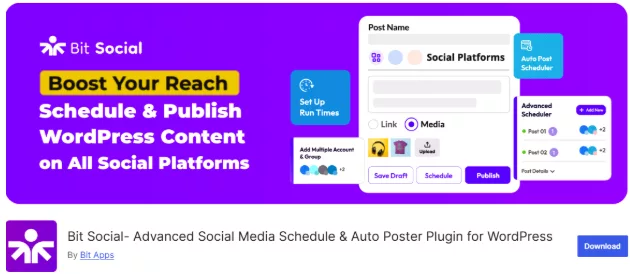
A blogging website needs consistency to boost engagement on its site. Plus, you need to post blogs on multiple social media platforms to generate traffic. With a social media sharing plugin like Bit Social, you can schedule and share your WordPress posts automatically. Also, with its “Share Now” feature, you can auto-post to different social media accounts without having to log in to each account separately.
This plugin’s free version allows you to make unlimited auto-posts on a Facebook page and a LinkedIn profile. You can schedule these auto-posts for 1 day with a feature image and link. Plus, this plugin allows you to schedule WP posts for one day. If you are a beginner who has no budget to spend on a free plan right now, this plugin can help you get started effectively.
Free Features:
- One Click Facebook Page and LinkedIn Profile
- Unlimited Auto Post (Only on Facebook page and LinkedIn profile)
- Instant Sharing (With a single image and link)
- Schedule Posts For One Day (With a feature image and link)
- Templates Available For WordPress and Scheduled Posts
- Free WordPress Cron Included
Rank Math – SEO Optimization Engine

Rank Math is an SEO plugin with useful tools that optimize your blog for search engines. If you are a blogger, you definitely need this plugin for search engine optimization. Usually, you manually need to do the technical SEO of any blog content. But Rank Math provides you with free SEO tools by which you can improve your content to rank higher in search engines.
In particular, Rank Math provides you with an advanced SEO analysis tool that analyzes your content and gives a score to your blog. It helps you correct the mistakes in your blog. Also, you get 18 predefined schema types that you can add to your blog without coding.
All these features are available in the free plan! So, if you want to rank your article with an effective SEO tool like Rank Math, you should definitely install this plugin.
Free Features (Key):
- Advanced SEO Analysis Tool
- 30+ Detailed SEO Tests
- SEO Analysis Score
- 18+ Pre-Defined Schema Types
- Focus Keyword

Bit Form– Multi-Step Form Builder
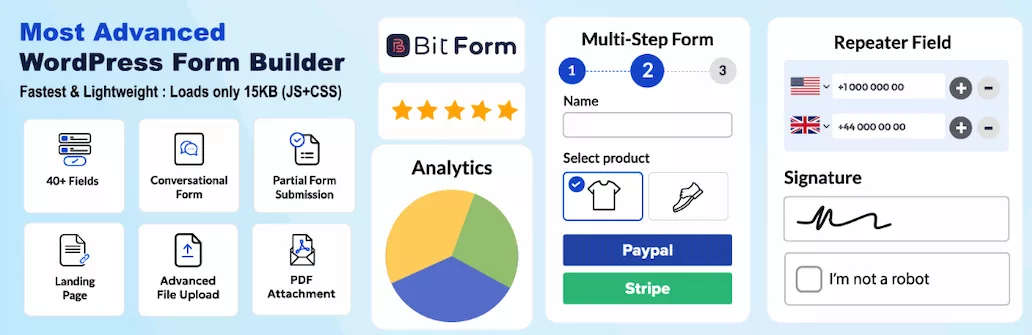
Bit Form’s free version is designed to capture leads seamlessly. With this plugin’s 40+ fields, you can create newsletter forms, event registration forms, or contact forms to generate leads effectively. Also, you can create attractive multi-step forms to collect lead information and build an email marketing list.
This plugin also offers 30+form templates, which saves you time and effort. Plus, with its 50+ integrations, you can store the form data on your favorite platform. And the conditional logic helps you create any complex workflow that streamlines your business.
With a free WordPress form plugin like Bit Form, a small to large business owner or a beginner to advanced user can benefit. So, if you want an all-in-one solution in the free plan, Bit Form is the perfect choice for you.
Free Features:
- 40+ Input Fields
- Advanced Style Editor (Individual field style)
- Advanced Conditional Logic (Free version is limited to 1 conditional logic only)
- 30+ Form Templates (6 templates pro)
- Block Spamming Features (Recaptcha v2/v3 and CloudFlare Turnstile, hCaptcha)
- Multi-Step Forms
- Repeater Field
- 50+ Integrations Without Addons
- Rating Field
- Advanced Calculation
- Image Select Option
- Piping
- 60-Column Responsive Layout
- SMTP with Test Mail Functionality
- Confirmation Messages
- Email Template
- Advance Country, Currency, Phone Number, and Dropdown Fields
WordFence Security – Firewall & Malware Scanner

WordFence Security is one of the best security plugins that gives a broad range of protection to your site. This plugin’s free version offers you firewall protection, which saves your site from malware before it reaches your website. Also, it provides a malware scanner that scans for threats in existing files. Well, you will find some limitations in the free version.
The firewall and malware scanner will warn you of threats after 30 days, which means your site will be vulnerable to threats for a month. This plugin is suitable for entry-level WordPress websites as it is less prone to threats. As a beginner, you can install this free plugin to secure your site effectively.
Free Features:
- Wordfence Firewall (Rules delayed 30 days)
- Wordfence Malware Scanner (Signatures delayed 30 days)
- Wordfence Vulnerability Scanner
- Login Protection
- Notifications and Alerts
Real Estate (Listings, Image Optimization, and Mapping Plugins)
Estatik – Map-Based Listing Plugin

Estatik is a WordPress real estate plugin designed to create agent or agency websites easily. This plugin is suitable for Real Estate business owners who want to promote their property on a customized website. With this plugin, you get built-in features, widgets, and page builders support. This plugin offers Elementor support, which allows you to build the page according to your needs.
With its features like map search, field builder, and search bar, you can create a professional property listing website. This plugin’s free version is suitable for beginners with no budget to kick-start their journey!
Free Features:
- Map Search
- CSV Import & Export via WP All Import
- Login via Facebook & Google
- Fields Builder (Limited)
- Search
- Slider
- Request Info
- Elementor Support
- Unlimited Domains/Sites
- Support (WordPress.org forum only)
- Lifetime Updates & Access to Download Area
Easy Property Listings – Grid View Listing

The Easy Property Listings is designed to create a dynamic real estate website. With this plugin, you can display listings in a responsive list and grid format. Also, you get 95+ pre-made theme templates, which saves you time to build the website from scratch.
This plugin is suitable for small to large real estate business owners to promote their listings effectively. Plus, developers can also flexibly customize this website with its easy-to-understand API, clean CSS, and modular templates.
Free Features (Key):
- 100 Ready-to-Use Theme Templates
- Supports Page Builders like Elementor, WP Bakery, and Visual Composer
- Over 150 Custom Fields, 7 Post Types (All pre-configured)
- Detailed API Documentation
- Powerful Shortcodes
- Instantly Sort Displayed Listings by Price, Date, Location
Smush – Bulk Image Compressor

Smush is an image optimization plugin that compresses images and resizes them based on your needs. While this is not a direct real estate plugin but this plugin can help you compress real estate websites’ photos. A real estate website needs big photos, which slow down your site. With this plugin, you can resize large files without making them look blurry.
Free Features (Key):
- Resize images
- Bulk Optimize and Compress Images with One Click
- Built-In Lazy Loading
- Gutenberg Block Integration
- Multisite Compatible
- Automated Optimization
Workflow Automation (Integration & Task Automation Plugins)
Bit Integrations – Integration Plugin

Bit Integrations is an integration automation plugin designed to streamline businesses’ complicated processes. This plugin offers 5 triggers and 150+ actions in its free plan. With this plugin, you can create unlimited integrations using all free triggers.
For example, you can integrate Bit Form (Trigger) with Google Sheets (Actions) to store customers’ data or build an email marketing list. Also, you can map form fields so that the CRM places the data in the exact way you want.
This is a free WordPress plugins for ecommerce business owners who don’t have heavy operations in the business and want to automate their basic workflow without any manual effort.
Free Features:
- 5 Free Triggers
- 150+ Free Actions
- Unlimited Integrations
Bit Flows – Workflow Automation Plugin

Bit Flows is a workflow automation plugin designed to automate repetitive tasks and complex workflows. With this plugin, you can create unlimited workflows with over 182 tools or platforms. A business may need to send data to different platforms or CRMs. So, this plugin provides you with multi-step workflows that create unlimited integrations and automate your business processes.
In its free version, this plugin allows you to create unlimited integrations and workflows. These features are less likely to be available in other plugin’s free versions. However, this plugin is suitable for e-commerce stores or business website owners who have complicated work processes and want to automate their workflow effectively.
Free Features:
- Router
- Multi-Step Workflows
- Unlimited Workflows
- Unlimited Tasks Execution
- Re-execute Workflows
- Notifications and Error Handling
- Preserve Flow Logs
- Dark Mode
Small business (E-Commerce, Analytics & Email Marketing Plugins)
WooCommerce – E-Commerce Automation Plugin

WooCommerce is an e-commerce plugin to customize your store according to your preference. You can use this plugin to create beautiful product pages that captivate user’s attention. Also, you can use hooks and filters to enhance the store’s functionality. This plugin is suitable for small to large business owners to provide a better user experience and streamline their business.
Free Features (Key):
- Themes suited to your brand and industry
- Optimized Shopping Cart
- Modular Product Blocks
- REST API and Webhooks
Site Kit by Google – Analytics Dashboard Insights

Site Kit by Google is an analytics tool from Google that allows you to track visitor behavior or traffic sources. With this plugin, you can learn how many people are seeing your site in search results. Also, you can keep track of how much your site is earning from AdSense. As a small business owner who opened a new website, this free tool can help you access all key metrics and insights directly on your WordPress dashboard.
Free Features:
- Easy to Understand Stats
- Quick Setup For Multiple Google Tools
- Metrics For the Entire Site
- Supported Google Tools: Search Console, Analytics, AdSense, PageSpeed Insights, and Tag Manager
MailPoet – Automated Email Sender

MailPoet is an email marketing automation plugin that helps you send and manage your email marketing campaigns. With this plugin’s free version, you can add a newsletter subscription form to your website. Also, you can send automated welcome emails. This plugin is suitable for small business owners who want to lead conversions for their business websites.
Free Features:
- Send Up To 5,000 Emails Per Month
- Send with MailPoet Sending Service
- Email and E-commerce Marketing
- Subscription Forms
- Basic Marketing Automation
- Summarized Email Engagement Statistics
E-Commerce (Sales Funnel, Checkout & Coupon Plugins)
WooCommerce – E-Commerce Plugin

WooCommerce is an e-commerce plugin for automating a store’s business processes. With this plugin, you can customize product pages according to your needs. Also, you can securely accept credit cards, bank transfers, and mobile wallets from customers.
This plugin supports 100+ payment gateways, which makes it easy to accept payments from customers who have different payment options. With its flexibility to customize the website, this plugin is suitable for E-Commerce store owners to enhance their store’s functionality.
Free Features:
- Modular Product Blicks
- 100+ Payment Gateways- Including Stripe, PayPal, And Square
- Robust REST API and Webhooks
- More Than 800 Official Extensions
CartFlows – Optimized Checkout Pages

CartFlows is a WooCommerce Checkout plugin designed to increase your conversion rates. If you are a new e-commerce store owner, you want to generate revenue quickly. With this plugin’s free version, you can make checkout carts with pre-designed templates. Also, you can customize the checkout field according to your needs. This plugin is highly suitable for turning your prospects into conversions with this plugin’s modern checkout page.
Free Features (Key):
- One Column Checkout
- Two Column Checkout
- Store Checkout
- Free Funnel Templates
- Customize Fields
- Payment Gateway: Stripe and PayPal
Advanced Coupons for WooCommerce – Cart Condition Coupons

The Advanced Coupons for WooCommerce is designed to offer BOGO deals, irl coupons, cart conditions, etc, so that you can market your e-commerce store better. This plugin also protects against accidental discounts via Cart Conditions. As a beginner, if you want to market your store effectively, you can use this plugin.
Free Features (Key):
- 100s of Coupon Templates
- Grant Customers WooCommerce Store Credit
- Send Coupons Quickly via Email or Push Notifications
- Apply Coupons with a URL easily
WPLoyalty – Points and Rewards for WooCommerce

WPLoyalty Free Version makes it easy to reward customers and encourage repeat purchases in your WooCommerce store. You can create simple loyalty campaigns, offer flexible rewards, and track how customers engage with your store. It’s a great starting point for building long-term customer loyalty without extra complexity.
Free Version Highlights
- Create points campaigns for purchases, sign-ups, referrals, reviews, birthdays, and more
- Build a tiered loyalty program to reward your most valuable customers
- Let customers redeem points as discount coupons
- Track points, rewards, and repeat purchases from a single dashboard
- Send automatic notifications for earned and expiring points
- Import or export customers when switching loyalty systems
- Support multi-lingual and multi-currency WooCommerce stores
Education & Online Courses
LearnPress – Quiz-Ready Course Builder

LearnPress is an LMS plugin for course creators to create courses easily. This plugin allows you to create a course curriculum with lessons and quizzes. Also, you get free add-ons for this LMS plugin. You can add courses to a wishlist for students or review courses for enrolled students. This plugin is suitable for new online course creators who want to communicate the course with students effectively.
Free Features (Key):
- Watch Statistics About The Number of Students or Trends
- Supported Billing Methods: PayPal, WooCommerce, Stripe, etc
- Free Add-Ons
- Monetize Online Courses
Tutor LMS – Interactive Course Platform

Tutor LMS plugin is a free course creator plugin that allows you to create unlimited courses. With this plugin, you can create quizzes, interactive lessons, and generate reports. This plugin also supports integrations like WooCommerce, Elementor, Divi, etc. As a beginner, you can use this plugin to create effective courses.
Free Features:
- Unlimited Courses
- Native Video, YouTube, and Vimeo Video Support
- Course Filtering Options
- Public Courses
- Unlimited Students and Integrators
- Unlimited Quizzes
Membership & Community Sites – (Access Control & Social Plugins)
Paid Memberships Pro – Tiered Subscription Access

Paid Membership Pro is a free plugin that allows you to design different membership tiers with different settings. With this plugin, you can set up recurring subscriptions for monthly, yearly, or custom billing cycles. You can use this plugin to control your website’s membership content effectively.
Free Features (Key):
- Membership Tiers (Access Levels, Pricing Options, and Exclusive Benefits)
- Payment gateways: Stripe and PayPal
- Offer Promotions and Discounts
- Track Member Activity
BuddyPress – Profile & Group Creator

BuddyPress is a social networking plugin designed to create user profiles and build social connections. This plugin is built to increase user interaction and build a community. With this plugin, you can have private conversations and interact in groups. If you are a business website owner and want to leverage your marketing strategy, you can install this plugin.
Free Features:
- Robust Theme Compatibility API
- Create Groups
- Create User Profiles
- Messaging
Event Management – (Event Scheduling & Registration Plugins)
Events Manager – Booking & Ticket Manager

Events Manager is an event management plugin that enhances your site with a full-featured event calendar, bookings, and registration forms. With this plugin, you can easily create custom event attributes. This plugin is suitable for people who frequently host events or seminars.
Free Features (Key):
- Easy Event Registration
- Bookings Management
- Multiple Tickets
- Recurring and Long Event Registration
- Calendars, Search Pages, Lists, Grids, and Booking Forms
The EventsCalendar – Map-Enabled Event Listings

The EventsCalendar plugin is designed to create and manage events on your WordPress site. This plugin offers Google Maps, event list view, and upcoming events list to provide a better user experience. You can use this plugin to manage your in-person or virtual events with a wide range of features.
Free Features:
- Saved Venues & Organizers
- Event Search
- Events Taxonomies
- Block Editor Support
- Google Calendar and iCal Exporting
Portfolio & Freelance Sites
Portfolio Gallery – (Portfolio Display & Page Builder Plugins)

Portfolio Gallery is designed to create beautiful portfolios for your WordPress websites. With this plugin, you can get a responsive Bootstrap image lightbox. Also, the Portfolio Gallery provides a multiple-column layout, which enhances the look of the gallery. As a beginner, you can use this plugin to create an attractive portfolio gallery for your website.
Free Features:
- Filters
- Bootstrap Lightbox
- Numbering on Images
- Show image Title
- Grayscale Effect
Elementor –Drag & Drop Editor

The Elementor plugin is a page builder plugin that allows you to create a portfolio page for your WordPress site. This plugin provides an intuitive drag-and-drop builder and a template library, which helps you make instant setups. So, if you want to make a professional portfolio page with no budget, this plugin is the right choice for you.
Free Features:
- Intuitive Drag & Drop Builder
- Advanced Widgets
- Responsive Design
- CSS Transform
- Template Library
- Pixel-Perfect Design Tools
Food & Recipe Blogs – (Recipe Card & Formatting Plugins)
Recipe Card Blocks – Nutrition Facts Blocks

Recipe Card Blocks allows you to create beautiful recipe cards on your WordPress site. This plugin provides blocks that help you create attractive recipe cards. With this plugin, you get the following blocks: Recipe Card, Recipe Details, Ingredients, Directions, Nutrition Facts, and Recipe Widget for Elementor.
As a beginner, this plugin is suitable for new food and recipe blog websites that want to boost traffic to their site with no budget.
Free Features:
- Elementor Support
- Gutenberg-ready
- GDPR Compliant
- Recipe Shortcode
- Works with Any Theme
- Video Integration
WP Recipe Maker – Schema-Optimized Recipes

WP Recipe Maker is a recipe plugin that allows you to add recipes to your WordPress posts. With this plugin, you can add photos and videos to any step of the recipe. Also, this plugin includes an Elementor block that helps you enhance the recipe card visually. This plugin is suitable for small to large food and recipe blogging websites.
Free Features:
- Compatible with Classic Editor and new Gutenberg Editor
- Google AMP Compatible
- Integrates Recipe Metadata with Yoast SEO and Rank Math Schema Graph
- Include a Recipe Video in the Template and Metadata
- Fully Responsive Plugin
Nonprofit & Fundraising – (Donation & Charity Plugins)
GiveWP – Custom Donation Forms

GiveWP is a free donation plugin for WordPress that allows you to accept online donations. With this plugin, you can see donor data and fundraising reports. You can also manage donors. This plugin is suitable for non-profit websites that want campaign-based fundraising to accept donations.
Free Features:
- Create Multiple Campaigns
- Customizable Donation Forms
- Organized Fundraising
- Dedicated Landing Pages
- Visibility Controls
Charitable -Set Up Fundraising

Charitable is a WordPress donation plugin that allows you to create beautiful fundraising campaigns with donation forms. This plugin accepts donations from Stripe, Square, and PayPal. Also, with this plugin, you can create a donation form with pre-built templates. If you have a new non-profit organization website, this plugin can help you get started.
Free Features:
- Customize Donate Buttons
- Create Unlimited Fundraising Campaigns
- Set Fundraising Goals
- Accept One-Time and Recurring Donations
Must-Have Free WordPress Plugins (My Top Picks)
Out of all WordPress free plugins, I have my favourites which provide better efficiency and performance to websites. Check them out below:
- Bit Form
- RankMath
- Bit Social
- Bit Integrations
- Elementor
- Wordfence Security
- WooCommerce
- WP Super Cache
- UpdraftPlus
- Smush
- Ninja Tables
Bit Form :This plugin is ideal for bloggers and e-commerce website owners to create beautiful forms and capture leads. With this plugin, blogging websites can create newsletter forms, event registration forms, and many other types of forms. And, you can also send data to popular platforms for automating workflow.
RankMath: RankMath is the perfect plugin for bloggers for SEO automation. You can improve your search engine rankings with this plugin. Plus, this plugin helps you boost traffic to your site. As a beginner, you can use this plugin’s free version to improve your blogs.
Bit Social: Bit Social is a social media scheduler and auto-poster plugin suitable for social media marketers or bloggers to increase traffic on their website. With this plugin, you can post on time to WordPress. Also, you can auto-post to social media when your audience is most active. As a beginner, this free WordPress plugins for bloggers can bring engagement to your blogs.
Bit Integrations: This plugin is suitable for business websites, e-commerce owners, and bloggers who want to automate their repetitive tasks. With this plugin, you can transfer data to different platforms or CRM. Also, this plugin offers 5 triggers and 150+ actions in the free version, which is less likely to be available in other free plans. If you are a beginner, you can use this plugin to kick-start your journey.
Elementor: Elementor is a page builder plugin ideal for developers or e-commerce businesses to build website pages and enhance a site’s visuals. If you want to provide a better user experience to customers, using this plugin’s free version can definitely help you succeed.
Wordfence Security: Wordfence Security is ideal for beginners to protect your site from malware and viruses. With this plugin’s firewall protection, you get threat warnings just after a month – So you can save your site from attacks beforehand. However, as a beginner with no budget, you can install this plugin and get the most benefit.
WooCommerce: As an e-commerce business owner, you should definitely install this ecommerce plugin. With this plugin, you can manage several orders, track inventory, or customize your site beautifully. So, no more limitations on creating a perfect e-commerce website. You can install this plugin to customize the store’s each detail.
WP Super Cache: WP Super Cache generates static HTML files every time a visitor comes to your website. So, instead of serving customers with heavy scripts, this cache plugin creates duplicate pages that allow the page to load faster. So, if you want to provide customers a better user experience when they visit your site, this plugin is the right choice.
UpdraftPlus: UpdraftPlus is a backup and migration plugin designed to restore your site’s database. With this plugin, you can easily migrate the website’s data to another web host or domain. So, when your site gets hacked, you won’t have to lose your site. This plugin will restore your site in just a few clicks.
Smush: If you have a real estate website, an image optimization plugin is a must-have. This plugin allows you to resize the big photos and prevent your site from slowing down. Also, an e-commerce store owner can also use this plugin to compress high-resolution images. It helps the site improve rankings and page load time.
Ninja Tables: Ninja Tables is a WordPress table plugin that helps you create any sort of table quickly without using a single code. With this plugin, you can add unlimited data, use pre-made templates, and customize the table’s design. If you want to show table comparisons on your blogs, this plugin can help you make beautiful tables within just minutes.
Wrapping Up
As a beginner, you must install efficient, safe, and secure plugins on your website. However, it is challenging to find free plugins that provide value or security to your site. That’s why I have suggested to you some of top best WordPress free plugins that are effective and secure.
You can choose Bit Social as a blogger to automate your posts. Besides, Rank Math is a great choice for improving SEO on your blogs. Also, if you need to automate a complex workflow, you can choose Bit Flows. For basic automation, Bit Integration is the right choice for you.
FAQs
Are free WordPress plugins actually safe to use?
Most free plugins available in the official WordPress repository are thoroughly reviewed for security and performance. However, always check reviews, ratings, the last update date, and number of active installations for added peace of mind.
How do I know if a plugin is compatible with my WordPress version or theme?
Before installing a plugin, check the plugin’s page for compatibility details. The WordPress plugin repository clearly indicates compatibility with different WordPress versions and often lists known conflicts with popular themes.
Will installing too many plugins slow down my website?
It depends. More important than the number of plugins is the quality. Lightweight, well-coded plugins typically have minimal impact, while poorly-coded plugins can noticeably reduce speed and performance.
Which plugins help bloggers improve SEO for free?
Yoast SEO, Rank Math, and All in One SEO Pack are excellent free SEO plugins popular among bloggers. They help with optimizing keywords, creating sitemaps, and improving readability scores.
Are there free plugins specifically for displaying property listings?
Yes, plugins like Essential Real Estate, Estatik, and WP Real Estate offer robust property management, listings display, and customization options entirely for free.
Which free plugins help automate routine WordPress tasks?
Plugins like WP Crontrol, Uncanny Automator (free tier), Bit Integrations (free tier), and WP Scheduled Posts are great for automating content publishing, task scheduling, and connecting various tools without coding.
What are the best free WordPress plugins for small business websites?
Plugins like WPForms (for contact forms), MonsterInsights (for analytics), Wordfence Security, and WP Super Cache can significantly enhance security, performance, and engagement—all without added costs.
Can I run a fully functional online store using only free WordPress plugins?
Yes! WooCommerce is entirely free and provides comprehensive e-commerce functionality. You can extend it further using free add-ons like WooCommerce Stripe Gateway, WooCommerce Coupons, and WooCommerce Blocks.
Can I create online courses using free WordPress plugins?
Absolutely! LearnPress, Tutor LMS, and Sensei LMS offer robust solutions allowing you to create courses, quizzes, and even certificates without spending anything upfront.
Is there a reliable free plugin for creating membership or community websites?
Yes, plugins like Ultimate Member, Paid Memberships Pro (free tier), and BuddyPress are popular, trusted options that offer significant features to manage memberships and online communities.
Can I manage events and bookings entirely for free on WordPress?
Definitely! The Events Calendar, Amelia Lite, and WP Simple Booking Calendar offer excellent free solutions to manage events, bookings, and reservations easily.
Which free plugins are ideal for building portfolio websites?
Plugins like Elementor (free page builder), Envira Gallery Lite, and WP Portfolio make it easy to create elegant, professional portfolios to showcase your work and skills.
Are there any specific plugins food bloggers should use for recipes?
Yes! Plugins like WP Recipe Maker, Recipe Card Blocks by WPZOOM, and Delicious Recipes offer attractive recipe cards, SEO-friendly markup, and integration with platforms like Pinterest and Google.
Can nonprofits use WordPress plugins to manage fundraising campaigns effectively for free?
Yes! GiveWP Donation Plugin, Charitable, and PayPal Donations offer comprehensive donation collection, fundraising management, and donor tracking without initial fees.
What should I do if a plugin breaks my site after activation?
If a plugin breaks your website, first deactivate it immediately from the WordPress admin dashboard. If that’s not accessible, disable it manually via FTP by renaming or deleting its folder within the plugins directory (wp-content/plugins). Afterward, contact the plugin developer or search community forums for troubleshooting.
How do I check if a plugin slows down my website?
Use performance-testing plugins like Query Monitor or online tools such as Google PageSpeed Insights or GTmetrix. Run tests before and after plugin activation to identify performance impacts.
Are there free plugins for automatic WordPress backups?
Yes! Popular free backup plugins include UpdraftPlus, BackWPup, and WPvivid Backup Plugin, each offering scheduled automatic backups and easy restore options.
How often should I update my WordPress plugins?
It’s advisable to update plugins as soon as new versions become available to enhance security and functionality. Always perform a backup before significant updates, especially for crucial plugins.

Related Blog
Best Beginner-Friendly WordPress Contact Form Plugins in 2026

Best AI Plugins for WordPress: Scale Your Business Fast in 2026