Forms are a great way to collect lead information and grow any business. However, longer forms often scare visitors away.
That’s where conditional logic in forms makes sense. They make forms shorter and less confusing, encouraging users to complete them. Did you know that conditional logic in forms is one of the most impactful techniques for boosting conversions? Multi-step form with conditional logic 2X your form completion rate, which is quite impressive.
When your form shows only the fields a user needs, the form feels simple. This is not just about hiding fields. It’s about creating smarter forms that respond to each visitor’s action. And that significantly boosts form conversions and reduces drop-off.
Moving on, this guide will briefly discuss how conditional logic forms improve user satisfaction and boost conversion rate.
Basically, conditional logic forms are dynamic forms that change every time the user gives input. Instead of showing every question at once, WordPress forms with conditional logic adapt in real time. As a user interacts, fields show or hide based on the choices they make. This makes forms feel shorter, more personal, and easier to complete.
Imagine you are filling out a form. The first question it asks:
“Are you signing up as a Personal user or a Business user?”
If users choose “Business”, the form shows extra fields like:
But if you choose “Personal”, those fields stay hidden, and other fields relevant to the category appear.
All these are due to conditional logic in forms. It shows only the fields that matter based on your answer.
This makes the form feel smart and more relevant. That reduces friction and confusion, and increases the probability of completing the form.
In a regular form, all fields are visible all the time. That’s why they appear too complex for users. Users might see questions that are not relevant or don’t concern them. Long forms like that often cause people to leave before finishing.
Whereas in WordPress, conditional logic forms adapt to each user’s path. It instantly responds to choices and displays only what’s needed. This improves the user experience and helps reduce form abandonment.
| Feature | Regular Forms | WordPress Forms with Conditional Logic |
| Number of fields | Remains the same for everyone | Changes based on user input |
| User Experience | Form seems lengthy, and users feel confused and | More organized and faster |
| Time to complete | Takes more time | Takes less time |
| Form Interaction | Lower due to unnecessary fields | Higher |
| Abandonment rate | High | Very low compared to regular forms |
| Completion rate | Lower | Higher compared to regular forms |
| Conversion rate | Lower | Higher compared to regular forms |
Now, that’s a relevant question! But if you think normally, answer me: would you fill out a form that has too many fields? Obviously, NO, since filling a long, sophisticated form is not just boring but also time-consuming.
It immediately clicks the user’s mind when they see WordPress forms with conditional logic. Because conditional logic hides unnecessary questions, users are less likely to feel frustrated or confused. They don’t have to scroll through long lists of fields. The form feels shorter and easier to complete. Ultimately, form interaction increases.
If we particularly point out the benefits of WordPress forms with conditional logic, it provides a smoother user experience. As you make the forms simpler with conditional logic, it instantly becomes user-friendly. Eventually, the form completion rate increases automatically, leading to a reduction in form abandonment.
Another notable advantage of conditional logic forms is that you can collect valuable lead data and route it to other CRM platforms without any complexity.
Now the question is, how to add conditional logic in forms? Well, there’s nothing to worry about; we have a separate blog for this. Check it out.
Remember that, by adding too many fields, you make your form complicated. This increases the probability of form abandonment. Studies show that reducing form fields from 11 to 4 increases form completion rate by 120%.
So, try creating forms with conditional logic and remove all the fields that are irrelevant to users.
Don’t make people scroll up to answer a question that just appeared. If someone picks “Business Customer,” show business fields immediately below that choice. Just the way Bit Form does here, when the “Intern” option is selected, the related conditional fields instantly appear below.

Keep the flow natural since logical order prevents confusion.
If a hidden field becomes required when it appears, mark it with an asterisk, as Bit Form does in the above example. Don’t assume people will know it’s mandatory. Clear labels prevent form errors and frustrated users who think they’re done but can’t submit.
Write conditions as “If email is selected” instead of “If email is not unselected.” As, positive statements are clearer and easier to debug.
If three fields always show together when a particular option is selected, treat them as a group. In Bit Form, you get to set those related fields under a single section.
For example, in this job application form, when the “Developer” option is selected, → All the Programming Languages, GitHub link, and years of experience fields are shown at the same time under the Developer fields.
Other fields for the Designer and Intern options stay hidden.

Your WordPress conditional logic forms should provide analytics. So that you could trace which fields are causing friction. With this data, you can optimize your form to capture more engagement and reduce abandonment.
Take the example of Bit Form’s “View Analytics Report”. This option gives a full overview of your form performance. You can view how many candidates submitted the form, which dates received the maximum submissions, and other key metrics.

Bit Form also has an “Advanced field-wise report” feature. For example, in this job application form, if you notice Intern position got the most applications. You can view this data in different chart view like bar charts or pie charts.

To maximize form conversions and user experience, a conditional logic form plugin should include several key features:
Key features:
Design & Customization:
Third-party Integrations:
Analytics:
Pricing:
If you’re looking for the best form builder plugin within budget to create WordPress conditional logic forms, then Bit Form is the plugin you need. It’s more than just a form builder. It’s a modern, user-friendly builder that adapts to what your users choose and helps you collect better information.
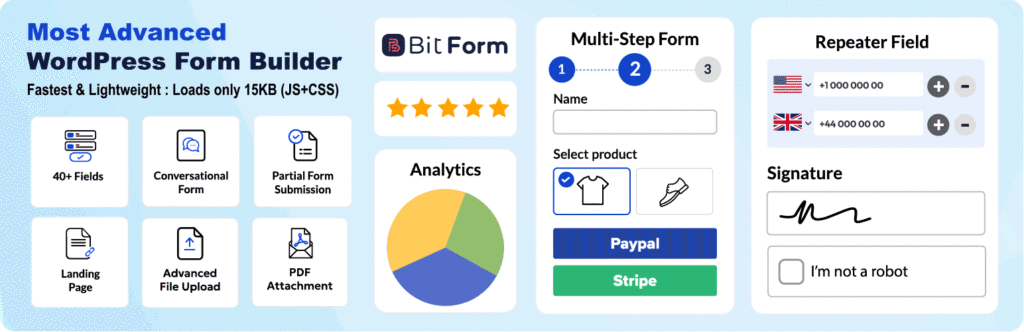
Bit Form combines a powerful drag-and-drop builder with advanced capabilities made for real users, not developers. You don’t need any coding skills to build complex forms that show or hide fields based on user answers.
It supports all the must-have features mentioned above:
• A flexible drag and drop builder with over 50+ field types, starting from dropdowns to file uploads and signatures.
• Nested conditional logic and advanced actions like redirects, email notifications, and webhooks triggered by user responses.
• Multi-step and conversational form layouts that keep users engaged.
• Built-in payment fields that integrate with PayPal, Stripe, Razorpay, Mollie, and more.
Design and customization are easy with Bit Form’s advanced style editor. You can match forms to your branding without extra tools or CSS knowledge.
But Bit Form doesn’t stop at creating advanced forms. It also gives you insights that help you improve over time:
• Detailed analytics to track performance and submission trends.
• Powerful customizable form templates to get started faster.
• Partial submission tracking so you never lose valuable data even when users leave forms halfway.
Plus, Bit Form integrates smoothly with 51+ popular platforms, making it easier to route leads, trigger workflows, and automate follow-ups based on user choices, all without complex setup.
In short, if you want a value-for-money WordPress form builder plugin with conditional logic, Bit Form delivers everything you need and more.
By now, you know conditional logic isn’t just a nice feature to have. It’s the difference between forms people finish and forms people abandon.
Here’s the hard truth: if your form takes over 30 seconds to complete, you’re already losing people. Complex forms like multi-step forms become conversion killers without conditional logic.
Think about it. Your entire business depends on one thing: satisfied customers. And a clean form experience is part of that satisfaction.
Conditional logic in forms gives you three things you can’t afford to miss:
✓ Cleaner, more organized form experience
✓ Higher completion rates
✓ Better quality data from every submission
The choice is yours. Regular forms or Smarter conditional logic in forms?
What’s the wait for? Create your first WordPress conditional logic form with Bit Form today. Free to start.
Conditional logic in forms is a feature that shows/hides specific fields based on user responses. For example, if someone selects “Business” as their customer type, the form displays business-related questions and hides other irrelevant fields. This gives users a dynamic, personalized form experience, which boosts their satisfaction.
Conditional logic in forms boosts completion rates by up to 53%. It reduces form length, eliminates user confusion, and improves data quality by collecting information that actually applies to each respondent. Users get a cleaner experience, businesses get better conversions, and everyone saves time.
Yes, conditional logic works in any type of form, whether it’s simple contact forms or multi-step forms like job application forms.
Conditional logic reduces form abandonment by eliminating irrelevant fields that cause frustration and cognitive overload. When users see only 4-5 relevant fields instead of 10 total questions, completion becomes faster and easier.







 EN
EN  ES
ES  DE
DE