EN
EN  ES
ES  DE
DE  PT
PT  IT
IT  JA
JA  ID
ID Is Bit Form Pro Worth It? A Feature-by-Feature Breakdown
WordPress form plugins can become expensive very quickly. You start with a simple form, then find that conditional logic, payments, signatures, PDFs, partial submissions, user registration, advanced integrations, or better design controls need a higher plan or another add-on. The first-year price may look affordable, but renewal can cost much more. As your forms grow, the cost and limitations grow with them.
That is why the real question is not just “Can this plugin build my form?” It is “Will it still give me the features I need when my forms become more important to my business?” That is the question behind “Is Bit Form Pro worth it?”
Bit Form handles this very well. Its free version already includes features that many form builders reserve for paid plans, while every paid Bit Form plan unlocks the complete Pro feature set. You do not have to keep moving to a higher paid tier just because you need another advanced feature.
For businesses, freelancers, and agencies that want one form builder they can keep using as their needs grow, that is where Bit Form Pro becomes a very strong choice
Quick Answer: Is Bit Form Pro Worth It?
Yes. If you are choosing Bit Form for a business website, client project, or workflow that needs room to grow, Bit Form Pro is a strong-value upgrade.
What makes that answer more convincing is how much Bit Form already gives away for free. The free version includes unlimited forms and submissions, multi-step forms, basic conditional logic, 38+ fields, email notifications, spam protection, and access to 53+ integrations. Many form builders reserve part of that functionality for paid plans.
So upgrading to Pro is not about paying just to make Bit Form useful. It is about unlocking the advanced business layer on top of an already capable free foundation. That includes payments, PDF generation, signatures, form abandonment, front-end entry viewing and editing, standalone landing forms, advanced conditional workflows, WordPress user registration, submission restrictions, custom CSS and JavaScript, and other features that become important as forms take on a bigger role in the business.
Because every paid Bit Form plan includes the full Pro feature set, you do not have to keep moving through higher feature tiers as your requirements grow. That makes Pro especially attractive if you already know the form will be used for lead handling, payments, onboarding, applications, customer workflows, automation, or client projects.
You can see the exact current differences on the Bit Form Free vs Pro comparison.
What Makes Bit Form Pro Different?
Most established form builders can create contact forms, payment forms, surveys, registrations, and multi-step forms. The difference is usually not whether a feature exists somewhere in the ecosystem. The difference is which plan unlocks it, whether another add-on is needed, and what the long-term license costs.
Bit Form Pro keeps that decision simple: choose a one-site or unlimited-site license, then get the full Pro feature set. You are not choosing between a Basic, Plus, Pro, and Elite feature matrix just to find the combination you need.
That matters more as your site grows. A form that starts as a lead form can later need payment collection, conditional email routing, PDF documents, entry editing, automation, user registration, or partial submission recovery. With Bit Form Pro, you do not have to rebuild the form around a new license tier every time the workflow becomes more advanced.
Bit Form Pro Features: A Practical Breakdown
1. A Modern Drag-and-Drop Builder With 50+ Fields
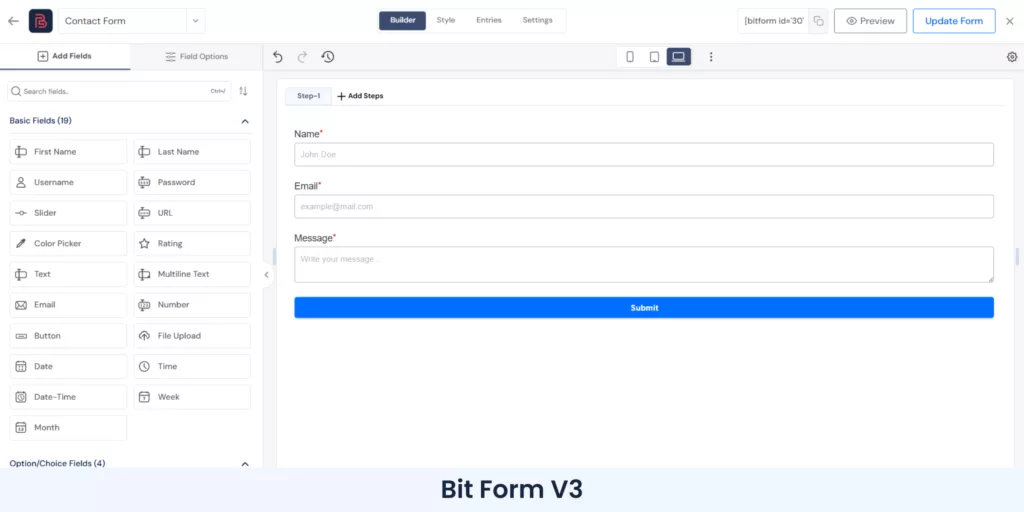
Bit Form V3 rebuilt the form-building experience around a cleaner dashboard, organized field categories, responsive previews, faster navigation, and more direct access to field settings. If you have used older WordPress form builders with long sidebars and settings scattered across multiple screens, the difference is noticeable.
The builder is visual, but it is not limited to simple forms. You can work with multi-column layouts, nested sections, responsive breakpoints, conditional behavior, advanced validation, and reusable styling without turning the form into a custom development project.

For a closer look at the current interface, see what changed in Bit Form V3.
2. Advanced Conditional Logic Without Turning the Form Into a Puzzle
Conditional logic is where many “simple” forms become business tools.
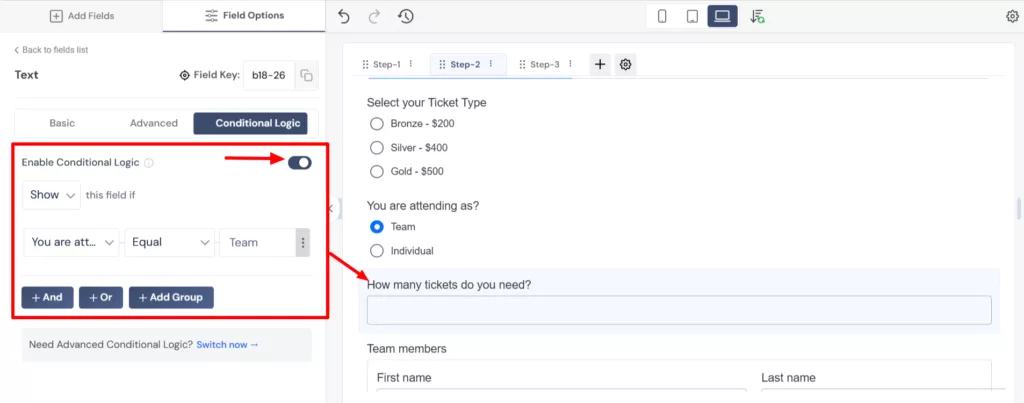
Bit Form can show or hide fields based on answers, change behavior as users interact with the form, and run actions when a form loads, a field changes, or a submission is created or updated. You can also apply conditions to confirmations, redirects, email notifications, integrations, and other actions.
For example, a service request form can:
- Show different questions based on the selected service.
- Send sales leads to one team and support requests to another.
- Redirect qualified leads to a booking page.
- Save an entry as a draft after an email address is entered.
- Trigger a CRM integration only when specific conditions are met.
Basic show/hide conditional logic remains available in Bit Form Free. Pro is the better fit when you need deeper rules and more complex workflows. The V3.2 update also simplified how standard actions work so you only need conditional logic when an action should run for specific submissions.

3. Multi-Step Forms That Can Actually Handle Long Workflows
A multi-step form should do more than split fields across screens. Long applications and onboarding forms need progress indicators, validation between steps, history, clear navigation, and a way to avoid losing progress.
Bit Form Pro adds controls for step headers, icons, labels, subtitles, previous and next buttons, progress styles, step numbers, percentages, step validation, history, switchable headers, and saved progress.
This makes it suitable for job applications, onboarding, enrollment, detailed quote requests, loan forms, client intake, assessments, and other forms where dumping every field onto one page would hurt completion rates.

See the Bit Form multi-step form guide for the full setup options.
4. Conversational Forms and Standalone Landing Forms
Some forms work better when the user sees one question at a time. Bit Form’s conversational mode supports a welcome screen, step-by-step interaction, progress controls, navigation buttons, auto-advance behavior, scroll navigation, layout choices, typography, colors, borders, and other theme settings.
You can also publish a form as a standalone form page with its own URL, page title, background, and wrapper styling. That is useful for campaigns, lead magnets, surveys, applications, or ad traffic when you want the form to be the entire experience instead of placing it inside a normal WordPress page.

5. Styling Control That Does Not Stop at “Choose a Color”
Customization is one of the places where form builders can become frustrating. A builder may let you change a button color, but matching the rest of the site still requires custom CSS.
Bit Form includes a visual style editor with global and individual element controls. You can work with the form container, field containers, labels, inputs, buttons, spacing, borders, backgrounds, typography, hover states, focus states, responsive layouts, themes, and device-specific previews. Pro also gives you custom CSS and JavaScript when the visual controls are not enough.
This is useful for agencies because the same form engine can fit very different client designs without installing another styling add-on.
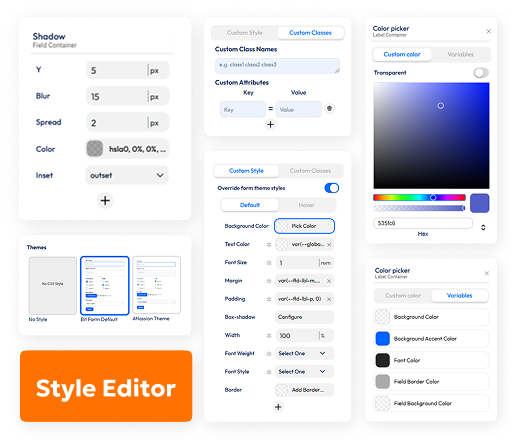
6. Front-End View and Edit Turns Form Entries Into a User Workflow
This is one of Bit Form Pro’s most practical differentiators.
Many forms are not finished when the user clicks Submit. A customer may need to update an address. A student may need to correct an application. A member may need to maintain profile information. A client may need to revise submitted project details.
Bit Form Pro can display submitted entries on the front end and let authorized users view or edit them without giving access to wp-admin. You can control who can view their own entries, who can view other users’ entries, who can edit their own entries, and who can edit other users’ entries.
You can also build Data Views with custom columns, action buttons, entry detail views, and separate edit flows.
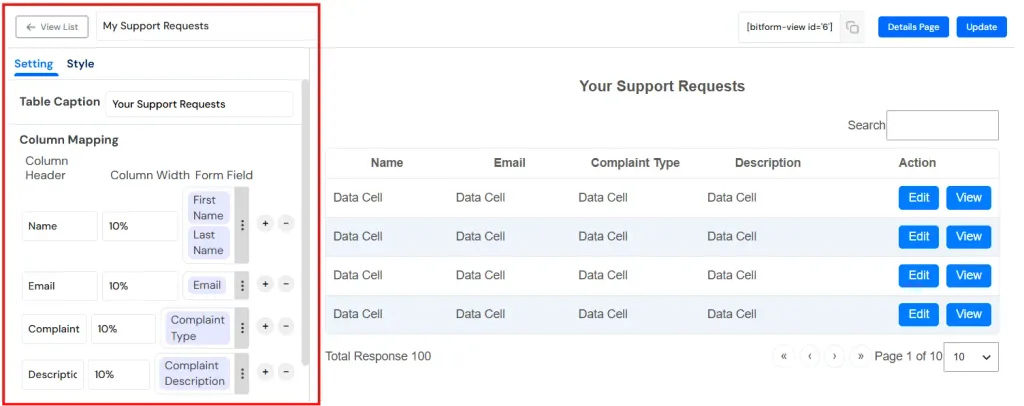
If this is important to your project, read the full guide on letting users edit their own form submissions from the front end.
7. Form Abandonment, Save Draft, and Resume Later
Long forms lose leads when users get interrupted, need more information, or simply do not have time to finish.
Bit Form Pro can save partial entries, add a Save Draft button, repopulate previous data, and conditionally save progress after useful information such as an email address has been entered. You can also control whether abandoned entries should always be saved or only when an email address or phone number is available.
That turns form abandonment from an invisible loss into data you may be able to recover.

The Form Abandonment documentation covers the save-and-resume options in detail.
8. Payments Without a Separate Form-Commerce Stack
Bit Form Pro supports payment fields for PayPal, Stripe, Razorpay, and Mollie. You can use them for order forms, service payments, donations, registration fees, deposits, paid applications, or other form-based transactions.
The payment fields live inside the same builder as your normal fields, conditions, emails, confirmations, and integrations. That means a single form can collect customer information, calculate values, take payment, send notifications, and pass the result to another system.
Bit Form also includes Currency fields and calculation features for totals, prices, scores, loan estimates, BMI, VAT, fuel costs, mortgage calculations, and other formula-based forms.

See the Bit Form payment form features for supported gateways and examples.
9. PDF Generation, Email Attachments, and Better Post-Submission Documents
For an application, order, agreement, quote, registration, or consent form, the submission often needs to become a document.
Bit Form Pro can generate PDFs from submitted data and attach them to emails. PDF templates support form data and smart tags, file naming, fonts, page settings, headers, footers, watermarks, password protection, and downloadable links.

This becomes especially useful when paired with the Signature field. A consent workflow, for example, can collect the user’s information, agreement, signature, and signing date, then generate a record from the submission. The guide on creating a digital consent form with a signature shows one practical use case.
10. Email Notifications, Conditional Routing, Double Opt-In, and Email OTP
Email is not treated as a single “send admin notification” checkbox.
You can create multiple email templates, map submitted data, add attachments, use smart tags, configure recipients, CC/BCC, reply-to addresses, and route emails conditionally based on form values. Bit Form also includes SMTP settings inside the plugin.

For verification-sensitive flows, Pro adds Double Opt-In and Email OTP capabilities. These are useful for newsletter signup, account verification, lead validation, and workflows where you want stronger confidence that the submitted email address belongs to the user.
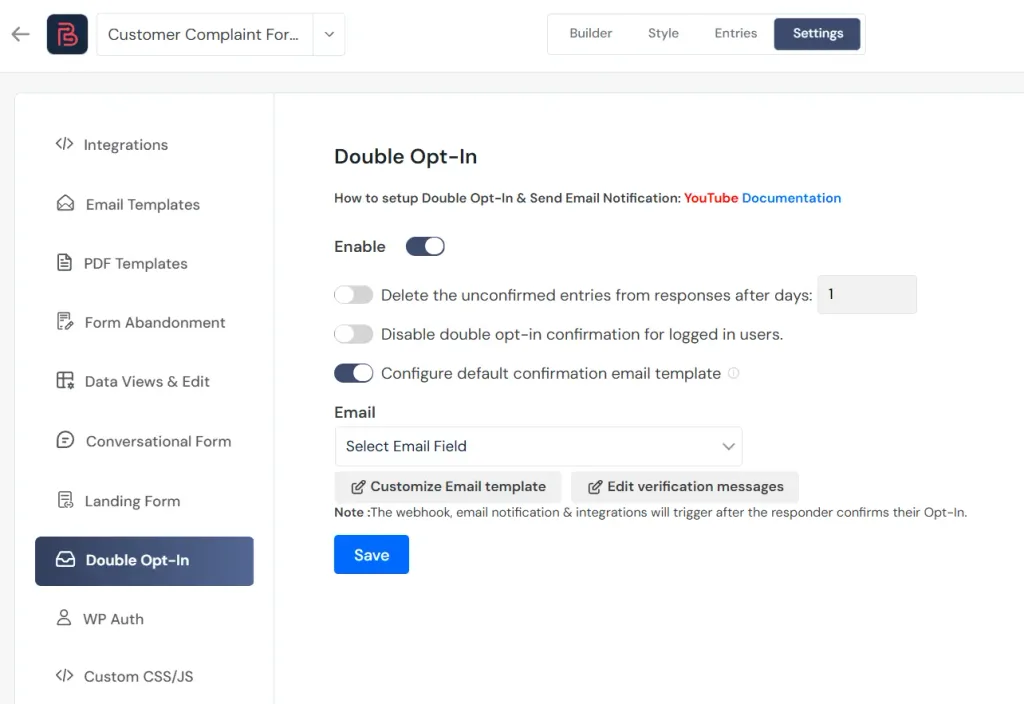
11. User Registration, Login Workflows, CPT, and WordPress Data
Bit Form Pro can go beyond storing entries in its own response table.
WordPress Auth features support registration, login, forgot-password, and reset-password workflows. You can create user-facing account forms without relying on the default WordPress login experience.

Bit Form also works with Custom Post Types and data tools such as ACF, Meta Box, and Pods. That opens the door to front-end content submission, directories, listings, applications, internal tools, and other workflows where submitted form data needs to become structured WordPress content.

12. Entry Management, Reporting, Filtering, and Export
Collecting data is only useful if you can work with it afterward.
Bit Form stores responses in an entries area where you can choose visible fields, inspect individual submissions, manage status, review related information, and export data. Export options include formats such as CSV, XLSX, XLS, ODS, HTML, text, and others, with control over sorting and selected fields.
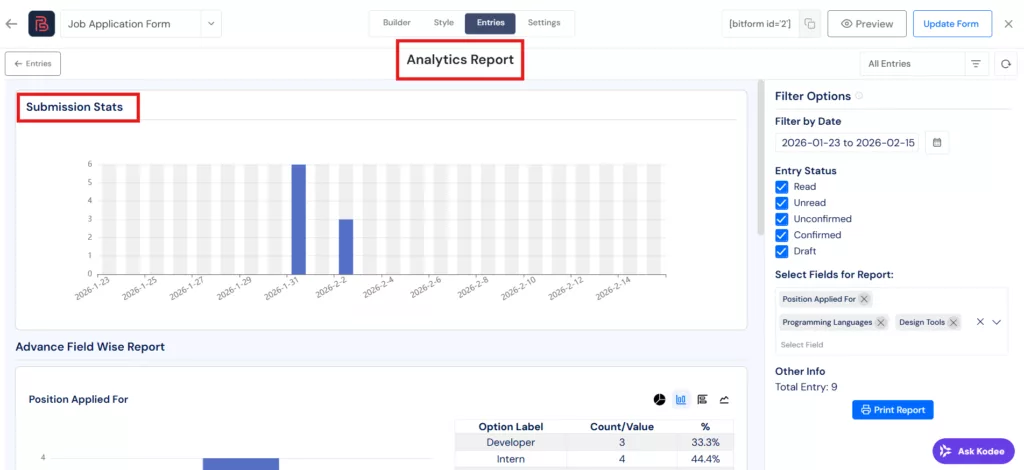
Pro also supports saved response filters and reporting workflows. See the response management documentation for the available entry tools.
13. Spam Protection, Submission Restrictions, and Access Control
A serious form builder also needs controls for the submissions you do not want.
Bit Form supports Google reCAPTCHA, hCaptcha, Cloudflare Turnstile, honeypot protection, login requirements, entry limits, per-user limits, IP controls, date restrictions, day restrictions, time restrictions, unique-value checks, and custom validation messages.

This is useful for limited registrations, one-entry applications, private forms, gated forms, time-sensitive campaigns, and forms where duplicate or automated submissions create real operational problems.

14. API, Webhooks, JavaScript Events, and Developer Hooks
Bit Form is friendly to non-developers, but it does not stop there.
Developers can work with the Bit Form API, webhooks, custom CSS, custom JavaScript, JavaScript form events, PHP action hooks, and PHP filter hooks. This gives technical teams room to extend a form instead of replacing it when a project becomes more custom.
What Fields Does Bit Form Pro Include?
Bit Form Pro expands the field library to 50+ fields. The current V3 field set covers basic inputs, advanced fields, payments, anti-spam tools, and layout elements.
Common input fields: Text, Multi-Line Text, Name, Email, Number, Username, Password, Slider, URL, Color Picker, Rating, File Upload, Date, Time, Date-Time, Week, Month, Phone Number, Country, Currency, Hidden Field, Address, and Email OTP.
Choice and selection fields: Select, Dropdown, Radio, Checkbox, Decision Box, Image Select, and advanced selection controls.
Advanced fields: Repeater, Signature, Advanced Date Time, Advanced File Upload, GDPR Agreement, Shortcode, and related structured fields.
Payment fields: PayPal, Stripe, Razorpay, and Mollie.
Spam protection: reCAPTCHA v2/v3, hCaptcha, Cloudflare Turnstile, plus honeypot protection at form level.
Layout and action elements: Submit Button, Save Draft, Next, Previous, Section, Title, Image, Divider, HTML, and Spacer.
The important part is not the number alone. These fields can participate in validation, conditions, calculations, styling, email templates, PDFs, integrations, and entry workflows.
What Types of Forms Can You Build With Bit Form?
Bit Form is flexible enough to cover both ordinary website forms and workflow-heavy forms. Common examples include:
- Contact forms
- Lead capture forms
- Newsletter signup forms
- Customer feedback forms
- Surveys and questionnaires
- Multi-step forms
- Conversational forms
- Job application forms
- Student enrollment forms
- Client onboarding and intake forms
- Service request and support forms
- Quote request forms
- Payment and order forms
- Donation forms
- Registration and login forms
- Consent, waiver, and signature forms
- File upload forms
- User-generated content forms
- Front-end profile or entry update forms
- Calculator forms such as BMI, mortgage, VAT, BMR, fuel cost, pricing, and estimate calculators
- Standalone campaign and landing-page forms
In other words, you are not buying Pro for one special form. You are buying a toolkit that can cover many different form jobs across the same site or across client sites.
Bit Form Integrations: 53+ Connections Without Add-On Shopping
Integration pricing is one of Bit Form’s strongest advantages. Bit Form currently lists 53+ integrations in the free version without requiring a Pro upgrade.

Current listed integrations include:
AutomatorWP, FlowMattic, ActiveCampaign, Acumbamail, Advanced Custom Fields (ACF), FunnelKit, Brevo, Custom Post Type (CPT), Dropbox, Elastic Email, Encharge, FluentCRM, GetGist, Google Ads, Google Sheets, Groundhogg, HubSpot, Integrately, Make, Mailchimp, MailerLite, MailPoet, Meta Box, OneDrive, Pabbly, Pods, rapidmail, reCAPTCHA V3, SendFox, Telegram, Twilio, Webhook, WooCommerce, Zapier, Zoho Analytics, Zoho Bigin, Zoho Campaigns, Zoho Creator, Zoho CRM, Zoho Desk, Zoho Flow, Zoho Mail, Zoho Marketing Hub, Zoho Project, Zoho Recruit, Zoho Sheet, Zoho Sign, Zoho WorkDrive, OttoKit (SureTriggers), Thrive Automator, Uncanny Automator, n8n, and Bit CRM.
You can browse the current list on the Bit Form integrations page.
This changes the value calculation. With Bit Form, upgrading to Pro is mainly about advanced form capabilities, not paying extra just to connect ordinary form data to the tools your business already uses.
Bit Form Is More Powerful Inside the Bit Apps Automation Ecosystem
Bit Form becomes even more valuable when you look beyond the form itself. We, the Bit Apps team, build our products around a connected WordPress automation ecosystem, so a submission does not have to end as a row in an entries table. It can become the starting point for a complete business process.
Bit Form handles data capture. Bit CRM handles the customer relationship. Bit Integrations moves data between apps. Bit Flows handles deeper, multi-step automation. Because these products are designed to work together, a business can move from lead capture to follow-up, sales activity, and ongoing automation without replacing its form builder or stitching together several unrelated plugins.

From Form Submission to CRM Lead Automatically
Bit Form has a native connection with Bit CRM. A visitor can submit a Bit Form and the mapped data can be created as a lead inside Bit CRM automatically, with tags applied to help identify the source or campaign.
That means a quote request, contact form, consultation form, event signup, or product inquiry can move directly into a CRM workflow instead of waiting for someone to copy the details manually.
Inside Bit CRM, the business can continue working with the same customer data across leads, contacts, companies, deals, products, tasks, meetings, calls, invoices, tags, and other sales activities. The form is no longer an isolated lead box. It becomes the front door to the customer-management system.
Use Bit Integrations for Fast App-to-App Automation
Bit Integrations is useful when you want a straightforward automation after a Bit Form submission. The form can pass data to CRMs, email marketing tools, spreadsheets, messaging platforms, project-management tools, LMS platforms, and many other supported services.
Bit Form is available in Bit Integrations Free, so users can build a large number of useful automations without purchasing another Bit Form add-on. Bit CRM is also available as a trigger and an action in Bit Integrations, which means data can move both into and out of the CRM as business events happen.
Use Bit Flows When One Submission Needs to Start a Real Workflow
Bit Flows takes the automation layer further. Bit Form can be used as a free trigger, and a successful submission can start a workflow containing multiple actions and logic steps.
You can add Conditions, Routers, Delays, Iterators, Repeater/Loop steps, JSON Parser steps, and multiple connected apps in the same flow. Instead of sending the same submission to one destination, you can build different paths depending on what the user submitted.
For example, a service inquiry could work like this:
- A visitor submits a Bit Form.
- The submission creates a lead in Bit CRM.
- A condition checks the selected service, budget, location, or lead type.
- The workflow sends qualified leads down one route and support requests down another.
- A task, tag, deal, notification, spreadsheet row, email marketing action, or other connected action can be created automatically.
- The sales team continues managing the lead inside Bit CRM instead of rebuilding the data elsewhere.
That is a much larger automation opportunity than a traditional form-to-email workflow.
One Connected Stack for the Core Business Workflow
This is where Bit Form has a strategic advantage that is easy to miss when you compare form fields alone. The Bit Apps ecosystem can cover the core flow many WordPress businesses actually need:
- Capture: Bit Form collects leads, applications, payments, files, signatures, survey responses, and other structured data.
- Connect: Bit Integrations sends that data to the apps the business already uses.
- Automate: Bit Flows turns the submission into a multi-step workflow with routing, delays, logic, and multiple actions.
- Manage: Bit CRM keeps leads, contacts, deals, tasks, meetings, calls, products, invoices, and customer activity inside WordPress.
For a small business, agency, or WordPress-focused team, this can reduce the number of disconnected tools needed to run everyday operations. More importantly, the stack can grow with the workflow. You can start with a simple Bit Form today, then add CRM management or deeper automation later without migrating the form data into an entirely different system.
So when you buy Bit Form Pro, you are not only buying more form features. You are buying into an automation-ready WordPress ecosystem where the same form can become the trigger for lead management, sales workflows, app integrations, and business automation.
Bit Form vs WPForms vs Fluent Forms vs Gravity Forms

WPForms, Fluent Forms, and Gravity Forms are established products. All three can build serious WordPress forms. The useful comparison is not “Can they build a form?” It is how much you pay to reach the feature set you actually need.
| Comparison | Bit Form | WPForms | Fluent Forms | Gravity Forms |
|---|---|---|---|---|
| 1-site annual price shown | $25/year | $39.60/year intro ($99 standard; renewals at full price) | $63/year | $59/year |
| 1-site lifetime | $99 one time | No lifetime plan | $279 one time | No lifetime plan |
| Unlimited-site annual price | $79/year | $239.60/year intro ($599 standard) | $239/year | $259/year |
| Unlimited-site lifetime | $199 one time | No lifetime plan | $719 one time | No lifetime plan |
| Paid feature access model | Full features on all paid plans | Features split across Basic, Plus, Pro, Elite | All features included on paid plans | Add-ons split across Basic, Pro, Elite |
| Integrations | 53+ available even in Free, 150+ using Bit Integrations | Many marketing/premium integrations depend on paid tier | 60+ third-party integrations | Add-ons depend on license tier |
| Front-end entry workflow | Role-controlled Data Views & Edit built into Pro | No native data view and edit features | Front-end Entry View is supported; no role-based Data Views & Edit options | No native front-end display/edit options |
| Payments | PayPal, Stripe, Razorpay, Mollie | Stripe, Square, PayPal; Authorize.Net on Elite | Payment features included | Payment add-ons vary by Pro/Elite |
Pricing was checked on September 8, 2026. Promotional prices can change, so verify the current price before purchasing.
Where Bit Form Has the Clearest Advantage Over WPForms

WPForms is easy to use and has a large ecosystem, but its paid features are divided across four plans. The current pricing page places marketing integrations in Plus, features such as user registration, post submissions, offline forms, and form permissions in Pro, and premium integrations such as Salesforce and Zoho CRM in Elite.
The headline pricing is also introductory. WPForms states that renewals are charged at full price. At the current rates, the one-site Basic plan is advertised at $39.60 for the first year against a $99 standard price, while Elite is advertised at $239.60 against a $599 standard price.
Bit Form’s answer is simpler: all paid plans have full feature access, and a one-site lifetime license is currently $99. If you know your project will need advanced features for several years, the cost difference becomes significant.
Where Bit Form Has the Clearest Advantage Over Gravity Forms

Gravity Forms has a mature ecosystem and a strong reputation for complex form workflows. Its pricing, however, is strongly tied to add-on tiers.
The current Basic plan is $59 per year for one site. Pro is $159 per year for three sites. Elite is $259 per year for unlimited sites. Gravity Forms lists User Registration, Conversational Forms, Partial Entries, Signature, Polls, and Survey add-ons under Elite, while payment and automation add-ons such as Stripe, Dropbox, Zapier, Slack, and Trello sit in Pro or above.
Bit Form packages comparable day-to-day business capabilities into its Pro feature set without requiring an Elite-style license. For front-end entry display and editing, Gravity Forms points users to the certified GravityView add-on, while Bit Form includes Data Views & Edit inside Pro. The unlimited-site Agency Lifetime plan is currently $199 one time, which is less than one year of Gravity Forms Elite at its current $259 annual price.
Where Bit Form Has the Clearest Advantage Over Fluent Forms

Fluent Forms is the closest comparison on licensing philosophy. Its paid plans include all features, it offers annual and lifetime licenses, and it currently advertises 65+ input fields and 60+ integrations.
So Bit Form’s argument here is not that Fluent Forms is missing the basics. It is price and specific workflow value.
Fluent Forms currently lists its one-site lifetime plan at $279 and unlimited lifetime at $719. Bit Form lists one-site lifetime at $99 and unlimited lifetime at $199. For an agency buying unlimited lifetime access, that is a $520 difference at the prices checked for this article.
Bit Form also makes front-end Data Views & Edit a prominent Pro workflow, gives free users access to 53+ built-in integrations, and provides deep styling and field-level controls that are useful when forms need to behave like part of an application rather than a simple contact widget.
For buyers comparing these two directly, the decision is less about whether Fluent Forms can handle advanced forms, because it can, and more about how much you need to spend to get the workflow you want. Bit Form delivers a strong business-ready feature set at a much lower lifetime price, while the wider automation ecosystem covered above adds another layer of long-term value.
Bit Form Pro Pricing: Where the Value Becomes Obvious
At the time of writing, Bit Form offers four main paid options:
- Starter Annual: $25/year promotional price, 1 site.
- Starter Lifetime: $99 one time, 1 site.
- Agency Annual: $79/year promotional price, unlimited sites.
- Agency Lifetime: $199 one time, unlimited sites.
Every paid plan includes full feature access. Annual plans include one year of updates and support. Lifetime plans include lifetime updates and support according to the current pricing page. Bit Form also lists a 14-day money-back guarantee.
See the current Bit Form pricing before purchasing because promotional prices can change.
Which Bit Form Pro Plan Makes the Most Sense?
Choose Starter Annual if you have one site and want the lowest initial cost.
Choose Starter Lifetime if the site is likely to use Bit Form for several years. At the current $99 one-time price, it is easy to justify once your workflow uses several Pro features.
Choose Agency Annual if you manage many sites but prefer annual software expenses.
Choose Agency Lifetime if you build or maintain WordPress sites for clients. Unlimited sites plus lifetime updates and support at the current $199 price is the strongest value in the lineup.
What Real Bit Form Users Say
Product pages can describe features. Reviews are useful because they show which parts users notice after actually working with the plugin.
At the time this article was checked, Bit Form had 260 reviews on WordPress.org, with 255 five-star ratings.
“Bit Form is feature-rich, built very clean and lightweight, yet very powerful.”
joshkho, WordPress.org review
“The free version is powerful on its own, but after testing it, I found the Pro version to be absolutely worth the upgrade.”
elsonsgx, WordPress.org review
“Bit Form includes most of the advanced features I need right out of the box.”
ashah1980, WordPress.org review
Another recent reviewer specifically highlighted the ability to view and edit submitted data after submission, which is exactly the kind of feature that matters when a form becomes part of an ongoing client or member workflow rather than a one-time contact form.
Bit Form Free Is Generous, So Why Upgrade to Pro?
Bit Form Free is not a stripped-down demo. It already includes features that many WordPress form builders reserve for paid plans, including unlimited forms and submissions, multi-step forms, basic conditional logic, file uploads, spam protection, email notifications, and access to 53+ integrations.
That is actually one of the strongest reasons Bit Form Pro makes sense. You are not upgrading to unlock the basics. You are upgrading when you want to turn a capable form builder into a more complete business workflow tool.
Pro adds the features that matter when forms begin handling revenue, documents, user access, ongoing customer data, or more complex processes. Payments, signatures, PDFs, form abandonment, front-end entry editing, advanced conditional workflows, user registration, standalone forms, advanced restrictions, and custom code controls all sit on top of the strong free foundation.
If Bit Form Free already covers everything your workflow needs, it remains a very capable choice. But if you are evaluating Bit Form for long-term business use, client work, or forms that are likely to become more advanced, moving to Pro early gives you the full feature set without rebuilding the workflow later.
When Bit Form Pro Is an Easy Recommendation
Pro makes the most sense when you need one or more of the following:
- Payment forms.
- Signature collection.
- PDF generation or PDF email attachments.
- Form abandonment and partial entries.
- Save draft and resume workflows.
- Front-end entry viewing and editing.
- Advanced multi-step controls.
- Advanced conditional workflows.
- Standalone form landing pages.
- WordPress user registration and authentication forms.
- Submission limits and advanced restrictions.
- Custom CSS and JavaScript.
- Advanced field controls.
- A lifetime license for one site or an unlimited number of client sites.
The more of these you need, the easier the pricing is to justify.
Final Verdict: Is Bit Form Pro Worth Buying?
Bit Form Pro is worth buying because it solves the expensive part of WordPress form building: needing several advanced capabilities at the same time.
WPForms, Fluent Forms, and Gravity Forms are all capable form builders. Bit Form stands out by combining a broad business-ready feature set with simple licensing and most affordable lifetime pricing.
You get 50+ fields, advanced logic, multi-step and conversational experiences, payments, PDFs, signatures, partial submissions, front-end Data Views & Edit, user registration, styling control, integrations, APIs, and business-level submission management without assembling a stack of separate form add-ons.
For one website, the current $99 Starter Lifetime plan can remove the annual renewal question entirely. For freelancers and agencies, the current $199 Agency Lifetime plan is even more compelling because it covers unlimited sites with the full Pro feature set.
Bit Form Free remains one of the stronger free starting points in this category. But if your forms are part of how your business collects leads, takes payments, manages users, gathers documents, automates work, or lets people manage submitted data, Bit Form Pro gives you the complete toolset from the beginning and leaves far more room for the workflow to grow.
Frequently Asked Questions
Is Bit Form Pro a one-time purchase?
Bit Form offers both annual and lifetime licenses. At the time of writing, the Starter Lifetime plan is $99 for one site and the Agency Lifetime plan is $199 for unlimited sites.
Does Bit Form Pro require separate add-ons?
Bit Form’s paid plans include full feature access. You do not need to choose a higher Pro tier to unlock another group of Bit Form Pro features.
Are Bit Form integrations only available in Pro?
No. Bit Form states that 53+ integrations are available in the free version, including popular connections such as Google Sheets, Mailchimp, HubSpot, Zoho CRM, Zapier, and Webhook.
Can users edit their Bit Form submissions from the front end?
Yes. Bit Form Pro includes Data Views & Edit. You can control which logged-in roles can view or edit their own entries and whether they can access other users’ entries.
Can Bit Form Pro accept payments?
Yes. Bit Form Pro supports PayPal, Stripe, Razorpay, and Mollie payment fields.
Does Bit Form Pro support signatures and PDFs?
Yes. Bit Form Pro includes a Signature field and PDF generation. Submitted form data can be used in PDF templates and PDFs can be attached to notification emails.
Should I use Bit Form Free or Pro?
Use Free for standard forms, show-hide conditional logic, multi-step forms, notifications, spam protection, and integrations. Choose Pro when you need payments, PDFs, signatures, form abandonment, front-end entry editing, advanced restrictions, landing forms, WordPress authentication, or other advanced workflows.


Related Blog

Best WordPress Form Builders with a Lifetime License (No Yearly Renewal)

8 Best WPForms Alternatives Compared: Features, Pricing & More