Are you trying to stack leads fast and scale your business? I see what is going on here! Getting fewer leads, incomplete forms, and reduced sales—pretty frustrating, right? Don’t worry, I’ve got you covered! You can get tons of leads quickly by strategically placing lead magnet forms on your website. Besides, you must offer the right lead magnet at the right place to grab leads from every angle!
But it is also true that you need a good layout, a responsive design, and advanced customization options to make a great lead magnet form. The good news is—with the Bit Form plugin, you can hit all these up in a blink! Want to learn how? Read this article to find out more.
Are you trying to get more leads by adding high-converting opt-in forms to your website? Well, that’s a solid move! A lead magnet form can get you quality leads fast and increase conversion rates. With this approach, you won’t have to wait for quality leads to click in and get things rolling. Want to find out more? Scroll down below –
With a customized lead magnet form, you can build an effective email marketing list and nurture your prospects. As serious customers need helpful resources, this strategy makes them fill out the form and provide you with quality leads. Consequently, you stack up an email list that will flip those leads into cash!
A successful lead magnet form doesn’t just build your email list—it proves that you’re the real deal! With a valuable lead magnet form, you show customers your credibility, knowledge, and expertise through the resources you provide. As a result, they find your business trustworthy. This strategy allows you to quickly convert many prospects into customers.
Through a lead magnet form, you can segment your audience by source, demographic, or purchase intent. This trick helps you understand customers better and nurture them according to their needs. As customers get high-value content aligned to their needs, they are most likely to convert into customers.

The average conversion rate of a lead magnet form is around 3% to 9%. Well, you can turn the conversion rate high with a lead magnet form.
Also, when you use a multi step lead magnet form, you can increase conversion by 20% to 30%.
Knowingly, a Webinar Lead Magnet form is also effective for a SaaS or educational-based business, as it can grab tons of leads through this strategy.
Using Discount Codes in a lead magnet form is super effective for e-commerce businesses, which increases the conversion rate to 25%.
Lastly, most websites generate leads from blog content, which means placing these lead magnets strategically can definitely level up your business.
Prospects can discover any of your website pages at any time. So, it is not necessary to add only one lead magnet form to your website. Adding them to different website pages can help you gain a lot of leads. Well, let’s learn how you can strategically place forms and build an email list with lead magnets:
You can place discount codes or a free consultation on the HomePage. So, when a prospect visits this page, they can see the discount codes or free consultations to get higher form submissions. Prospects get encouraged seeing incentives or free resources, which makes them fill out the form.
You must make sure that you offer the right lead magnet at the right time to grab maximum leads. And when it comes to blog posts, you can add eBooks, Webinars, or Resource Guides with an exit intent pop-up. As you provide free resources related to the blog to your audience, they feel connected to it. This action leads them to fill out the form quickly.
In a Contact Page, you can add free consultation or online course lead magnets. Prospects visit a contact page when they want to contact the business owner. So, when you offer an online course or a free consultation, they can get a quick demo of your expertise. It encourages them to fill out the form.
A product or service age should contain free trials or discount codes. Prospects want to know how a service works before they invest in it. So, when they see a free trial, it would definitely get them to fill out the form. And discount codes create an urge in customers as they feel satisfied with it.
Lead magnets are valuable resources that encourage prospects to fill out the form. This approach helps you create best lead magnet strategies to grow email list. However, do you know that you can generate more quality leads by placing these lead magnets based on the business types? If you don’t know, no worries at all! I’ve got it all figured out for you right here –
Worksheets are an actionable resource for customers that allow them to practice what they learned in real time. You can provide worksheets to businesses like educational services, consulting firms, or fitness and health coaches. These businesses require worksheets to make strategies or fitness planning. So, when you use it as a lead magnet, prospects will feel encouraged to fill out the form. Isn’t this the perfect way to snag some leads?
Do you want to know one of the best ways to grab leads – it’s a resource guide! The resource guide recommends a list of collections required to achieve a certain result. If your business is B2B or marketing-focused, you can offer the resource guide lead magnet to potential customers to grab their attention and make them fill out the form.
An eBook provides in-depth information about any topic to the prospect. Well, you can definitely get how it makes your business look solid! If you provide software or digital marketing solutions on your website, this lead magnet can get you tons of leads. Besides, even a personal development-centric business can use eBooks as a lead magnet by providing guides on self-improvement.
A webinar is an online event or presentation focused on a specific topic that is beneficial for potential customers. The great deal is that you can interact with the host through Q&A sessions or live chats. This strategy allows customers to know your expertise and show interest in your products. With this move, you’re not just getting customers to fill out the form – you’re turning them into sales.
Free consultation is advice businesses provide in exchange for completing a form. So, if you have a consulting or a legal service business, you can offer this lead magnet to prospects. Think of a client who needs a professional attorney to deal with a case. In such a situation, a free consultation before buying the service helps them the most.
Discount codes are promo codes offered to prospects that reduce the order’s price during checkout. With this trick, you create an urge in the customer’s mind to buy a certain product. Well, you can make different discount codes based on your preference. It can be a percentage discount, free shipping, or any other means that feels appropriate to you!
If you are an online course provider or a coach offering personal or professional skills, then this lead magnet can be the key to success! You can provide free courses to your prospects to encourage them to fill out the form. Well, you are probably wondering, why give it for free, right? I totally get it.
But offering a free course doesn’t necessarily mean that you have to share your core courses with prospects. You can offer relatable courses to potential customers as lead magnet incentives for email collection. That’s how you turn leads into cash!
A lead magnet form must have clear labels, a responsive design, and customization options. So, I am choosing the Bit Form plugin to create the lead magnet form. Here, I will be using “eBook” as the lead magnet. And the form will be multi-step! Check out the step-by-step guide below:
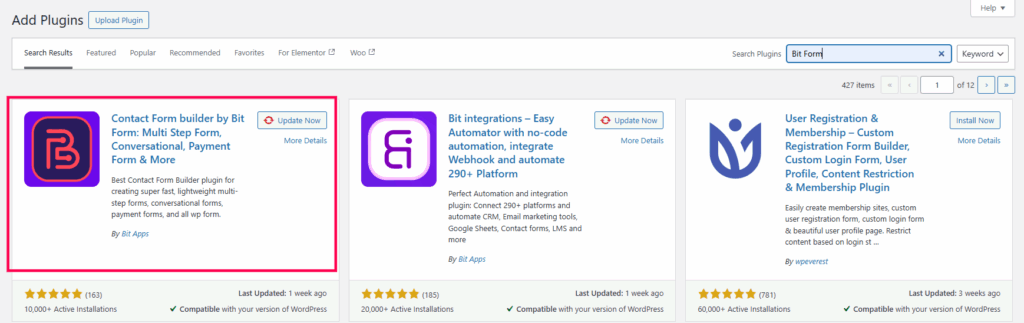
At first, go to WordPress dashboard > Add plugins. Now, search for the “Bit Form” plugin.
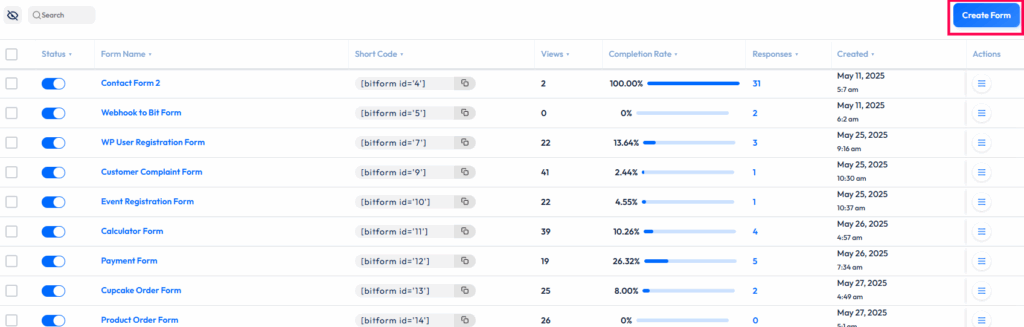
Once you have installed it, go to the Bit Form dashboard > Create Form.

Now, search for the “Title” option. Here, I have added a specific “Lead Magnet” text and kept the HTML tag to “H1”. You can drag the title option and customize it based on your needs.
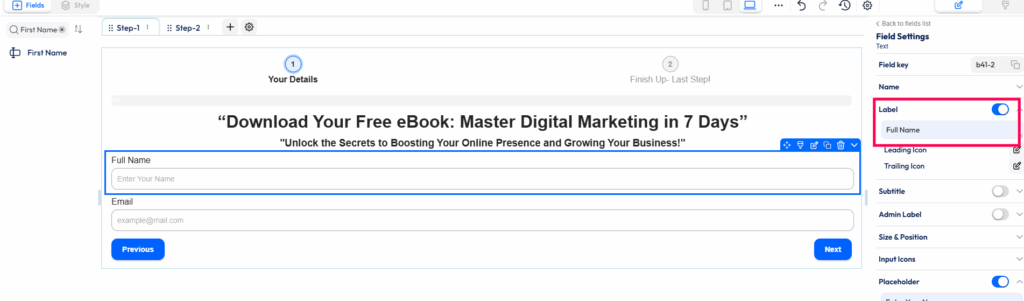
Now, I have dragged two fields here – First Name and Email. Well, I have changed the label of “First Name” to “Full Name”.

Now, click on “+” and add “step – 2”. Here, I have added two dropdown options:
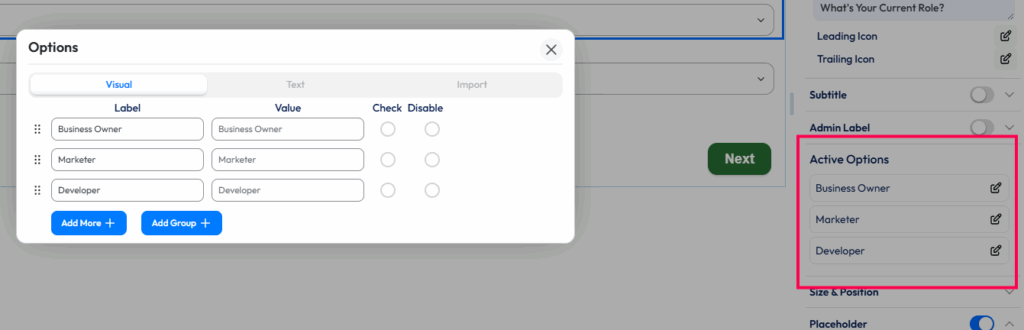
You can edit the options in the field settings. Go to “Active Options” and customize it according to your preference.
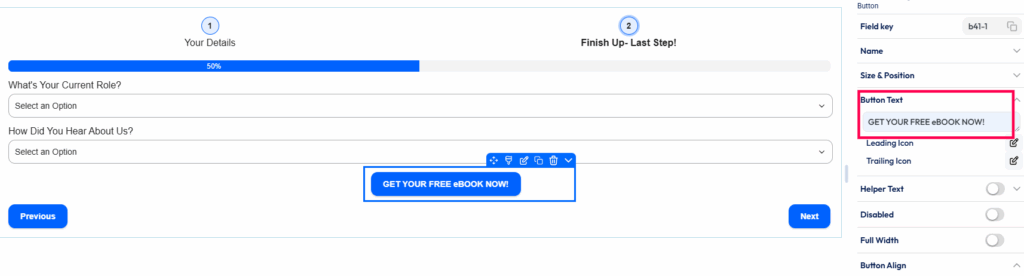
Now, I have changed the button text to “Get Your Free eBook Now”.
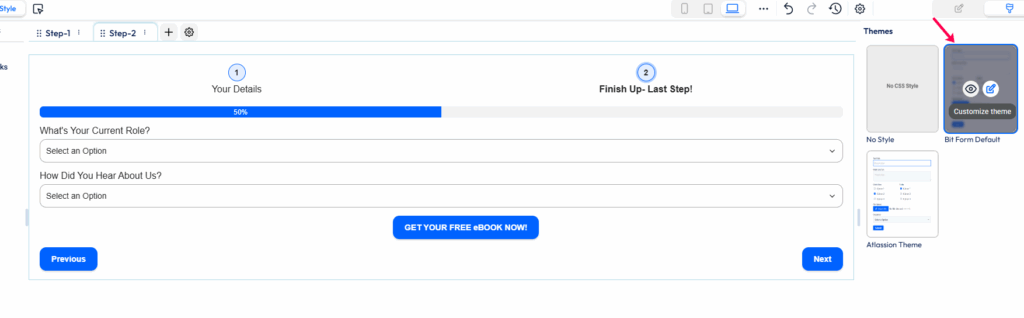
Now, it’s time to style the form. Here, I have chosen the “Bit Form” default theme to design the form.
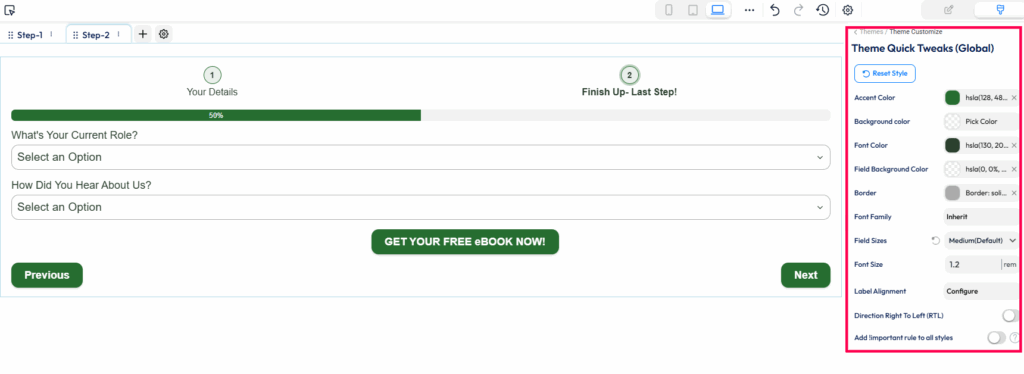
Here, I have changed the accent and font color. Also, I have chosen the text field as “Medium”.

Through the “Elements & Layer” function, you can customize the design of common and individual elements.
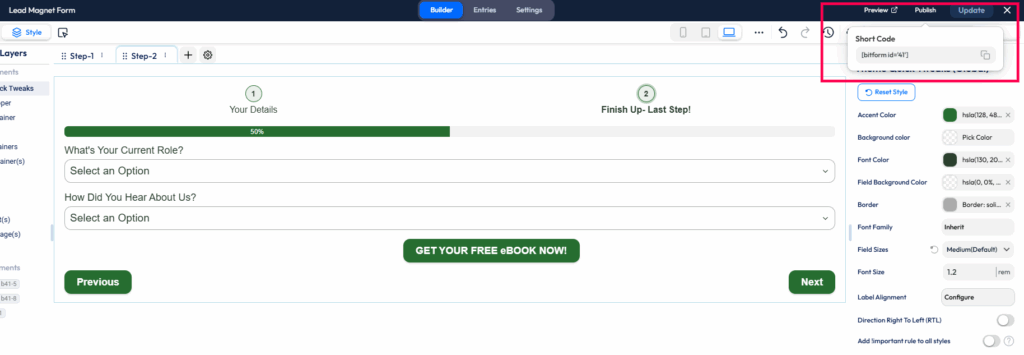
Once you have designed the form accordingly, go to Update > Publish. Now, copy the short code.

Now, you can directly add the short code in the post section or choose the “Bit Form” block and add your form. Well, the lead magnet form is finally ready. It’s time to publish the form!
Getting tons of leads by adding lead magnet forms—that’s all fine. But managing these leads and upgrading the marketing strategy efficiently—how does that sound? Great, right? Well, using the best opt-in form plugins for WordPress, like Bit Form, the following things can be executed perfectly. Want to learn how? Scroll down below.
The first thing to do to get customers’ trust is to be active and punctual. After prospects fill out the lead magnet form, you can automate the email with the following lead magnet! Through this strategy, you can automatically send follow-up emails to all customers. So, no more manual efforts needed—you can instantly pull this up by using the email automation feature!
Well, you have made customers fill out the form! But what’s the next move? The intention is to build your email list quickly. But it is not possible to record all lead information manually. The solution is to use a plugin or tool that allows you to do email marketing integration with WordPress email capture tools and CRM.
With Bit Form, you can connect to Google Sheets, Zoho Sheets, or other platforms, which automatically list lead information. Besides, by CRM integration with WordPress forms like Salesforce or Zoho CRM, you can upgrade your email marketing strategy effectively.
 Note:
Note:
Explore all the awesome integrations of Bit Form here!
If you want to segment leads based on their demographics, behavior, or other means, conditional logic can help you automate easily. By recording different lead groups based on their actions, you can improve your marketing strategy accordingly. As a result, you skip the confusion and crush lead segmentation.
Creating a basic lead magnet form is just not enough – you need a customized form that has a clear layout, advanced customization options, and a responsive WordPress form design for conversions. Here’s the good stuff – with Bit Form, you get endless customization options that allow you to create a form with clear labels and design.
Besides, as you want to build an email list quickly, integration with different tools or platforms can help you build the list fast. And, the available option to automate instant follow-ups increases your brand reputation. Bet you didn’t see that coming! As this plugin works as a one-stop solution for marketing and management, you can definitely install Bit Form and create lead magnet forms!
You can build your email list real-quick with an attractive lead magnet form. But more than that, you can grab a lot of leads from every angle by placing these forms strategically. As the form aligns with different customers’ business needs, they feel encouraged to fill out the form. And guess what? Your email list includes serious customers who are really interested in your products!
Ready to build your email list with quality leads and turn them into conversions? Use the Bit Form plugin that offers you endless customization options and helps you create an attractive lead magnet form!
Sometimes, it gets difficult for businesses to improve their conversion rate. Well, a lead magnet form can offer a valuable resource to customers and help businesses get quality leads. Through nurturing them effectively, a business can turn its conversion rate higher.
A lead magnet form provides a free resource to prospects. In return, these prospects fill out the lead magnet form, which allows businesses to record their contact information.
Choosing a lead magnet completely opposite to your business is just a waste! You must ensure that the lead magnet you offer to prospects is actually helpful for them. As they get valuable resources, they fill out the form real quick.
No. It is not necessary to use pop-ups for lead magnet forms every time. But sometimes using pop-ups efficiently to entice customers can be really helpful. You can use in-line pop-ups or exit-intent pop-ups for lead generation and show lead magnet forms to the audience.
You can make mobile-optimized lead magnet forms by using a plugin that automatically adjusts to different screen sizes. Besides, using minimal form field optimization for lead generation or making a multi-step form can make it easier for customers to fill out the form.
Yes. You can offer multiple lead magnets on one WordPress site. But you cannot randomly place these lead magnets anywhere. These lead magnets must be placed strategically on different pages of your website to milk leads from every angle.
Well, good question! You must be aware of which lead magnet forms are driving better leads. It will help you upgrade your strategy efficiently. However, some form builder plugins do provide form analytics! And with a email list building plugin like Bit Form, you can know the form completion rate. Also, you get to know when you created the form and how many people viewed the form.







 EN
EN  ES
ES  DE
DE