

 EN
EN  ES
ES  DE
DE Create a Stunning Online Wedding RSVP Form in WordPress!

Are you exploring how to create an online wedding RSVP form in WordPress? Whether you are a wedding event organizer or someone looking to create your own wedding RSVP, I’ve got the perfect solution for you. As an event organizer, you would want a WordPress RSVP plugin that creates a dynamic form based on users’ demands.
And, if you plan to make your own wedding RSVP, you would want an easy-to-use plugin. Well, the good news is – with the Bit Form plugin, you can create simple to dynamic forms within just minutes. And with this plugin, you can whip up RSVP forms for any sort of event. Wondering how? Read this article fully to learn more!
Table of Contents
Why Online Wedding RSVPs Are The Way to Go!

- An online wedding RSVP form has a higher response rate than a paper RSVP. It’s because paper RSVPs have an increased chance of coming across service disruptions or logistical problems. You don’t need to deal with such issues in a digital online form.
- You can get accurate and complete information through the online wedding RSVP form. But when you want to extract information through paper RSVPs, you will mostly get incomplete information.
- Online wedding RSVP forms are cost-effective than paper cards or any other method. It is because an RSVP form provides you with ease of management and usability.
- You can easily track form responses with the online wedding RSVP form. Well, this is not possible with traditional RSVPs, as they need manual efforts to be tracked or monitored, and it is time-consuming.
- Online wedding RSVP forms can be designed using conditional logic. With the right RSVP plugin, you can collect information in an organized way. And you won’t have to feel messed up in between all responses.
Create Your Wedding RSVP Form on WordPress Easily!
Do you want to create a stunning wedding RSVP form without the hassle? Then you need a WordPress event management plugin with effortless setup. With the Bit Form plugin, you can make a form easily with its drag-and-drop fields. Well, here I will show you a step-by-step guide on how to create online wedding RSVP form in WordPress within a few minutes! So, let’s get started:
Step 1: Install the Plugin and Activate It

At first, go to the WordPress dashboard > Add plugins. Then, search for the “Bit Form” plugin > Install > Activate.
Step 2: Go to the Plugin Dashboard and Create a Form

Next, go to the Bit Form dashboard > Create form.
Step 3: Add Fields

Here, I have searched for “Title” and dragged it to the form to add an introduction text here. As it is a Wedding RSVP Form, I have added a title “Are You Coming To Our Wedding?” Under the title, I added a subtitle mentioning the location and time of the wedding ceremony. You can choose “H2” or “H3” in the field settings based on the text type.
Step 4: Add Image

Now, I added an icon in the corner to make the form look more stylish. To add an icon, you have to search for the “Image” option > background image. Then, upload your preferred image and add it to the form.

Here, you can see a “Spacer” field, which allows you to add a space from the title to other form fields.
Step 5: Add a Radio Button

I have dragged a radio button here. You can change the label of the radio button in the “fields settings”. Then, customize the options in the “Options”.
Step 6: Add Other Fields

Now, I have added a number field that asks attendees if they are bringing any extra guests. Then, I added the following fields – First Name, Last Name, Email, Food Choice (Dropdown), and a field asking attendees for any special song requests.
Step 7: Design The Form

It’s time to design the form! You can go to the “Theme Customization” option and customize your form’s design based on your choice. Here, I have changed the accent color to black.

As you can see, I have also changed the border’s width and radius. You can adjust it according to your preference.

Further, I have changed the font color and kept it completely black.
Step 8: Add Conditional Logic

The form design task is finished. It’s time to set up the conditional logic so that we can make the form look more dynamic. So, firstly, you have to keep some fields hidden that you don’t want attendees to see when they choose a certain option. Here, I want to hide the following fields you can see in the above picture when attendees choose ‘No’.
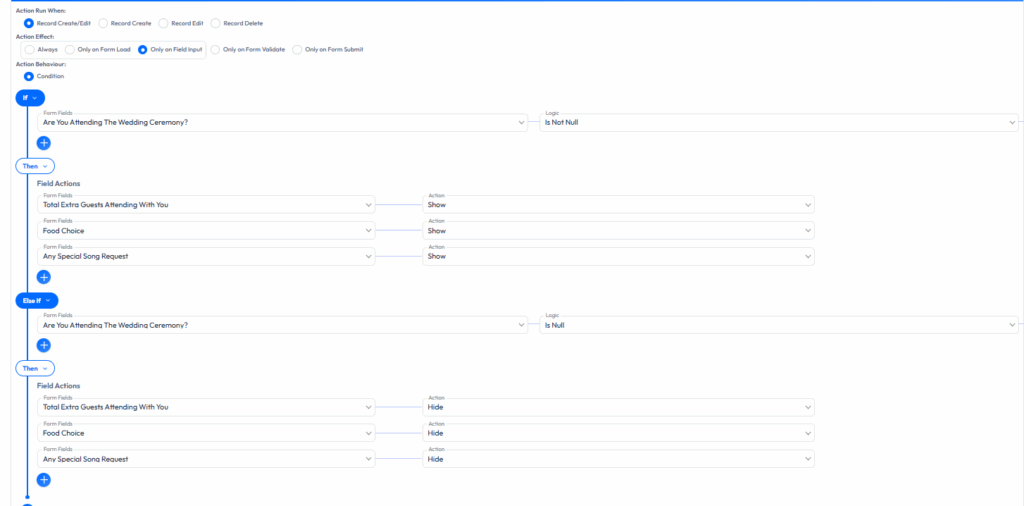
Now, go to the settings > Conditional Logic. Add “Action 2”. Now, keep the action effect on “Only On Field Input”. Here, I have applied the logic that when the form field is not null, show certain fields. And, when the form field is null, hide certain fields.
Step 9: Update and Publish the Form

Now, update the form and publish it. As you see a short code here, you need to copy this code and paste it into the WordPress post section using the Gutenberg block.
Step 10: Run a Live Test
The form is finally ready! Run a live test of the form.
 Note
Note
We keep it simple for easier understanding, but if you want, you can make it more lucrative by using more features, advanced fields and styling editor
The Secret to Crafting a Wedding RSVP Form That Excites Guests!
If you’re the one organizing, you know that the wedding RSVP form has to look fresh. And if you are designing your own wedding form, then you want people to be mesmerized by the form. So, are you down to make all this work? If yes, then you need to design the wedding RSVP form following best practices!
The good news is – with Bit Form, you can whip up perfect forms in no time. As this is one of the best WordPress RSVP plugins, you can totally vibe with this plugin. It’s super easy! Want to learn how? Slide in to learn more:
Get Contact Information
Sometimes you have to make changes to your wedding plans. It can include changing the location or venue. But you won’t be able to inform customers about the change if you don’t collect their contact information.
Want to avoid this possible scenario? You can add an email or phone number field in the form. This approach allows guests to know those changes and make the event successful.
Mobile Friendly Design
No one likes a messy form that’s all over the place. This is exactly why you need a plugin with a great layout. And to make an interactive form, a drag-and-drop WordPress form builder for events can help you the most. With such a form builder, you will get a mobile-friendly wedding RSVP form design that adapts to various screen sizes. As a result, you can use the form on any device easily.
Make Form Visually Appealing
Whether you are an event organizer or a DIY designer, the form must look top-notch to impress attendees. You’re not going for a bland wedding, right? Make that wedding RSVP form a showstopper!
You can use the Bit Form plugin to build an attractive form, as this tool also provides you with a theme customization feature! So, putting your imagination into action has become easier now.
Be Specific About the Information You Need
Attendees can find it boring to complete a form with irrelevant questions. As it is a wedding RSVP form, you need to be very particular about every question. Make sure that you collect all the essential information required to make a plan that satisfies attendees at the event.
Track Wedding RSVP Forms Like a Pro: Keep Things Organized Effortlessly!
Creating the best online wedding RSVP form is a must. But honestly, if your RSVP form doesn’t track guests or automate, what’s the use? Well, some form builders allow you to manage the guest list effectively. And with a plugin like Bit Form, you can go all out! Here, I have shared how you can track the wedding RSVP forms effortlessly. Go through the points to find out –
Automate RSVP Information
You want to organize the guests’ responses in a tool or platform. But it is hard to find a plugin that directs attendees’ responses to different platforms. Hold on! With Bit Form, you can easily integrate your favourite tools like Google Sheets, Zoho CRM, ActiveCampaign, and many more. With the right automation plugin, you can upgrade your marketing strategy and manage the guest list effectively.
Track Responses
You want to know how many people responded to your customizable wedding RSVP form. Well, some form builder plugins do allow you to track form analytics. With these builders, you can see how many people viewed the form or filled it out. So, ready to ease your tasks?
Send Follow-Ups
RSVP confirmation emails to attendees can impress attendees more than you think. Especially if you are an event organizer, then a follow-up message is definitely essential to increase brand credibility. And some form builders like Bit Form make this task easier for you. With this plugin, you can automate RSVP email notifications in WordPress to attendees – no complex setup, super simple!
How to Share a Wedding RSVP Form with Guests?
Do you want to reach a wide range of audience with your wedding RSVP form? Well, I get you. If it is a larger event, you definitely want everyone to RSVP. And to implement this, you must use a few channels to get form submissions from more people. Here, I have shared a few ways you can share a wedding RSVP form with guests –
Do you have a list of potential attendees’ emails? Then you can send the form to all attendees via email. It allows you to reach out to them with your form at the earliest. As a result, potential attendees can respond back to you on time.
Social Media
Social media is an effective way to reach out to your guests fast. You can share the form with social media to cover most of your guests. With this approach, you will also reach out to those attendees who are not added to your email list.
Text Message
Many people may not check their email much. And it’s also not necessary that all of them would be on social media. So, you can send the RSVP form embedded in a website to WhatsApp groups or inboxes. As a result, more guests would find out the RSVP form.
Here’s Why Bit Form Is The Perfect Plugin For Your Wedding RSVP Needs!
Whether you’re just starting out or a seasoned pro, an easy-to-use plugin is always a win. It all begins with the Bit Form plugin. A drag-and-drop form builder designed to create dynamic wedding RSVP forms that capture attendees’ attention.
For a slick wedding RSVP form, you’re going to need a plugin that’s responsive, customizable, and packed with conditional logic. The good news is – with Bit Form, you can wrap it all up in one shot!
No matter your level, this plugin is as easy as it gets. No worries with the pricing – it’s flexible enough to fit your budget. So, ready to create a top-notch wedding RSVP form without coding? Feel free to contact us right away for any queries.
Closing Thoughts!
I feel you – it’s all about making that wedding RSVP form stand out. But it’s a struggle to know which plugin actually works best. Well, with the Bit Form plugin, not only you create a rad wedding RSVP form, but you can also manage the data without breaking a sweat. And it’s down for all kinds of event RSVP forms too
Are you an event organizer? Bit Form’s lifetime deals are clutch, no matter if you’re a beginner or running the show with an agency. You can learn more about the pricing here. Got further questions? Don’t wait, get in touch with us now!
Your Burning Questions About Wedding RSVPs Answered!
When Should You Send Your RSVP Form Invitations?
You should send your RSVP form invitations 6 to 8 weeks in advance. It allows your attendees to take time to fill out the form and get your responses before the wedding ceremony occurs.
How Can I Ensure My Wedding RSVP Form Is Easy to Use for All Guests?
You want attendees to feel at ease when filling out the form? Then must use a plugin with an intuitive interface. And a drag-and-drop field is the best option. It allows you to create a perfect form within a few minutes and provide the best user experience to guests.
Do I Need A Wedding Website to Use an Online Wedding RSVP Form?
No. You don’t need a wedding website to use an online wedding RSVP form. If you are someone making your own wedding RSVP form, you can just install the plugin in your WordPress dashboard and create the RSVP form.
Can I Customize My RSVP Form to Match My Wedding Theme?
Yes. You can customize your RSVP form to match your wedding theme. With a plugin like Bit Form that offers theme customization options, you can definitely turn your imagination into action.
How Do I Create an RSVP Form That My Guests Will Actually Use?
You can use a wedding RSVP form with conditional logic to make the form more dynamic. It provides a targeted user experience to potential attendees. And, adding only the relevant field is a must. If you crowd form fields with unnecessary fields, then guests can easily abandon such a form.

Related Blog

How to Prevent Spam Form Submissions in WordPress
Create a WordPress File Upload Form for Free: Beginner’s Guide
